Admin Console Backup
Note: This is available for Litmus Edge Manager version 2.15.0 and later.
The Backup module allows you to download, upload, and bulk delete Litmus Edge Manager (LEM) application and configuration files.
Overview
The backup process for LEM consists of a compressed and encrypted file downloaded from the LEM Admin UI. The data is updated every 24 hours, and 7 copies of each LEM version are maintained on the server until user deletes them manually.
Backup Type: Compressed and encrypted file, available for download from the LEM Admin UI.
Rotation: 7 copies of each LEM version.
Retention Period: Backup files will remain until user deletes them manually.
LEM backup contain the following files:
1. Application Data
- Company and project settings
- Activation requests
- Sites (except site icons)
- Triggers and Actions
- Templates
- Marketplace Applications and their associated data and configurations
- Marketplace Catalog (data and configuration)
- Grafana Dashboards and other settings
- Remote access setup
- Licenses (Note: Licenses won't work after restoring on another VM)
- Keycloak
- Registry Credentials
- Certificates
- SMTP Settings
- Tokens
2. User Data
- Users and their access to specific projects/companies.
3. Marketplace Apps
- All marketplace apps and associated data and configurations.
4. LE Connected to LEM
- All Litmus Edge devices connected to the Litmus Edge Manager.
5. Database Dumps:
- mysql-grafana.sql
- mysql-keycloak.sql
- mysql-lem.sql
- mysql-mpcs.sql
- mysql-mpcs_rbac.sql
- mysql-mysql-user.sql
What Is Not Backed Up
- Old upgrades and backups
- Events
- Docker registry data
- ClickHouse data
- DNS Entries (LEM only lists DNS servers; not backed up to avoid network access issues)
- Network settings
Process
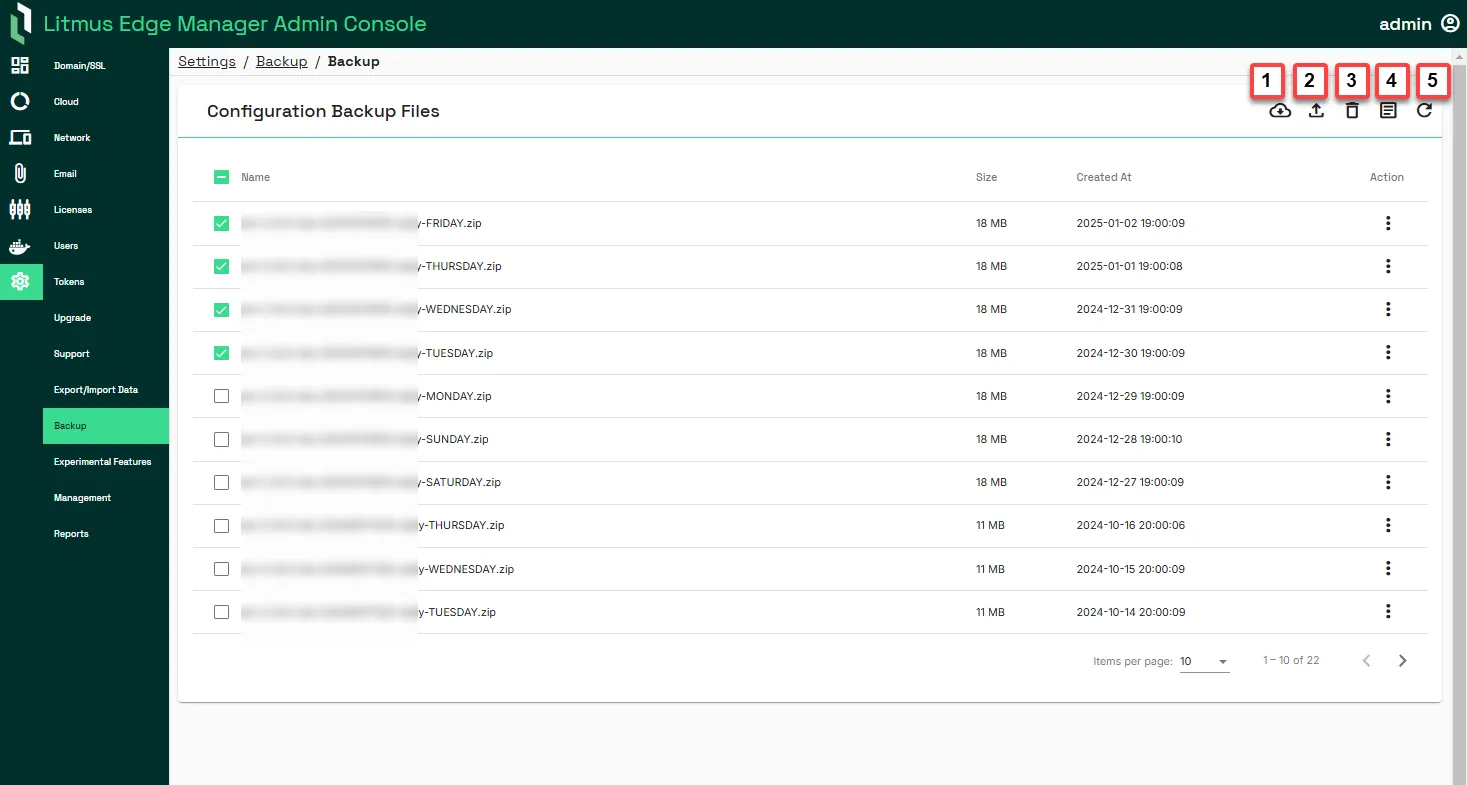
The following process define the steps required to create and upload a backup file in LEM.
Important:
- Importing a configuration replaces configuration data and cannot be undone. Select the appropriate bundled zip file.
- Any node-locked licenses will be removed after restoring a backup on a new virtual machine (VM). You will have to request new node-locked licenses from your Litmus account representative.
- Network files are not backed up to avoid breaks on restore.
- As of Litmus Edge Manager 2.24.0 release, LEM Admin UI allows you to create long-term API tokens with scope LEM Backup.
Action | Details |
|---|---|
[1] Create backup | Download a backup file of the Litmus Edge Manager configuration. Configuration files are password protected and generated as a .tar file. Process logs are visible in the Log section. To export the configuration, you'll need the password of the Litmus Edge Manager instance. |
[2] Upload backup file | Upload a Litmus Edge Manager configuration file. To import the configuration, you'll need the password of the Litmus Edge Manager instance. |
[3] Remove selected backups | This option allows you to bulk delete the selected backup configurations files at once. |
[4] Show backup/restore log | View the latest export/Import operation log. You can toggle Auto-scroll to the On position to automatically scroll down to the most recent messages in Process Log. Doing so helps monitor a running export/import process. |
[5] Refresh | Reload the list of backup files. |