Node-Locked Licenses
You can view and export a comprehensive summary of the usage of all Node-locked licenses for all companies and projects.
Access Node-Locked Licenses UI
To access the node-locked licenses UI:
- Log in to Litmus Edge Manager Admin Console.
- From the Navigational panel, select Edge Devices. The Edge Devices pane appears.
- Click Node-locked Licenses from the side menu. The Node-locked Licenses pane appears.
Refer to the following actions you can take from this page:
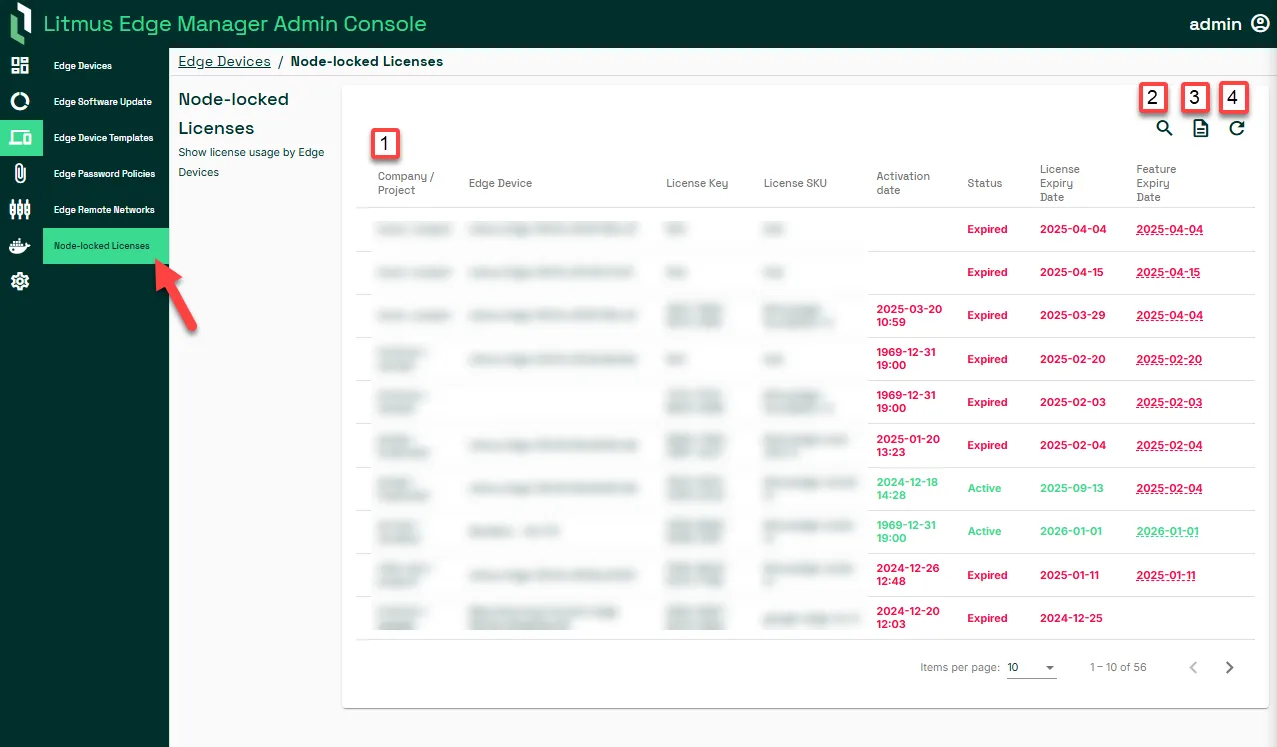
Action | Details |
|---|---|
[1] Node-locked License Usage Statistics | Displays comprehensive details about the usage of all node-locked licenses, including which licenses are currently active and their associated projects or companies. |
[2] Filter | Allows users to sort and narrow down the list of node-locked licenses based on specific criteria such as license status or network names. |
[3] Generate a Report | Enables the creation of a custom report on node-locked licenses by searching with parameters like Network Name, Subnet, or Status. |
[4] Refresh List | Updates the displayed list of node-locked licenses to ensure it reflects the most current information available in the system. |