Reports
You can now send periodic performance statistics of your Edge devices directly via email to offer tailored reports to individual sites or divisions. Metrics show percentage changes based on the report frequency. For example, an Uptime (Online) metric shows the number of hours online and change since the last report.
To view daily digest settings, toggle the Enable Report toggle. Here is a list of the information you can choose to send in email report:
- Edge Node Metrics:
- Connected Edge Nodes: The number of edge devices that are connected.
- Estimated Messages / Second: An estimate of how many messages are being processed.
- Flows: The number of data flows.
- Total Applications: The total number of applications.
- Connected Integrations: The number of integrations that are connected.
- Disconnected Edge Nodes: The number of edge devices that are disconnected.
- Newly Connected Edge Nodes (Recently Added Edge Nodes): The number of edge devices that have recently connected.
- Connected Industrial Systems: The number of industrial systems that are connected.
- Industrial Disruptions: Problems with industrial connections.
- Messages sent to Litmus Edge Manager: The number of messages sent.
- Alerts & Triggers:
- Number of alerts resolved: Display how many problems have been fixed.
- Number of triggers generated: Display how many times certain conditions have been met.
- Litmus Edge Manager Uptime & Downtime:
- Uptime (Online): Display how long Litmus Edge Manager has been running.
- Downtime (Offline): Display how long Litmus Edge Manager has been stopped.
- Active Users, Companies, and Projects:
- Total No. of Users: The total number of users.
- Total No. of Companies: The total number of companies.
- Total No. of Projects: The total number of projects.
- New Device Onboarding/Offboarding:
- Total number of new device onboarding: Display how many new devices have been added.
- Total number of new device offboarding: Display how many devices have been removed.
- Applications & Catalogs:
- Total number of applications deployed: Display how many applications have been installed.
- Total number of catalogs deployed: Display how many catalogs have been installed.
- Templates:
- Total number of templates deployed at instance level: Templates deployed for the entire system.
- Total number of templates deployed at company level: Templates deployed for specific companies.
- Total number of templates deployed at project level: Templates deployed for specific projects.
- License:
- Change in Node-locked License Activation: Changes in the activation of specific licenses.
- Change in Site License Activation: Changes in the activation of licenses for a location.
- AI/ML Models:
- Total number of models deployed: Display how many AI models have been installed.
- Software Update:
- Total number of software updates deployed: Display how many software updates have been installed.
- CPU, Memory, Network Load, Disk Usage: Information about how many resources Litmus Edge Manager is using. Please note: This information is only for Litmus Edge Manager.
- CPU Utilization: Display how much the processor is being used (User & System).
- Memory Usage: Display how much computer memory is being used.
- Network Load: Display how much data is being sent and received.
- Storage Utilization: Display how much storage space is being used.
- Edge Node Uptime & Downtime:
- Uptime (Online): Display how long the edge devices have been running.
- Downtime (Offline): Display how long the edge devices have been stopped.
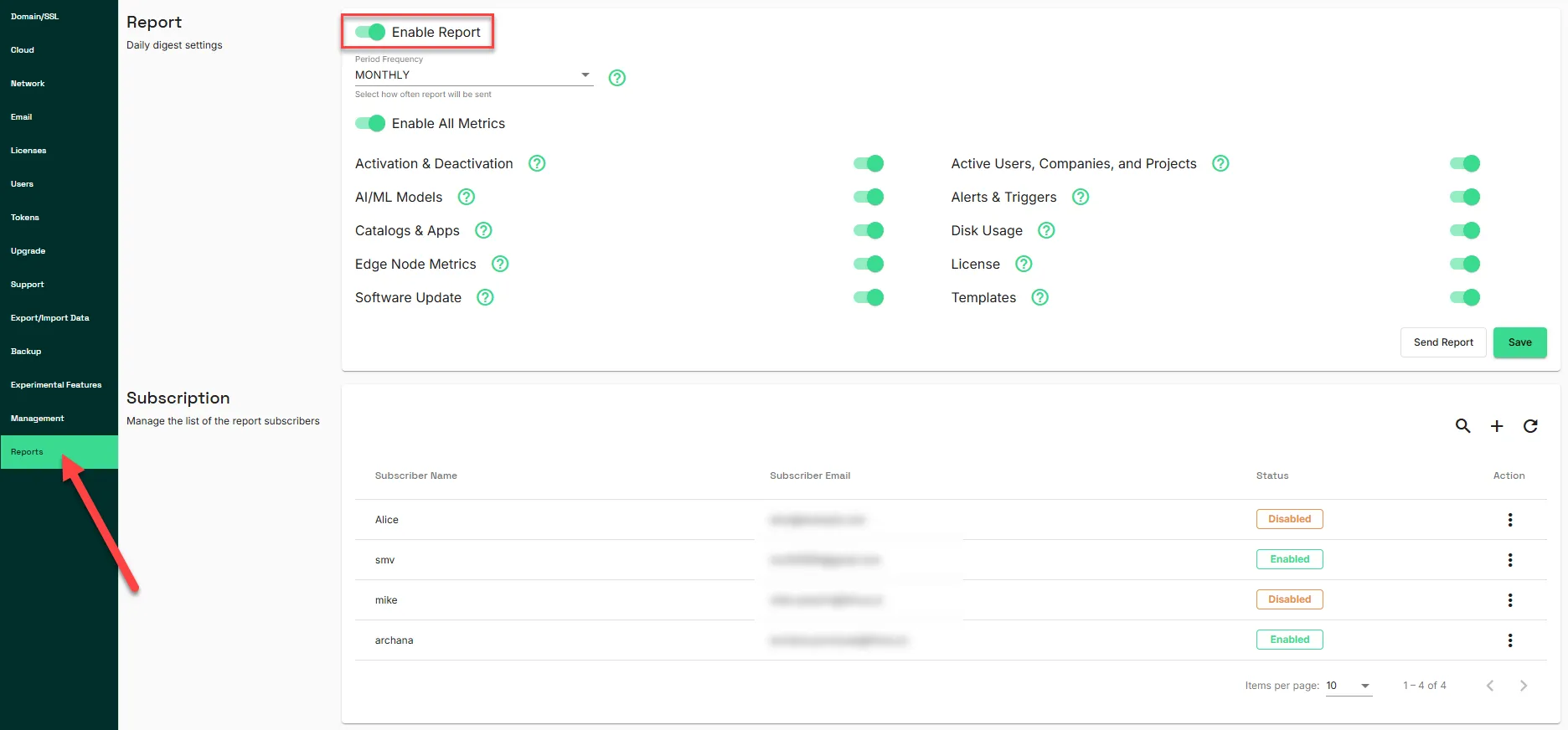
Report
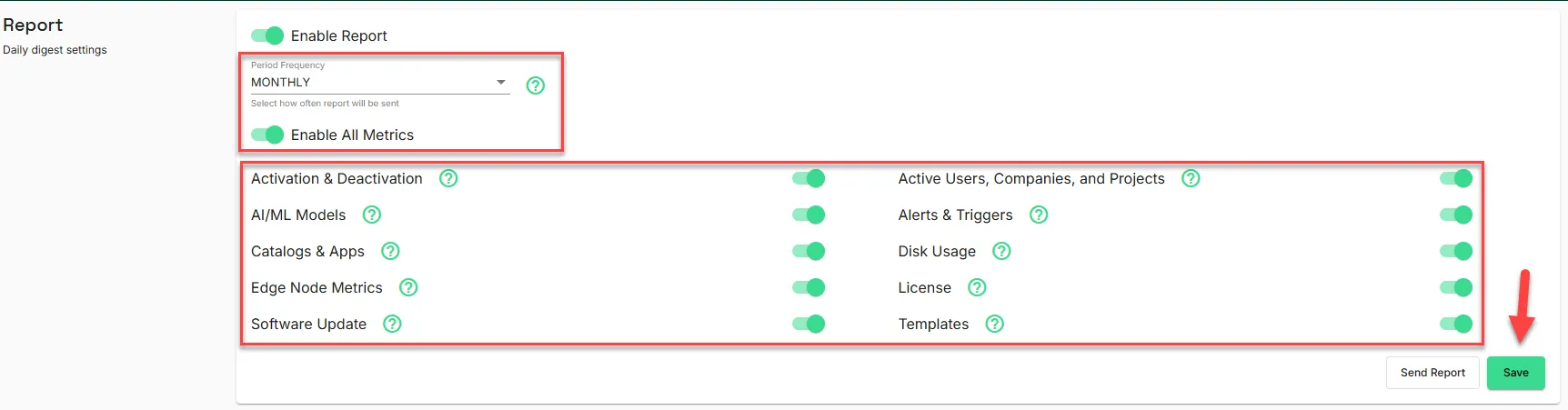
When Report is enabled, do the following:
- Period Frequency: Choose to receive updates daily, weekly, or monthly.
- Enable All Metrics: Select specific performance metrics to include in emails.
- Click Save or Send Report.
Subscription
You can manage the list of subscribers for the reports.
Important Notes:
- Only users with admin rights can configure the email settings.
- Users must set up SMTP Email settings to enable updates.
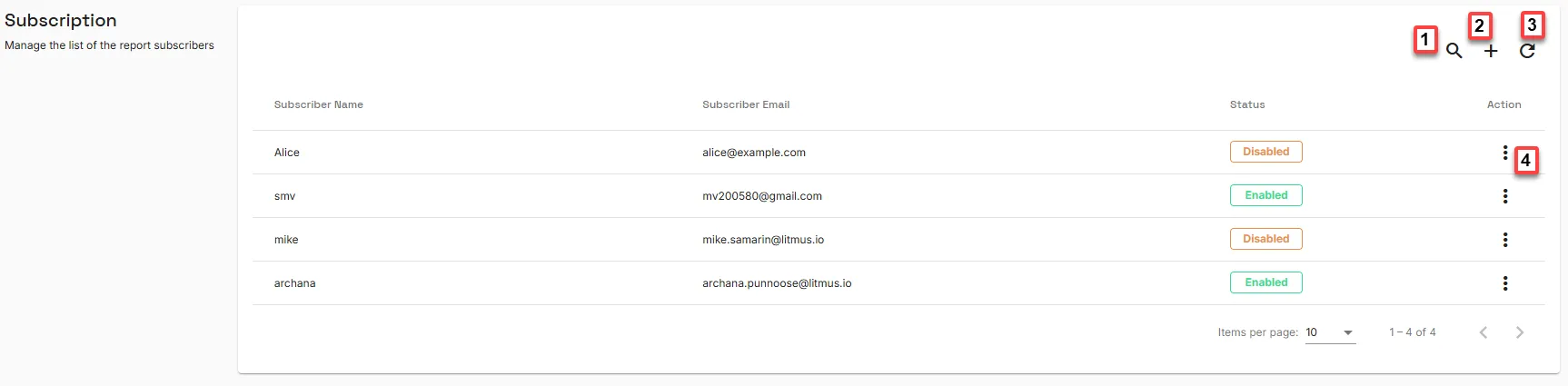
Action | Details |
|---|---|
[1] Show filter: | Filter the list of subscribers. |
[2] Add Subscriber: | Add a new name and email to subscribe to the reports. |
[3] Refresh list: | Reload the list of subscribers. |
[4] Action: |
|