Create a Shared Folder in Windows 10
To expand the storage pool for your enterprise, you must make a shared folder. If you have issues completing these steps, refer to the "Troubleshooting" section below.
Before You Begin
Before completing the steps below, make sure you do the following:
- Set up a remote storage location.
- Verify you have admin/root permissions to create shared folders.
Create a Shared Folder in Windows 10
To create a shared folder in Windows 10:
- Log in to Windows 10 as a user with admin permissions and create a new folder. This example uses C:\SharedFolder.
In the File Explorer, right click the folder and select: Give access to > Specific people...
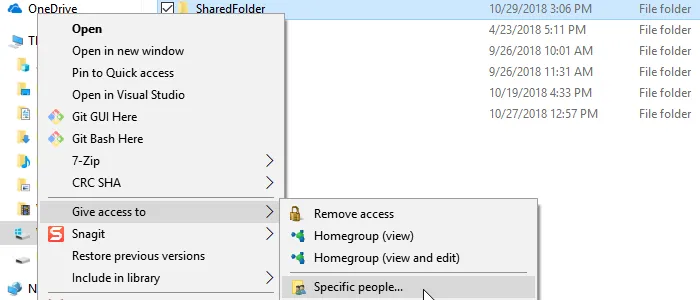 Give access to specific people option
Use the drop-down menu to share the folder with Everyone. Click Share.
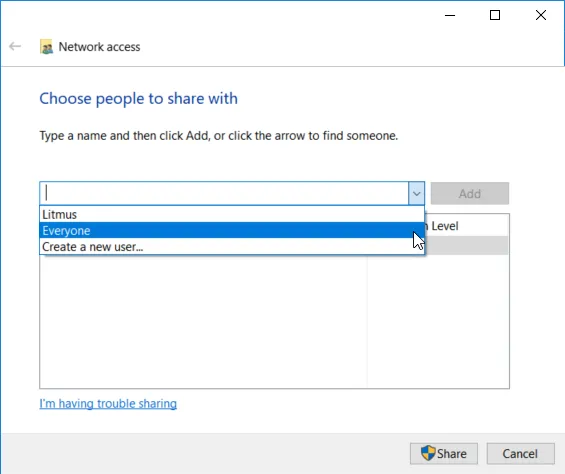 Choose people to share with dialog box
To check if the folder is shared properly, open File Explorer and type \\localhost into the top bar. The folder appears if it is set up correctly.
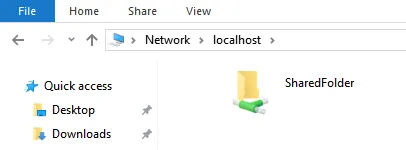 localhost path
Troubleshooting
If you encounter issues, make sure you have SMB 1.0/ CIFS File Sharing support enabled in the Windows Features settings. Refer to the steps below.
Activate SMB 1.0/CIFS in Windows 10
To activate SMB 1.0/CIFS in Windows 10:
- Search Windows Features in the Windows 10 search bar.
Click Turn Windows features on or off.
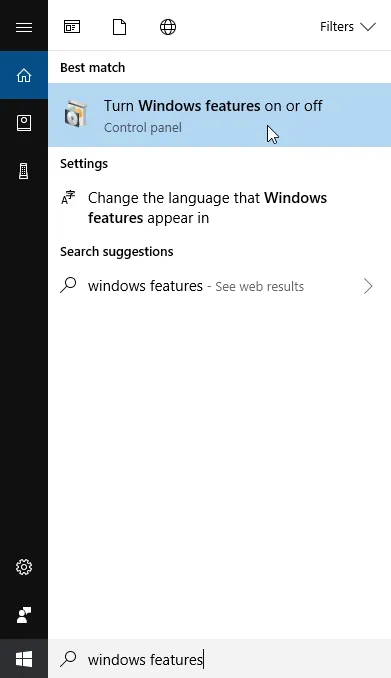 Turn Windows features on or off option
Click the SMB 1.0/CIFS File Sharing Support checkbox to activate all of the CIFS services on Windows 10, and then click OK.
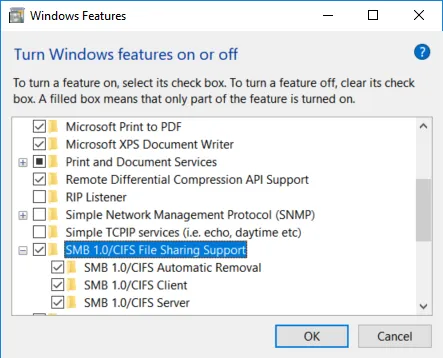 The SMB 1.0/CIFS File Sharing Support check box