Litmus Edge Docker Deployment and Auto-Activation
Auto-activation allows you to deploy Litmus Edge on Docker without any manual UI steps. By passing environment variables as command line arguments when you run the Docker container, Litmus Edge automatically connects to Litmus Edge Manager (LEM), receives a license, accepts the EULA, and applies a configuration template. This eliminates the need to manually activate each Litmus Edge instance through the web interface after deployment.
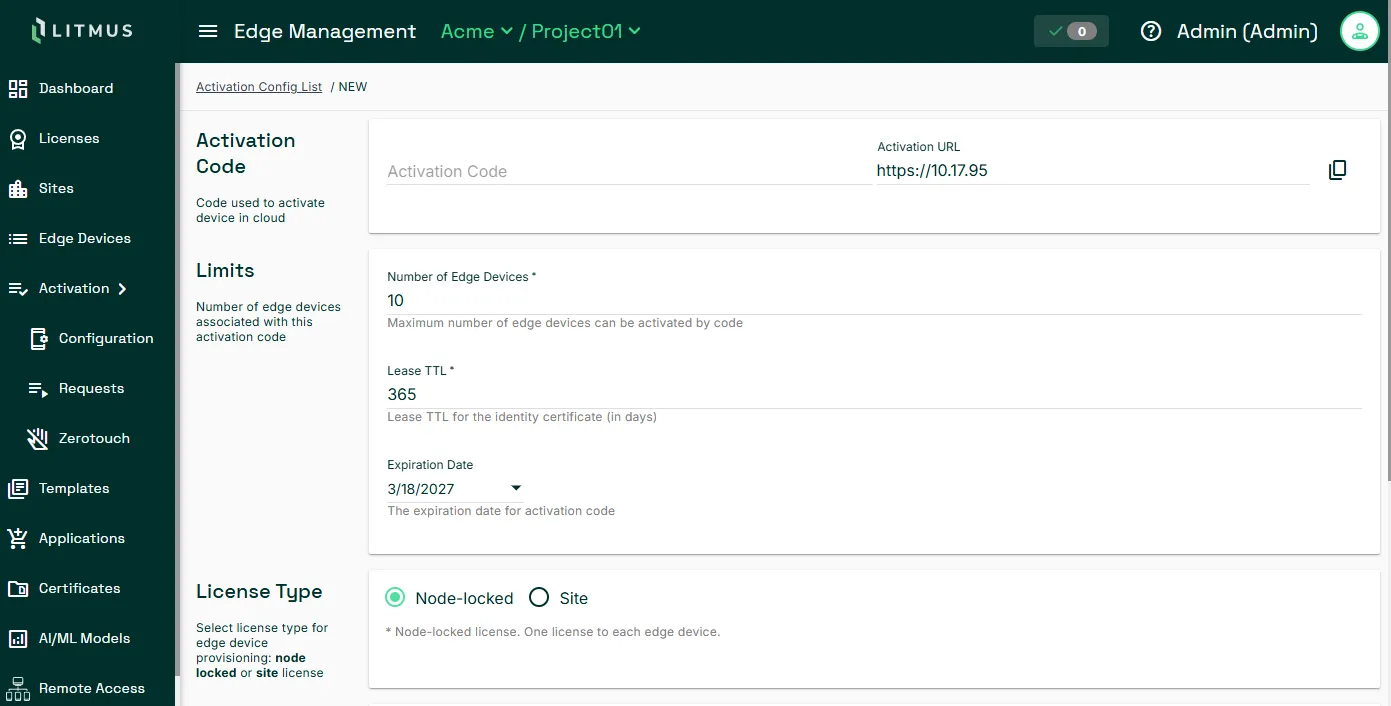
The following image shows the Litmus Edge Manager UI for providing an activation code and URL.
Why Auto-Activation Matters
Auto-activation is designed for teams that need to deploy Litmus Edge at scale or on demand. It supports two primary scenarios:
- Mass deployment: Automate the deployment of many Litmus Edge instances without touching each one individually.
- Sandbox environments: Quickly spin up Litmus Edge instances for testing or development.
How Auto-Activation Works
At container startup, Litmus Edge reads environment variables passed via docker run. If AUTO_ACTIVATE_CONTAINER=true and ACCEPT_EULA=true are present, Litmus Edge initiates an activation request to the LEM URL specified by ACTIVATION_URL, using the ACTIVATION_CODE to identify and authenticate the instance.
If COMPONENT_CONFIG is provided, Litmus Edge reads all activation configuration from a base64-encoded JSON payload and ignores all other environment variables.
Upon a successful activation request, LEM:
- Validates the activation code.
- Issues a license to the Litmus Edge instance.
- Applies system configurations, DeviceHub, flows, connectors, and analytics from an associated template.
What Happens During Activation
- The Docker container starts with the required environment variables.
- Litmus Edge detects AUTO_ACTIVATE_CONTAINER=true and begins the auto-activation sequence.
- If CA_CERT is provided, that certificate is installed. Otherwise, Litmus Edge downloads the certificate from LEM.
- Litmus Edge sends an activation request to LEM using ACTIVATION_URL and ACTIVATION_CODE.
- In Litmus Edge Manager, an administrator approves the activation request.
- The EULA is acknowledged automatically via ACCEPT_EULA=true.
- Activation events are recorded in logs and the system.
Environment Variables
Variable | Description | Example Value | Required |
|---|---|---|---|
AUTO_ACTIVATE_CONTAINER | Set to true to enable auto-activation | true | Required |
ACCEPT_EULA | Accepts the end user license agreement. Must be true. | true | Required |
ACTIVATION_URL | URL endpoint for the LEM | "https://lem.production" | Required |
ACTIVATION_CODE | Activation code | "SXZQE-DNK6W-YHA32-TD36N-KSAWY" | Required |
CA_CERT | LEM CA certificate. When provided, this certificate is installed instead of downloading one from LEM. Protects against activating to a LEM with the wrong certificate. | "-----BEGIN CERTIFICATE-----MIIDMzC...-----END CERTIFICATE-----" | Optional |
COMPONENT_CONFIG | Passes all variables in a base64-encoded JSON payload. When specified, all other environment variables are ignored. | "eyJBVVRPX0FDVEl..." | Optional |
Deploying with Auto-Activation
You can deploy in two ways. Deploy either by specifying variables directly in the command line or by passing variables in a JSON payload.
Deploy with Individual Variables
Pass each activation variable separately in the docker run command:
docker run --rm --name <LE> -d \
  --sysctl net.ipv6.conf.all.disable_ipv6=0 \
  --cap-add=NET_ADMIN \
  -p 8443:443 \
  -e AUTO_ACTIVATE_CONTAINER=true \
  -e ACCEPT_EULA=true \
  -e ACTIVATION_URL="https://development.lem" \
  -e ACTIVATION_CODE="5LN53-RRJYM-NXES9-J35L6-VNSC5" \
  litmusedge-std-docker:4.04.0
Deploy Using COMPONENT_CONFIG
Instead of passing variables individually, encode all variables in a base64-encoded JSON payload and pass them using COMPONENT_CONFIG. When COMPONENT_CONFIG is present, all other environment variables are ignored.
The JSON payload before encoding:
{
  "AUTO_ACTIVATE_CONTAINER": true,
  "ACCEPT_EULA": true,
  "ACTIVATION_URL": "https://sales.em.la2.space",
  "ACTIVATION_CODE": "5LN53-RRJYM-NXES9-J35L6-VNSC5",
  "CA_CERT": "-----BEGIN CERTIFICATE-----MIIDMzCCAhugAwIBAgIUPgCF448zrBswHvTATffHb+Rihw4wD… …Mc73if5ACwmaxFPueOGGJzEYymvkbj6R2byhVphhA==-----END CERTIFICATE-----"
}
Pass the base64-encoded payload in the docker run command:
docker run --rm --name LE -d \
  --cap-add=NET_ADMIN \
  -p 8443:443 \
  -e COMPONENT_CONFIG="eyJBVVRPX0FDVElWQVRFX0NPTlRBSU5FUiI6dHJ1ZSwiQUNDRVBUX0VVTEEiOnRydWUsIkFDVElWQVRJT05fVVJMIjoiaHR0cHM6Ly8xMC4xNy4xMC4yMTYiLCJBQ1RJVkFUSU9OX0NPREUiOiI1Q1FNNy1LSkU5Ti1QRVlHUy1YT0VXVS1NNTdOTiJ9" \
  litmusedge-std-docker:latest