Create API Credentials
3 min
Note: This feature is only available on the Scale plan.
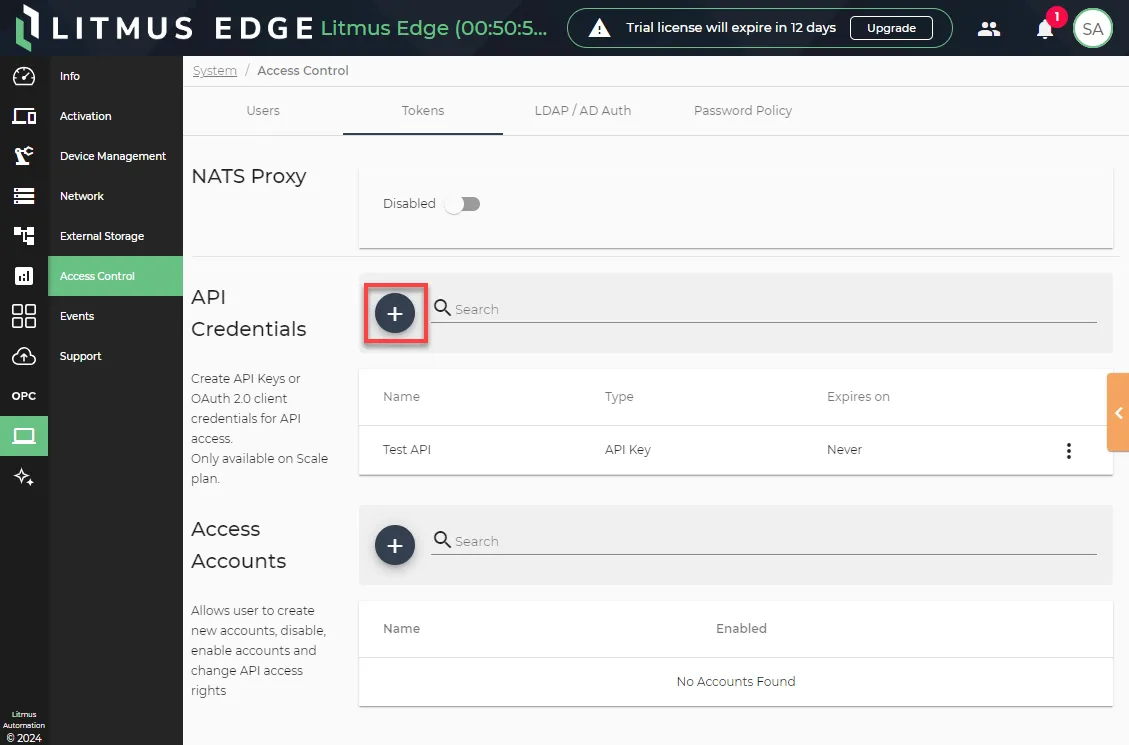
You can create an API credentials by navigating to System > Access Control > Tokens.
To create API Credentials:
- Navigate to System > Access Control.
- Click the Tokens tab.
From the API Credentials section, click the Add icon.
- Select the type of API credentials you want to create: API Key or OAuth 2.0 Client.
API Key
Enter a name for the key and click Create API Key.
OAuth 2.0 Client
Configure the parameters.
- Client Name: Enter a name for the client.
- Select RBAC Groups: Select which access groups will have access to the client. See Users to learn more.
- Expiration Date (Optional): Configure an expiration date for the client.
- Access Token Lifespan in minutes: Configure how long the access token will be valid.
Once the client is created, you must copy the Client ID and Client Secret. You won't be able to view them again.
Important: To set up and manage your OAuth 2.0 client, check the guide on How to Create and Use OAuth 2.0 Tokens in Litmus Edge.