Fanuc CNC Ethernet
Review the following information for setting up and configuring the Fanuc CNC Ethernet driver. The driver reads and writes FANUC CNC and PMC data over the FOCAS2 Ethernet interface.
Note: This driver is experimental. Some features might not work as expected.
Litmus Edge compatible series
Compatibility parameter | Compatible items |
|---|---|
Driver type | Ethernet |
Validated devices/series | Any PLC model that supports FANUC FOCAS |
To set up and configure this device in Litmus Edge (LE), do the following:
- Step 1: Set up and configure the PLC device
- Step 2: Set up the PLC device in Litmus Edge DeviceHub
- Step 3: Configure the list of registers
Note: Incorrect tag configurations, unsupported tags, or tags missing from the PLC cause the device to cycle repeatedly between Connected and Disconnected statuses. A stable connection requires that all configured tags are valid, supported by the driver, and correctly mapped to the PLC.
Step 1: Set up and configure the PLC device
If the device is configured for Ethernet access, find its network parameters. Otherwise, follow the steps below.
Review the following parameters for the PLC Configuration.
Supported Data Types
Refer to the following supported data types by Fanuc and Litmus Edge. Below is the Fanuc PMC (Programmable Machine Control).
Fanuc Macro variables support the FLOAT data type.
Table 1
Data Type | Size |
|---|---|
BYTE | 1 byte |
WORD | 2 bytes |
Table 2
Signed Value | Data Type | Size |
|---|---|---|
INT8 | SINT | 1 byte |
INT16 | INT | 2 bytes |
INT32 | DINT | 4 bytes |
Table 3
Unsigned Value | Data Type | Size |
|---|---|---|
UINT8 | USINT | 1 byte |
UINT16 | UINT | 2 bytes |
UINT32 | UDINT | 4 bytes |
The Fanuc PMC System is the interface between the Fanuc CNC and the machine tool. For information on the PMC system, visit the Fanuc Corporation website.
RDPMC Tags
RDPMC tags provide all information about the Address Type, the Address Number to read data from, and Size within the tag itself.
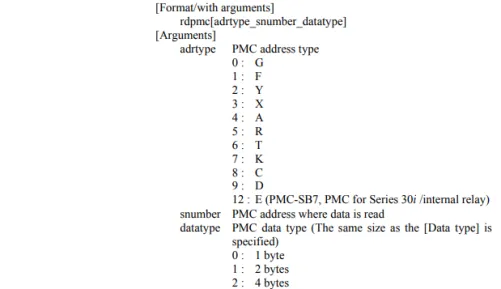
Example of an RDPMC Tag
Tag | Address Type | Address Number | Size |
|---|---|---|---|
Rdpmc [9_746_2] | D | 746 | 4 bytes |
In the previous example, 9 refers to an address type listed in the image, 746 is the address number to read data from, and 2 means that the data is four bytes long.
Configure device
Refer to the following configurations if the device doesn't connect right away.
To configure the device:
- Note down the following information and refer to it when needed. Device: Fanuc 0i-F Communication I/F: Ethernet. Refer to the following figure.
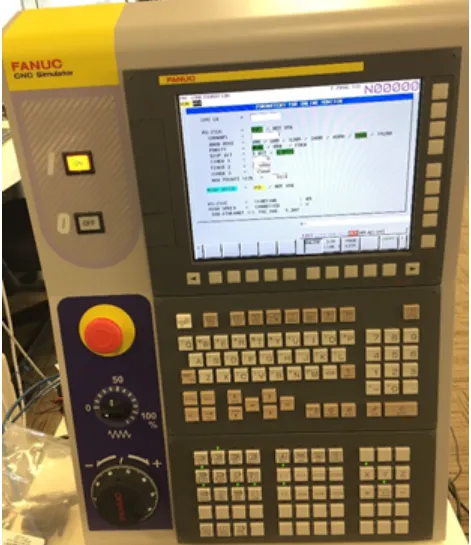
- Press Soft key five times to set up the IP Address.
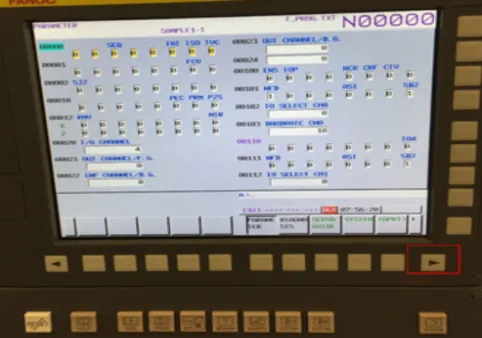
- Press the Soft key Embed Port to set up the network parameters, and then press the Soft key OPRT.
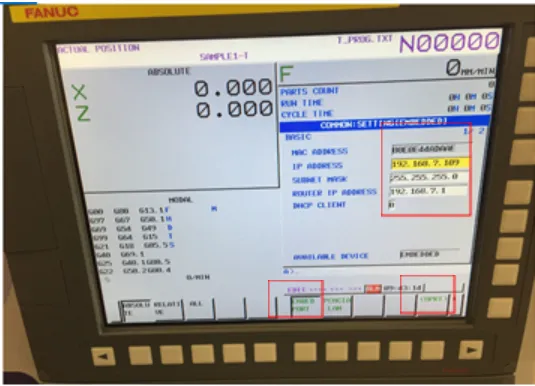
- Press the Soft key Restart to activate the settings.
![Activate settings screen [1]](https://cdn.images.archbee.com/SSUUxKZUk9bFTEPNn_6Zo/TBGmJBCz6DUz3H9rvKBj2_04fanuc-cnc-ethernet-settings.png?format=webp "Activate settings screen [1]")
- Press the Soft key Execute to activate the settings.
![Activate settings screen [2]](https://cdn.images.archbee.com/SSUUxKZUk9bFTEPNn_6Zo/OdVxfjpyDOFcc9_GS-9-R_05fanuc-cnc-ethernet-activate.png?format=webp "Activate settings screen [2]")
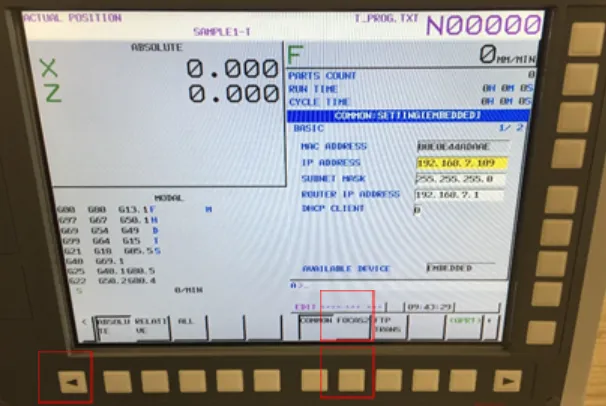
- Press the Soft key two times to reach this page, and then press the Soft key FOCAS2.
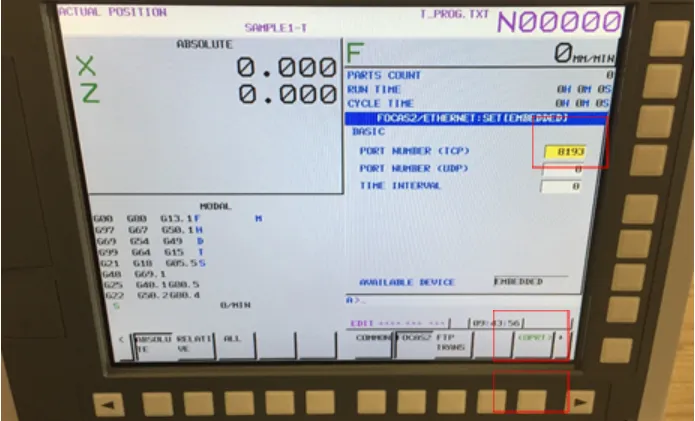
- Set up the port number, and then press the Soft key OPRT.
Step 2: Set up the PLC device in Litmus Edge DeviceHub
Configure the following parameters when you Connect a DeviceConnect a Device with this driver. Update default values to the specific setup of your device.
Parameter | Value |
|---|---|
Type | Fanuc Corporation |
Driver | Fanuc CNC Ethernet |
NetworkAddress | The IP address of the CNC you defined in Step 1. Default value 192.168.0.1 |
NetworkPort | The FOCAS2 port of the CNC. This must match the port configured on the CNC. Default value 8193 |
The following parameter is under Advanced Parameters.
Parameter | Value |
|---|---|
ReadTimeout | How long the driver waits for a response, in milliseconds. Enter a value from 1000 to 60000. Default value 5000 |
For the Meta Data, Status Register, and Optional Settings options, see Connect a DeviceConnect a Device.
Step 3: Configure the list of registers
When you Add a TagAdd a Tag to the connected device, see the following register table and tag parameters. This driver does not support browsing tags.
Each register maps to one FOCAS function. If an option is not installed on the CNC, its registers report as unsupported.
See the following additional resources if necessary:
- Organize Device and Tag Data by Using MetadataOrganize Device and Tag Data by Using Metadata
- Tag Formula VariablesTag Formula Variables
Register table
The PMC memory classes (G, F, Y, X, A, R, T, K, C, D, and E) are addressed by byte. Each class also has a _Bit register for single-bit access. For a _Bit register, the last digit of the address is the bit number, from 0 to 7. For example, address 1003 is byte 100, bit 3.
Name | Value Types | Access Type | Address Format | Min Address | Max Address | Description |
|---|---|---|---|---|---|---|
G_Bit | bit, bit[] | R/W | DDDDd | 0 | 99997 |
|
F_Bit | bit, bit[] | R/W | DDDDd | 0 | 99997 |
|
Y_Bit | bit, bit[] | R/W | DDDDd | 0 | 99997 |
|
X_Bit | bit, bit[] | R/W | DDDDd | 0 | 99997 |
|
A_Bit | bit, bit[] | R/W | DDDDd | 0 | 99997 |
|
R_Bit | bit, bit[] | R/W | DDDDDd | 0 | 599997 |
|
T_Bit | bit, bit[] | R/W | DDDDd | 0 | 99997 |
|
K_Bit | bit, bit[] | R/W | DDDDd | 0 | 99997 |
|
C_Bit | bit, bit[] | R/W | DDDDd | 0 | 99997 |
|
D_Bit | bit, bit[] | R/W | DDDDd | 0 | 99997 |
|
E_Bit | bit, bit[] | R/W | DDDDd | 0 | 99997 |
|
G | usint, sint, int, uint, dint, udint, float, usint[], sint[], int[], uint[], dint[], udint[], float[] | R/W | DDDD | 0 | 9999 |
|
F | usint, sint, int, uint, dint, udint, float, usint[], sint[], int[], uint[], dint[], udint[], float[] | R/W | DDDD | 0 | 9999 |
|
Y | usint, sint, int, uint, dint, udint, float, usint[], sint[], int[], uint[], dint[], udint[], float[] | R/W | DDDD | 0 | 9999 |
|
X | usint, sint, int, uint, dint, udint, float, usint[], sint[], int[], uint[], dint[], udint[], float[] | R/W | DDDD | 0 | 9999 |
|
A | usint, sint, int, uint, dint, udint, float, usint[], sint[], int[], uint[], dint[], udint[], float[] | R/W | DDDD | 0 | 9999 |
|
R | usint, sint, int, uint, dint, udint, float, usint[], sint[], int[], uint[], dint[], udint[], float[] | R/W | DDDDD | 0 | 59999 |
|
T | usint, sint, int, uint, dint, udint, float, usint[], sint[], int[], uint[], dint[], udint[], float[] | R/W | DDDD | 0 | 9999 |
|
K | usint, sint, int, uint, dint, udint, float, usint[], sint[], int[], uint[], dint[], udint[], float[] | R/W | DDDD | 0 | 9999 |
|
C | usint, sint, int, uint, dint, udint, float, usint[], sint[], int[], uint[], dint[], udint[], float[] | R/W | DDDD | 0 | 9999 |
|
D | usint, sint, int, uint, dint, udint, float, usint[], sint[], int[], uint[], dint[], udint[], float[] | R/W | DDDD | 0 | 9999 |
|
E | usint, sint, int, uint, dint, udint, float, usint[], sint[], int[], uint[], dint[], udint[], float[] | R/W | DDDD | 0 | 9999 |
|
cnc_absolute | dint | R/O | D | 1 | 8 |
|
cnc_absolute2 | dint | R/O | D | 1 | 8 |
|
cnc_machine | dint | R/O | D | 1 | 8 |
|
cnc_relative | dint | R/O | D | 1 | 8 |
|
cnc_relative2 | dint | R/O | D | 1 | 8 | |
cnc_distance | dint | R/O | D | 1 | 8 |
|
cnc_acts | dint | R/O | D | 0 | 0 |
|
cnc_acts2 | dint | R/O | D | 1 | 8 |
|
cnc_actf | dint | R/O | D | 0 | 0 |
|
cnc_rdparam | sint, int, dint, float | R/W | DDDDDDD | 0 | 3276747 | Address consists of 2 parts. last 2 numbers are axis. |
cnc_rdparam3 | sint, int, dint, float | R/O | TDDDDDDD | 0 | 19999947 | Address consists of 3 parts; last 2 number are axis, T:0 Relative axis, 1 Absolute axis. |
cnc_diagnoss | sint, int, dint, float | R/O | DDDDDDD | 0 | 3276747 |
|
cnc_diagnosr | sint, int, dint, float | R/O | DDDDDDD | 0 | 3276747 | Address consist of 2 parts. last 2 numbers are axis, |
cnc_rddiaginfo | custom | R/O | DDDDD | 0 | 32767 |
|
cnc_rdparainfo | custom | R/O | DDDD | 0 | 9999 |
|
cnc_rdparainfo3 | custom | R/O | DDDD | 0 | 9999 |
|
cnc_rdmacro | float | R/O | DDDD | 0 | 9999 | custom macro variable number |
cnc_rdmacror | float, float[] | R/O | DDDD | 1 | 9999 |
|
cnc_rdmacror2 | float | R/O | DDDDD | 0 | 98499 | custom macro variable number |
cnc_wrmacro | float | R/W | DDDD | 0 | 9999 | custom macro variable number |
cnc_wrmacror | float, float[] | R/W | DDDD | 0 | 9999 | custom macro variable number |
cnc_wrmacror2 | float | R/W | DDDDD | 0 | 98499 | custom macro variable number |
cnc_exeprgname | custom | R/O | D | 0 | 0 |
|
cnc_rdprgnum | custom | R/O | D | 0 | 0 | Running and main program number under execution |
cnc_rdseqnum | custom | R/O | D | 0 | 0 |
|
cnc_rdblkcount | custom | R/O | D | 0 | 0 |
|
cnc_rddynamic2 | custom | R/O | DDD | 1 | 255 | |
cnc_rdprogdir3 | custom | R/O | D | 0 | 0 | |
cnc_getpath | dint | R/O | D | 0 | 0 | |
cnc_statinfo | statInfo | R/O | D | 0 | 0 |
|
cnc_statinfo2 | statInfo2 | R/O | D | 0 | 0 |
|
cnc_rdopmode | custom | R/O | D | 0 | 0 | |
cnc_sysinfo | custom | R/O | D | 0 | 0 |
|
cnc_sysinfo_ex | custom | R/O | D | 0 | 0 |
|
cnc_rdtimer | custom | R/O | D | 0 | 4 | |
cnc_gettimer_date | date | R/O | D | 0 | 0 |
|
cnc_gettimer_time | time | R/O | D | 0 | 0 |
|
cnc_rdmenuswitch | dint | R/O | D | 0 | 0 | |
cnc_alarm | dint | R/O | D | 0 | 0 |
|
cnc_alarm2 | dint | R/O | D | 0 | 0 |
|
cnc_rdalmmsg | custom | R/O | D | 0 | 0 |
|
cnc_rdalmmsg2 | alarm | R/O | D | 0 | 0 |
|
cnc_rdalminfo | alarmInfo | R/O | DD | 0 | 19 |
|
cnc_rdopmsg | custom | R/O | D | 0 | 9 |
|
cnc_rdopmsg2 | custom | R/O | D | 0 | 9 |
|
cnc_rdopmsg3 | custom | R/O | DD | 0 | 10 |
|
cnc_rdopnlsgnl | custom | R/O | D | 0 | 0 |
|
cnc_modal | custom | R/O | DDDD | 0 | 3033 | Address consist of 2 parts. First 3 numbers are the type. |
cnc_rdgcode | custom | R/O | DDDD | 0 | 1032 | Address consist of 2 parts. First 3 numbers are the group of G code. |
cnc_rdcommand | custom | R/O | DD | 10 | 32 | Address consist of 2 parts. First number is type. 1: Read all modal data except G code at a time, 2: Read all commanded data at a time, 3: Read all commanded data concerning axis at a time. Second Number is block. |
cnc_rdsvmeter | custom | R/O | D | 0 | 0 |
|
cnc_rdspmeter_meter | custom | R/O | D | 0 | 0 |
|
cnc_rdspmeter_speed | custom | R/O | D | 0 | 0 |
|
cnc_rdspcss | custom | R/O | D | 0 | 0 |
|
cnc_rdspeed | custom | R/O | D | 0 | 0 |
|
cnc_rdspload | custom | R/O | DD | 0 | 99 |
|
cnc_rdspmaxrpm | custom | R/O | DD | 0 | 99 |
|
cnc_rdspgear | custom | R/O | DD | 0 | 99 |
|
cnc_rdloopgain | custom | R/O | D | 0 | 0 | |
cnc_rdcurrent | custom | R/O | D | 0 | 0 | |
cnc_rdsrvspeed | custom | R/O | D | 0 | 0 | |
cnc_rdnspdl | dint | R/O | D | 0 | 0 | |
cnc_loadtorq | int | R/O | DEE | 0 | 147 | D 1: Spindle motor, 0: Servo motor, dd: Axis |
cnc_rdposition | custom | R/O | D | 0 | 0 |
|
cnc_rdposerrs | custom | R/O | D | 0 | 0 | |
cnc_rdaxisdata | custom | R/O | DE | 10 | 59 | D: class of data, d: type |
cnc_skip | custom | R/O | DD | 1 | 48 | DD: axis |
cnc_srvdelay | custom | R/O | DD | 1 | 48 | DD: axis |
cnc_accdecdly | custom | R/O | DD | 1 | 48 | DD: axis |
cnc_rdmovrlap | custom | R/O | DD | 1 | 48 | DD: axis |
cnc_canmovrlap | custom | R/W | DD | 1 | 48 | DD: axis |
cnc_rdtofsr | custom | R/W | TDDDD | 0 | 19999 | T 0: Machining Mode, 1: Lathe mode |
cnc_rdtofsinfo | custom | R/O | D | 0 | 0 |
|
cnc_rdtofsinfo2 | custom | R/O | D | 0 | 0 |
|
cnc_tofs_rnge | custom | R/O | TTTDDDD | 0 | 1029999 |
|
cnc_rdactfixofs | custom | R/O | DD | 1 | 48 |
|
cnc_rdzofs | custom | R/W | DDDEE | 0 | 99948 | Address consist of 2 parts. first 3 numbers are offset number, second 2 numbers are axis. |
cnc_rdzofsinfo | dint | R/O | D | 0 | 0 | |
cnc_rdfixofs | custom | R/W | DEE | 101 | 848 | Address consist of 2 parts. first 1 numbers are c fixture offset number. |
cnc_rdintchk | custom | R/W | DDDDE | 0 | 99997 | Address consist of 2 parts. first 4 numbers are check data number, second 1 number is type of coordinate. |
cnc_rdwkcdshft | custom | R/W | DD | 1 | 48 | |
cnc_rdwkcdsfms | custom | R/W | DD | 1 | 48 | |
cnc_wksft_rnge | custom | R/O | DD | 1 | 48 | |
cnc_rdradofs | custom | R/O | D | 0 | 0 | |
cnc_rdlenofs | custom | R/O | D | 0 | 0 | |
cnc_rdfixcycle | custom | R/O | D | 0 | 0 | |
cnc_rdtoolrng_number | dint, dint[] | R/O | DDDD | 0 | 9999 |
|
cnc_rdtoolrng_life | dint, dint[] | R/O | DDDD | 0 | 9999 |
|
cnc_rdtoolrng_count | dint, dint[] | R/O | DDDD | 0 | 9999 |
|
cnc_rdgrpid2 | custom | R/O | DDDDD | 0 | 99999 | |
cnc_rdngrp | custom | R/O | D | 0 | 0 |
|
cnc_rdntool | custom | R/O | DDDDD | 0 | 32767 |
|
cnc_rdlife | custom | R/O | DDDDD | 0 | 32767 |
|
cnc_rdcount | custom | R/O | DDDDD | 0 | 32767 |
|
cnc_rd1length | custom | R/O | TTTTTDDDDD | 0 | 2147483647 | Address consist of 2 parts. first 5 numbers are group number. |
cnc_rd2length | custom | R/O | TTTTTDDDDD | 0 | 2147483647 | Address consist of 2 parts. first 5 numbers are group number. |
cnc_rd1radius | custom | R/O | TTTTTDDDDD | 0 | 2147483647 | Address consist of 2 parts. first 5 numbers are group number. |
cnc_rd2radius | custom | R/O | TTTTTDDDDD | 0 | 2147483647 | Address consist of 2 parts. first 5 numbers are group number. |
cnc_t1info | custom | R/O | TTTTTDDDDD | 0 | 2147483647 | Address consist of 2 parts. first 5 numbers are group number. |
cnc_t2info | custom | R/O | TTTTTDDDDD | 0 | 2147483647 | Address consist of 2 parts. first 5 numbers are group number. |
cnc_toolnum | custom | R/O | TTTTTDDDDD | 0 | 2147483647 | Address consist of 2 parts. first 5 numbers are group number. |
cnc_rdtoolgrp | custom | R/O | DDDDD | 0 | 32767 |
|
cnc_rdusegrpid | custom | R/O | D | 0 | 0 |
|
cnc_rdmaxgrp | custom | R/O | D | 0 | 0 |
|
cnc_rdmaxtool | custom | R/O | D | 0 | 0 |
|
cnc_rdusetlno | custom | R/O | DDDDD | 0 | 32767 |
|
cnc_rd1tlifedata | custom | R/O | TTTTTDDDDD | 0 | 2147483647 | Address consist of 2 parts. first 5 numbers are group number. |
cnc_rd1tlifedat2 | custom | R/O | TTTTTDDDDD | 0 | 2147483647 | Address consist of 2 parts. first 5 numbers are group number. |
cnc_rd2tlifedata | custom | R/O | TTTTTDDDDD | 0 | 2147483647 | Address consist of 2 parts. first 5 numbers are group number. |
cnc_rdgrpinfo | custom | R/O | DDDDD | 0 | 32767 |
|
cnc_rdgrpinfo2 | custom | R/O | DDDDD | 0 | 32767 |
|
cnc_rdgrpinfo3 | custom | R/O | DDDDD | 0 | 32767 |
|
cnc_rdgrpinfo4 | custom | R/O | DDDDD | 0 | 32767 |
|
cnc_rdtlinfo | custom | R/O | D | 0 | 0 |
|
cnc_rdtlusegrp | custom | R/O | D | 0 | 0 |
|
cnc_rdtlgrp | custom | R/O | DDDDD | 0 | 99999 |
|
cnc_rdtltool | custom | R/O | TTTTTDDDDD | 0 | 2147483647 | Address consist of 2 parts. first 5 numbers are group number. |
cnc_rdexchgtgrp | custom | R/O | D | 0 | 0 |
|
cnc_rdtlgeomsize_ext | custom | R/O | DDDDDD | 0 | 199999 | Address consist of 2 parts. first 1 numbers are coordinate. |
cnc_rdmirimage | custom | R/O | D | 0 | 0 | |
cnc_rdcdrotate | custom | R/O | D | 0 | 0 | |
cnc_rdscaling | custom | R/O | D | 0 | 0 | |
cnc_rd3dcdcnv | custom | R/O | D | 0 | 0 | |
cnc_rd3dtofs | custom | R/O | D | 0 | 0 | |
cnc_rd3dtooltip | custom | R/O | D | 0 | 0 | |
cnc_rd3dpulse | custom | R/O | D | 0 | 0 | |
cnc_rd3dmovrlap | custom | R/O | D | 0 | 0 | |
cnc_rd3dofschg | dint | R/O | D | 0 | 0 | |
cnc_rdhndintrpt | custom | R/O | D | 0 | 1 | 0: input unit, 1: output unit |
pmc_rdpmcinfo | custom | R/O | DD | 0 | 99 |
|
pmc_getdtailerr | custom | R/O | D | 0 | 0 |
|
pmc_rdalmmsg | custom | R/O | DD | 1 | 99 |
|
pmc_wrcntldata | custom | R/W | DDDD | 0 | 9999 | group number |
pmc_wrcntlgrp | uint | R/W | D | 0 | 0 | group number |
pmc_wrkpm | custom | R/W | DDDDD | 0 | 65535 | start address |
pmc_wrkpm2 | custom | R/W | DDDDD | 0 | 65535 | start address |
pmc_wrpmcparam | custom | R/O | D | 0 | 0 | start address |
Tag parameters
- Name: Select a register name from the drop-down list. The available options depend on the names in the register table.
- Value Type: Select a data type from the drop-down list. The available options depend on the register name selected.
- Address: Enter the register address in decimal format, within the min and max range in the register table. Omit leading zeros. For _Bit registers, add the bit number (0 to 7) at the end of the byte address, without a separator.
- Path: Enter the CNC path, from 1 to 15. For PMC registers, this is the PMC unit. Default value 1.
- If you use 2-path control with independent macros on each path, enter 1 or 2.
- If you use custom macro common variables (the same macros for each path), leave the default value 1.
- Count: For array value types only (such as int[] or float[]), and for some custom registers. Enter the number of values to read. The maximum is 64 for PMC registers and 32 for macro, tool, and group registers. Default value 1.
- PollingInterval: Enter how often the tag polls for data, in seconds. Enter 0 to disable polling. Default value 1
- Tag Name: Enter a name for the tag.
- Description (Optional): Enter a description for the tag.
- Tag Formula: Enter a formula for the tag to process the generated data. You can use two variables: value (current tag value) and timestamp (current tag UNIX time in milliseconds). The following math functions are available:
- sin
- cos
- sqrt
- tan
- power: power(x) performs the operation 10^x.
- log: log(x) is the natural logarithm (the logarithm is in base e).
- exp: exp(x) performs the operation e^x.
- Only Publish on Change of Value: Select the checkbox to publish NATS messages only when the value parameter changes. Change of Value only applies to boolean, numeric (such as int or float), and simple string data types. It does not apply to complex types, such as JSON or array. Poll-once topics are not affected by Change of Value settings, and still receive a single message.
- Meta Data: Define key-value pairs to add to the device output payload.
Note: If you use special characters in metadata key names, the special characters are replaced with underscore characters in the payload. This can cause two key names to be combined into one. For example, configuring the key names a**b and a&&b creates only one key name (a__b).