Litmus Edge Manager event monitoring with external Syslog Servers
Overview
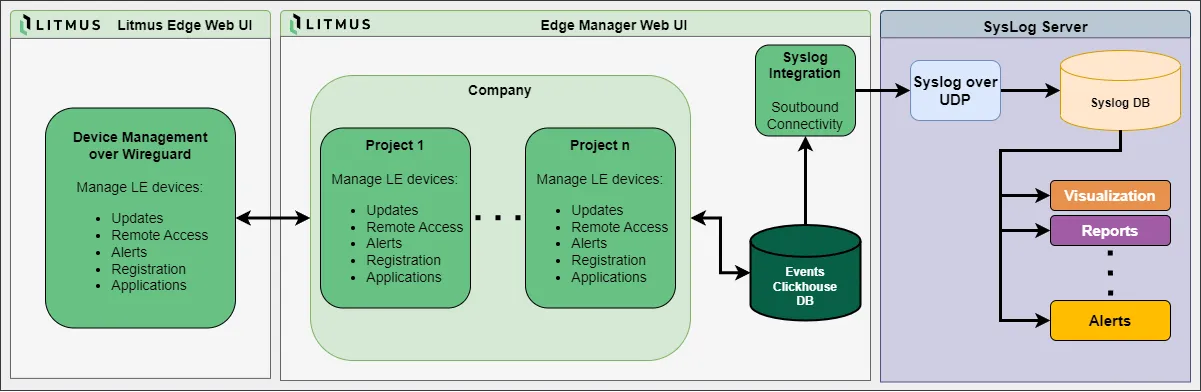
Litmus Edge Manager (LEM) 2.31.x and later can forward all of its system events to an external syslog server over UDP. Connecting the two takes two configuration steps: add a UDP syslog input on the syslog server, then point LEM at that input.
Data flow: LEM sends syslog messages over UDP to the syslog server's IP address and chosen port. The syslog server stores them, and your SIEM or log tooling reads them from there.
Scope: this guide assumes LEM and a syslog server are already installed and running. It does not cover installing either one. Graylog and Nagios Log Server are used as examples. Any syslog server that accepts syslog over UDP from Linux hosts works, because LEM runs on Ubuntu Server.
Key facts
Item | Value |
|---|---|
Protocol | Syslog over UDP only |
Minimum LEM version | 2.7.0 |
What LEM forwards | All LEM system events (the System Events tab of the LEM Events page) |
Direction | Outbound from LEM to the syslog server |
Network requirement | The syslog server must accept inbound UDP from LEM on the chosen port |
Where to configure LEM | LEM Admin Console at https://<LEM IP address>:8446, then Integration, then Syslog |
Source for LEM settings: Litmus Edge Manager Syslog.
Before you begin
Confirm all of these before starting:
- LEM 2.7.0 or later is running, and you can log in to the LEM Admin Console as an administrator.
- A syslog server is running, accepts syslog over UDP from Linux hosts, and you have admin access to it.
- LEM can reach the syslog server on the UDP port you will use. Check the syslog server's host firewall and any network firewalls in between.
Collect these values as you go:
Value | Where it comes from | Where it is used |
|---|---|---|
Syslog server IP address or hostname | Your syslog server | LEM Syslog pane, Syslog Server Host field |
Syslog UDP port | Chosen when you create the Graylog input, or shown by Nagios Log Server when you add a Linux log source | LEM Syslog pane, Port (UDP) field |
LEM IP address | Your LEM installation | LEM Admin Console URL; Nagios Log Server IP Address field |
Part 1: Configure the syslog server
Follow the subsection for your syslog server. When you finish, you have the syslog server's IP address and a UDP port that is listening for LEM.
Option A: Graylog
- In Graylog, open System > Inputs.
- In the Select input dropdown, choose Syslog UDP, then click Launch new input.
- Fill in the input form:
- Title: any descriptive name, for example Litmus Edge Manager.
- Bind address: 0.0.0.0 to listen on all interfaces, or the specific IP address LEM will send to.
- Port: the UDP port LEM will send to, for example 1514. Graylog normally runs as a non-root user, so it cannot listen on ports below 1024, such as 514.
- Global or node: set according to your Graylog cluster setup.
- Leave all other fields at their defaults unless your organization's guidelines require otherwise.
- Click Launch Input.
- Check that the new input shows the state Running. Graylog only receives events while the input is running.
- Note the Graylog server's IP address and the port, then continue with Part 2.
Option B: Nagios Log Server
- Click + Add Log Source.
- Select Linux. LEM runs on Ubuntu Server, so it is added as a Linux source.
- Nagios Log Server now shows a setup script and syslog configuration for Linux hosts. Do not run these on LEM: LEM is configured from its Admin Console in Part 2. Only note the port used in those commands, which is 5544 by default.
- Note the Nagios Log Server IP address and that port. Make sure the firewall allows UDP on that port; many Nagios guides only open TCP.
- Keep this page available. Its Verify Incoming Logs section, where you enter the LEM IP address, is used in Part 3. Continue with Part 2.
Other syslog servers
Create a listener that receives syslog over UDP on a port of your choice and accepts messages from the LEM IP address. Use your syslog server's own documentation for the exact steps. Note the server's IP address and the port, then continue with Part 2.
Part 2: Configure Litmus Edge Manager
You need the syslog server IP address or hostname and the UDP port from Part 1.
- Open https://<LEM IP address>:8446 and log in to the LEM Admin Console.
- In the navigation panel, select Integration. The Kafka pane opens by default.
- In the Integration sub-panel, select Syslog.
- Turn on Enable/Disable logs forwarding.
- In Syslog Server Host, enter the syslog server IP address or hostname.
- In Port (UDP), enter the UDP port from Part 1.
For details on each field, see Litmus Edge Manager Syslog.
Part 3: Verify that events arrive
Setup is complete only when a message from LEM shows up on the syslog server. UDP has no delivery confirmation, so LEM reports no error if packets are dropped on the way.
- In the LEM Admin Console, open Integration > Syslog and click Send test message.
- Look for the message on the syslog server:
- Graylog: open System > Inputs, find the input from Part 1, and click Show received messages.
- Nagios Log Server: on the Linux log source page, enter the LEM IP address under Verify Incoming Logs and click Verify. You can also search the dashboard for messages from the LEM IP address.
- Other servers: search for messages from the LEM IP address.
- If the test message is there, setup is complete. LEM system events arrive the same way as they occur. If it is not there, use the troubleshooting table below.
Troubleshooting
Symptom | Likely cause | What to check |
|---|---|---|
Test message does not arrive | A firewall blocks the UDP port | The syslog server's host firewall and any network firewalls allow UDP from LEM on the port. A TCP rule on the same port does not help. |
Test message does not arrive | Wrong host or port in LEM | The Syslog Server Host and Port (UDP) values in LEM match the syslog server and the port from Part 1. |
Graylog input does not reach Running | Port below 1024, or port already in use | Use a port of 1024 or higher, such as 1514, that no other input or service uses. |
Graylog input is Running but receives nothing | Bind address excludes the interface LEM sends to | Set the bind address to 0.0.0.0 or to the IP address LEM sends to. |
Nagios Log Server Verify finds nothing | Wrong IP entered, or LEM traffic arrives from another address (for example through NAT) | Enter the IP address that LEM's traffic actually comes from. |
Test message arrives, but no system events follow | Forwarding is off, or no system events have occurred yet | The logs forwarding toggle is on. The System Events tab of the LEM Events page shows new events. |
To tell a network problem from a syslog server problem, run tcpdump -n udp port <port> on the syslog server and send another test message. If packets show up, the network is fine and the issue is in the syslog server's input.
Remove the integration
Turn off forwarding in LEM first, then clean up the syslog server. Messages already stored on the syslog server are not deleted; its retention settings remove them over time.
Stop forwarding in LEM
- In the LEM Admin Console, open Integration > Syslog.
- Turn off Enable/Disable logs forwarding.
- Confirm that no new messages from the LEM IP address arrive on the syslog server.
Clean up the syslog server
Other sources may send to the same input. Before deleting anything, check that only LEM uses it.
- Graylog: open System > Inputs and find the input from Part 1. Click Stop input to pause it, or choose More actions > Delete input to remove it.
- Nagios Log Server: adding a Linux log source only shows setup instructions and a verification tool. It creates no LEM-specific input, so there is nothing to delete. Leave the default syslog input in place.
- Other servers: disable or remove the listener created for LEM.
If you opened a firewall rule only for LEM, remove it as well.
Common questions
Can LEM send syslog over TCP or TLS?
No. LEM forwards syslog over UDP only.
Which events does LEM forward?
All LEM system events, as listed on the System Events tab of the LEM Events page.
Which LEM versions support syslog forwarding?
LEM 2.31.x and later.
Can I use a syslog server other than Graylog or Nagios Log Server?
Yes. Any syslog server that accepts syslog over UDP from Linux hosts works, for example rsyslog or syslog-ng.
Do I run the Nagios Log Server setup script on LEM?
No. LEM is configured only through its Admin Console. Use the Nagios page only to read the port.
Can I use port 514?
Yes, if your syslog server can listen on it. Graylog needs root privileges or extra configuration for ports below 1024, so 1514 is the usual choice there.
Do I need to open inbound ports on LEM?
No. Syslog traffic goes outbound from LEM. Only the syslog server needs to accept inbound UDP on the chosen port.