Litmus Edge Manager Kafka Broker monitoring with Lenses
Overview
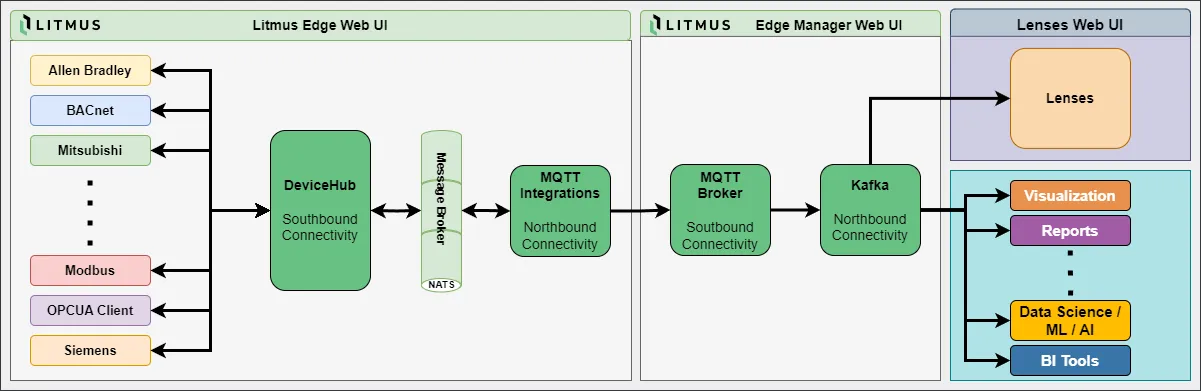
Litmus Edge Manager (LEM) runs a Kafka broker that carries data and events from your Litmus Edge devices. Lenses can connect to that broker as a Kafka client, so you can browse LEM topics and watch their throughput, such as records per second.
Data flow: the Lenses Agent connects to the LEM broker on port 9093 with SASL_SSL. The connection is encrypted with TLS, and the Agent logs in with a Kafka user created in LEM.
Scope: this guide covers only the encrypted connection on port 9093. LEM also offers an unencrypted listener on port 9092, which sends credentials and data in clear text; this guide does not use it. The guide assumes LEM and Lenses 6 are already installed and running, and does not cover installing Lenses.
Key facts
Item | Value |
|---|---|
Bootstrap address | <LEM host>:9093, shown as the SSL bootstrap server link in LEM |
Security protocol | SASL_SSL |
SASL mechanism | PLAIN |
Authentication | A Kafka user and password created in LEM |
Server certificate | The LEM CA chain, downloaded from LEM as ca_chain.pem |
Client certificate | Not needed |
Minimum versions | LEM 2.31.x, Lenses 6 |
Network requirement | The Lenses Agent must reach LEM on inbound TCP port 9093 |
Where to configure LEM | LEM Admin Console at https://<LEM IP address>:8446, then Integration, then Kafka |
Broker metrics (JMX) | Not available from LEM; leave Lenses broker metrics off |
Topic names | lem.mqtt.<project ID> for device data, lem.events.<project ID> for events |
Before you begin
Confirm all of these before starting:
- LEM 2.31.x or later is running, and you can log in to the LEM Admin Console as an administrator.
- Lenses 6 is running, and you can edit the Agent's provisioning.yaml for the environment that will connect to LEM.
- The Lenses Agent can reach LEM on TCP port 9093. Open that port in LEM's firewall and any network firewalls in between, and limit the rule to the Agent host where you can.
- The Agent host can resolve and reach the host name in LEM's SSL bootstrap link. The TLS certificate is checked against that name.
- A machine with Java's keytool is available to build the truststore.
Collect these values as you go:
Value | Where it comes from | Where it is used |
|---|---|---|
SSL bootstrap server | LEM Kafka pane, SSL bootstrap server link | kafkaBootstrapServers in provisioning.yaml |
ca_chain.pem | LEM Kafka pane, CA certificate download | Building the truststore |
Truststore file and password | You create them in Part 1 | sslTruststore and sslTruststorePassword |
Kafka user name and password | You create them in LEM in Part 1 | saslJaasConfig |
Part 1: Prepare Litmus Edge Manager Kafka
Get the connection details
- Open https://<LEM IP address>:8446 and log in to the LEM Admin Console.
- In the navigation panel, select Integration. The Kafka pane opens.
- In the Kafka Server section, copy the SSL bootstrap server link. It ends in port 9093.
- Download the Kafka CA certificate. The file is named ca_chain.pem.
Create a Kafka user for Lenses
Use a dedicated user for Lenses rather than an existing one, so you can control and remove its access separately.
- In the Users section, add a user, for example lenses.
- Set a password for the user.
- In the ACL section, give the user READ and DESCRIBE access to each topic Lenses should show, for example lem.mqtt.<project ID> and lem.events.<project ID>. Add one entry per topic and operation.
Build the truststore
The Lenses Agent runs on Java and reads the CA certificate from a Java truststore. Convert ca_chain.pem into one on a machine with keytool:
# Split the chain into one file per certificate
csplit -s -z -f lem-ca- ca_chain.pem '/-----BEGIN CERTIFICATE-----/' '{*}'

# Import every certificate into a new truststore
for f in lem-ca-*; do
  keytool -importcert -noprompt -alias "$f" -file "$f" \
    -keystore lem-kafka-truststore.jks -storepass '<truststore password>'
done

# Check the result: one trustedCertEntry per certificate
keytool -list -keystore lem-kafka-truststore.jks -storepass '<truststore password>'
Copy lem-kafka-truststore.jks to the Lenses Agent host and note the truststore password.
Part 2: Connect Lenses to the LEM Kafka broker
In Lenses 6, the Agent reads its Kafka connection from provisioning.yaml. Each Agent has exactly one Kafka connection, and it must be named kafka.
- Add or replace the kafka entry in the Agent's provisioning.yaml, using the values from Part 1:
kafka:
- name: kafka
  version: 1
  tags: [lem]
  configuration:
    kafkaBootstrapServers:
      value:
        - SASL_SSL://<LEM host>:9093
    protocol:
      value: SASL_SSL
    sslTruststore:
      file: /path/to/lem-kafka-truststore.jks
    sslTruststorePassword:
      value: <truststore password>
    saslMechanism:
      value: PLAIN
    saslJaasConfig:
      value: |
        org.apache.kafka.common.security.plain.PlainLoginModule required
        username="lenses"
password="<Kafka user password>";- Use the host name exactly as it appears in LEM's SSL bootstrap link. The certificate is checked against that name.
- Leave out the keystore settings. LEM does not use client certificates.
- Leave out the broker metrics settings. LEM does not publish JMX broker metrics.
- Apply the change in the way your Agent deployment expects, for example by restarting the Agent container.
To keep secrets out of the file, Lenses also accepts environment variables, for example value: ${SASL_JAAS_CONFIG}.
Part 3: Verify that Lenses sees the broker and topics
- In Lenses, open the environment that belongs to this Agent. It shows as connected once the Agent has reached the LEM broker.
- Open the topic list. The lem.mqtt.<project ID> and lem.events.<project ID> topics you granted access to appear.
- Open a topic to see its throughput, such as records per second and the number of records.
If the environment does not connect, test TLS on its own from the Agent host:
openssl s_client -connect <LEM host>:9093 -servername <LEM host> -CAfile ca_chain.pem </dev/nullThe output ends with Verify return code: 0 (ok) when the network path and the certificate are fine. Any other result points to the TLS rows in the troubleshooting table.
Troubleshooting
Symptom | Likely cause | What to check |
|---|---|---|
Connection to port 9093 times out | A firewall blocks the port, or the address is wrong | openssl s_client from Part 3 connects from the Agent host. Firewalls allow TCP 9093 from the Agent host. |
PKIX path building failed or unable to find valid certification path | The truststore lacks the LEM CA, or its path or password is wrong | keytool -list shows the LEM CA entries. The sslTruststore path and sslTruststorePassword match the file on the Agent host. |
No subject alternative names matching or No name matching | The bootstrap host name does not match the certificate | Use the host name from LEM's SSL bootstrap link rather than an IP address, and make sure the Agent host resolves it. |
SaslAuthenticationException: Authentication failed | Wrong user name, password or mechanism | The user exists in LEM and the password is current. saslMechanism is PLAIN, and the JAAS line ends with a semicolon. |
Bootstrap succeeds, then requests time out | The broker address LEM returns is not reachable from the Agent | The Agent host can resolve and reach the same host name on port 9093. |
Lenses connects, but topics are missing | Missing ACL entries | The Lenses user has READ and DESCRIBE on each topic in the LEM ACL section. |
Remove the integration
Remove the Lenses side first, then the user and access in LEM.
Clean up Lenses
- Remove the kafka entry for LEM from the Agent's provisioning.yaml, or point it at another cluster. An Agent cannot start without a Kafka connection, so stop or remove the Agent if it served only LEM.
- Delete lem-kafka-truststore.jks from the Agent host.
Clean up LEM
- In the LEM Admin Console, open Integration > Kafka.
- In the ACL section, remove the entries for the Lenses user.
- In the Users section, delete the Lenses user.
- If you opened port 9093 only for Lenses, remove that firewall rule as well.
Common questions
Can I use the unencrypted port 9092 instead?
LEM offers it, but it sends the Kafka password and all data in clear text. This guide covers only the encrypted SASL_SSL connection on port 9093.
Do I need a client certificate?
No. Lenses logs in with a Kafka user and password. The CA chain from LEM is only used to verify LEM's certificate.
Why are broker metrics turned off?
LEM does not publish Kafka broker metrics over JMX. Lenses still shows topic-level throughput, such as records per second.
Can Lenses write to LEM topics?
Only if the Lenses user has WRITE access in LEM. For monitoring, READ and DESCRIBE are enough, and leaving out WRITE prevents accidental changes.
Which topics does LEM provide?
Two per project: lem.mqtt.<project ID> for device data and lem.events.<project ID> for events.
Can I use the existing admin Kafka user?
It works, but a dedicated Lenses user is safer. You can limit its access and remove it without affecting other clients.
I use Lenses 5. Does this still apply?
The connection values are the same: SASL_SSL, PLAIN, the JAAS configuration and the truststore. Lenses 5 enters them through its setup wizard or its own provisioning format; see the Lenses 5 documentation.
Which versions are supported?
LEM 2.31.x and later, with Lenses 6.