Sending Data to InfluxDB Using REST API Integrations : Walk-through
Pre-requisite
Download the helper template from central portal, and Upload it to your LitmusEdge
Write data with the InfluxDB API (v1.x)
A recommended reference to review when writing data using InfluxDB APIs is located here. The below example is extracted from the template file that was shared with the solution. It is a raw API call with a sample piece of data that is being sent to the database.
- Sending a POST request to the InfluxDB that is running on tsdata IP address is http://10.17.9.53 and the port is 8087
- The -u is followed by username:password
- The information in the URL consists of the database and the precision. database is tsdata and precision is seconds
- Data-binary is the measurement (mymeas in the example) and the key/value pairs that are being sent ( in this format key=value)
- Note: if there are no timestamps with the data, the database will publish the timestamp that it receives the data at
curl -i -XPOST -u litmus:Example@123 "http://10.17.9.53:8087/write?db=tsdata&precision=s" --data-binary 'mymeas,mytag=1 myfield=90,myfield2=123'This can be further explored in this flow:
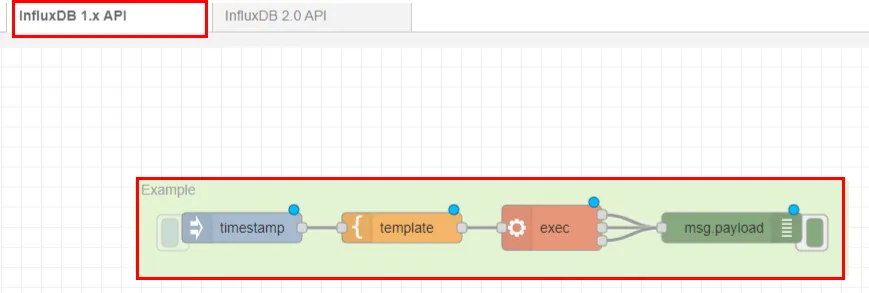
To further understand the payload that needs to be sent via NATS, see the explanation below related to the flow shown below:

- Note: nodes 1- 5 are preparing the data schema
- Bring in all the tags from device sim03
- Convert string to object
- Start preparing the schema by having key=value
- Send a msg.complete to the join node. Put this as repeating on a regular interval (once per second) to send the data compiled through every second
- Join the key/value pairs into one payload with commas separated
- Add the measurement name to the payload
- Send the data to a topic
Once the data is published to a topic, you will be ready for the next step (preparing the Integrations).
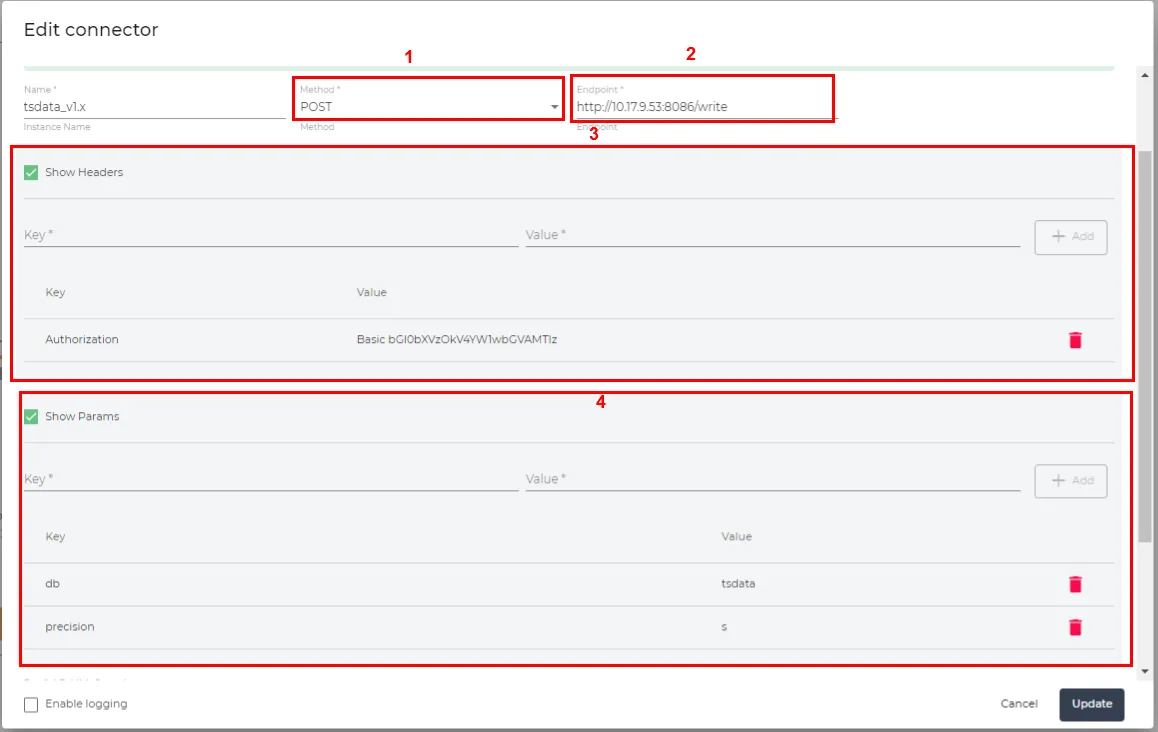
- Method: Choose POST
- Endpoint: http://<IP_Address>:/write
- Headers (key : value pair):
- Authorization: Basic username:password (converted to base_64, eg. litmus:Example@123 converted to base_64)
- The following information could be either in the Params or in the topic of the Integrations
- db (database that your system is set up with, eg. tsdata)
- precision: (s for seconds, ns for nanoseconds)
- Note: alternatively you can input the information in the Remote Topic of the Integrations. The topic can be set up as follows:
- http://<IP_Address>:/write?db=litmus&precision=s
You are now set up to send data to InfluxDB v1.x via API calls!
Write data with the InfluxDB API (v2.x)
A recommended reference to review when writing data using InfluxDB APIs is located here. The below example (extracted from the template that was shared under the Files and References section), is a raw API call with a sample piece of data that is being sent to the database. The information is as follows:
- Sending a POST request to the InfluxDB that is running on tsdata IP address is http://10.17.9.53 and the port is 8087
- The org is litmus, bucket is litmus and precision is nano-seconds
- Header carries the authorization, content type and formating accepted.
- Data-binary is the measurement (airSensors) and the key/value pairs that are being sent.
- Note: if there are no timestamps with the data, the database will publish the timestamp that it receives the data at
curl --request POST "http://10.17.9.53:8087/api/v2/write?org=litmus&bucket=litmus&precision=ns" --header "Authorization: Token cr9hOZAHRm8j-VD2Nk6o6bWrNEubsZ1KFtad0ZNX4nmrgFhgfRsgN1ybF6Ylv41Fo82K6JXCmRDXksAo42wamg==" --header "Content-Type: text/plain; charset=utf-8" --header "Accept: application/json" --data-binary 'airSensors,sensor_id=TLM0201 temperature=73.97038159354763,humidity=35.23103248356096,co=0.48445310567793615'This can be further explored in this flow:
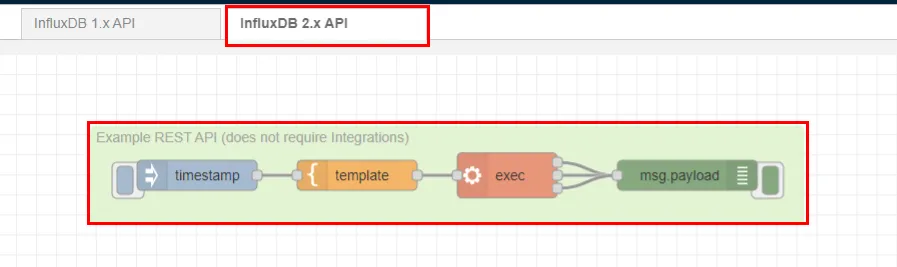
To further understand the payload that needs to be sent via NATS, see the explanation below related to the flow shown below:

- Note that nodes 1- 5 are preparing the data schema
- Bring in all the tags from device sim03
- Convert string to object
- Start preparing the schema by having key=value
- Send a msg.complete to the join node. Put this as repeating on a regular interval (once per second) to send the data compiled through every second
- Join the key/value pairs into one payload with commas separated
- Add the measurement name to the payload
- Send the data to a topic
Once the data is published to a topic, you will be ready for the next step (preparing the Integrations).
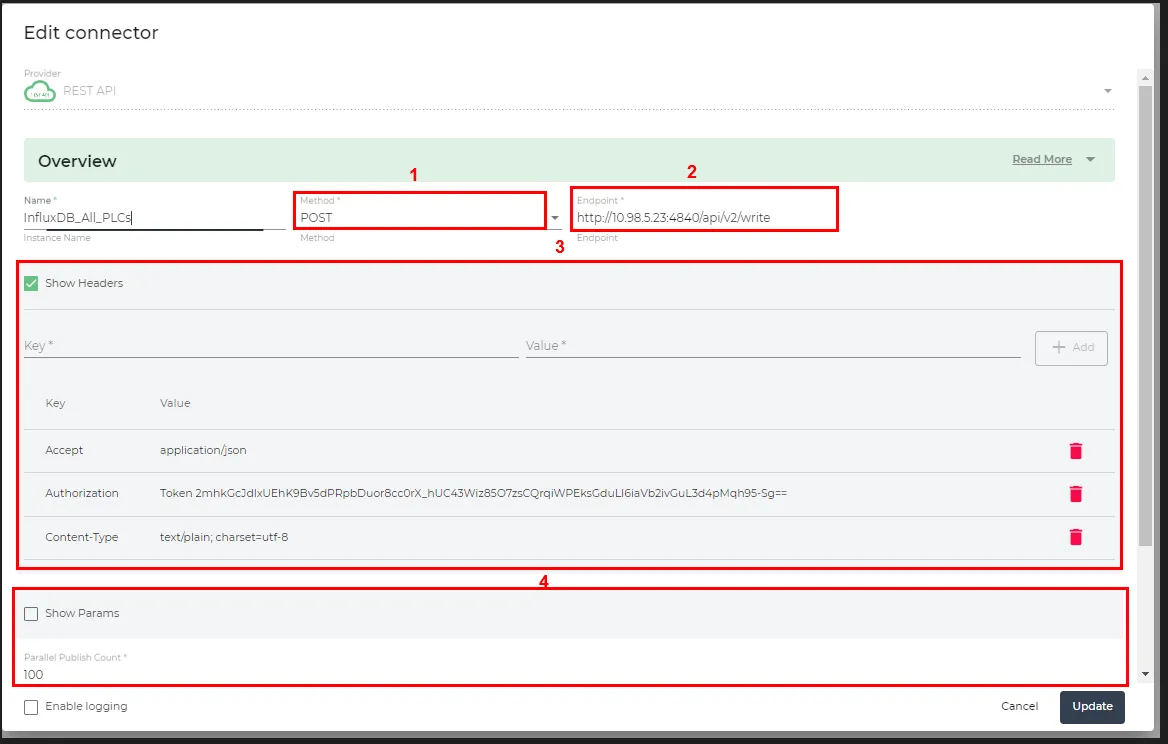
- Method: Choose POST
- Endpoint: http://<IP_Address>:<Port>/api/v2/write
- Headers (key : value pair):
- Accept : application/json
- Authorization: Token YOUR_API_TOKEN
- Content-Type: text/plain; charset=utf-8
- The following information could be either in the Params or in the topic of the Integrations
- bucket (bucket that your system is set up with, eg. PLC_Data)
- org (org name that your InfluxDB is set up with, eg. litmus)
- precision: (s for seconds, ns for nanoseconds)
- Note: alternatively you can input the information in the Remote Topic of the Integrations. The topic can be set up as follows:
- http://<IP_Address>:<Port>/api/v2/write?org=litmus&bucket=PLC_Data&precision=s
You are now set up to send data to InfluxDB v2.x via API calls!