Admin Console backup
The Backup module allows you to download, upload, and bulk delete Litmus Edge Manager (LEM) application and configuration files.
Overview
The backup process for LEM consists of a compressed and encrypted file downloaded from the LEM Admin UI. The data is updated every 24 hours, and 7 copies of each LEM version are maintained on the server until user deletes them manually.
Backup Type: Compressed and encrypted file, available for download from the LEM Admin UI.
Rotation: 7 copies of each LEM version.
Retention Period: Backup files will remain until user deletes them manually.
LEM backup contain the following files:
1. Application Data
- Company and project settings
- Activation requests
- Sites (except site icons)
- Triggers and Actions
- Templates
- Marketplace Applications and their associated data and configurations
- Marketplace Catalog (data and configuration)
- Grafana Dashboards and other settings
- Remote access setup
- Licenses (Note: Licenses won't work after restoring on another VM)
- Keycloak
- Registry Credentials
- Certificates
- SMTP Settings
- Tokens
2. User Data
- Users and their access to specific projects/companies.
3. Marketplace Apps
- All marketplace apps and associated data and configurations.
4. LE Connected to LEM
- All Litmus Edge devices connected to the Litmus Edge Manager.
5. Database Dumps:
- mysql-grafana.sql
- mysql-keycloak.sql
- mysql-lem.sql
- mysql-mpcs.sql
- mysql-mpcs_rbac.sql
- mysql-mysql-user.sql
What is not backed up
- Old upgrades and backups
- Events
- Docker registry data
- ClickHouse data
- DNS Entries (LEM only lists DNS servers; not backed up to avoid network access issues)
- Network settings
Process
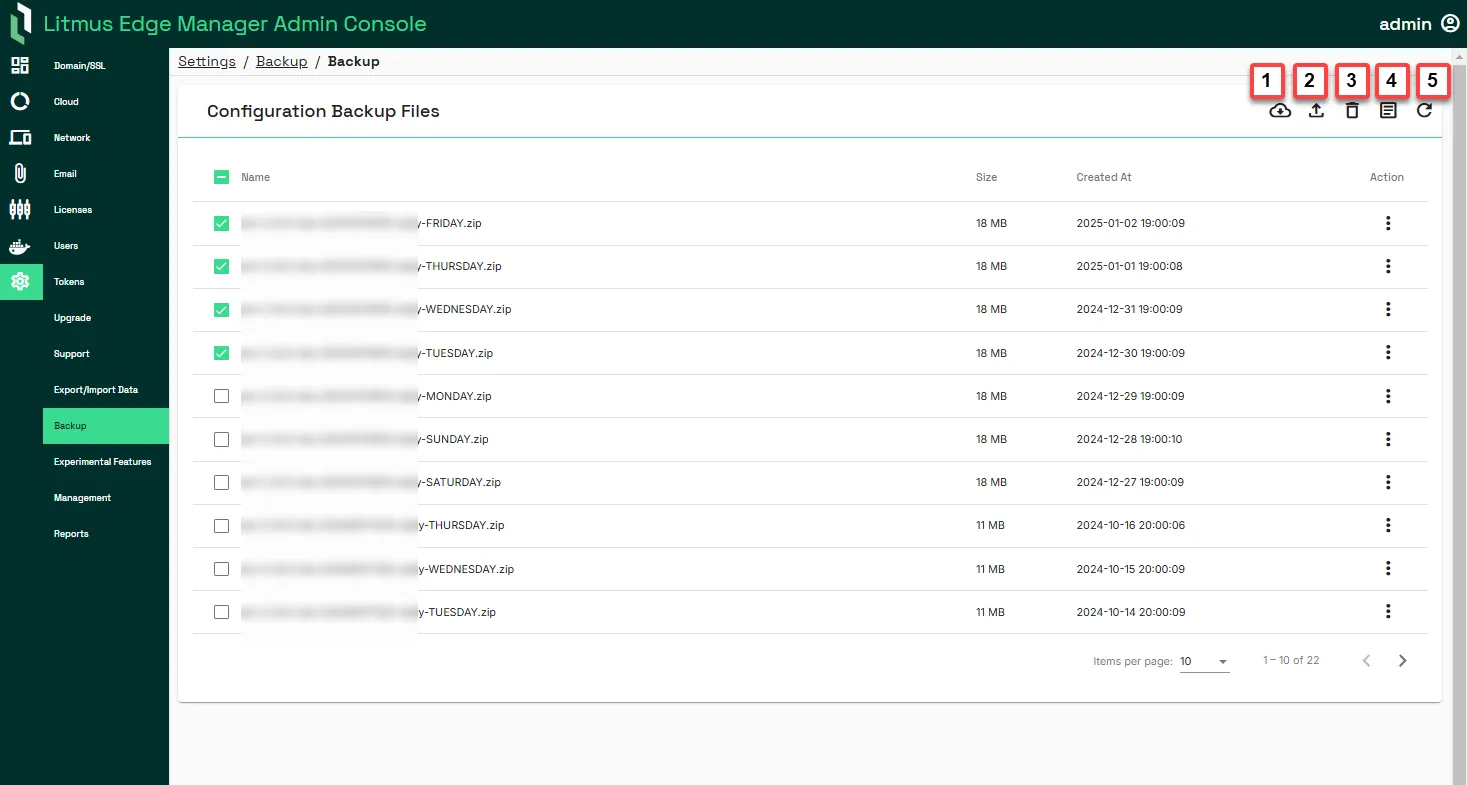
The following process define the steps required to create and upload a backup file in LEM.
Important:
- Importing a configuration replaces configuration data and cannot be undone. Select the appropriate bundled zip file.
- Any node-locked licenses will be removed after restoring a backup on a new virtual machine (VM). You will have to request new node-locked licenses from your Litmus account representative.
- Network files are not backed up to avoid breaks on restore.
- As of Litmus Edge Manager 2.24.0 release, LEM Admin UI allows you to create long-term API tokens with scope LEM Backup.
Action | Details |
|---|---|
[1] Create backup | Download a backup file of the Litmus Edge Manager configuration. Configuration files are password protected and generated as a .tar file. Process logs are visible in the Log section. To export the configuration, you'll need the password of the Litmus Edge Manager instance. |
[2] Upload backup file | Upload a Litmus Edge Manager configuration file. To import the configuration, you'll need the password of the Litmus Edge Manager instance. |
[3] Remove selected backups | This option allows you to bulk delete the selected backup configurations files at once. |
[4] Show backup/restore log | View the latest export/Import operation log. You can toggle Auto-scroll to the On position to automatically scroll down to the most recent messages in Process Log. Doing so helps monitor a running export/import process. |
[5] Refresh | Reload the list of backup files. |