Overview
Litmus MCP Server
The Litmus MCP Server is the official Model Context Protocol (MCP) server for Litmus Automation. It lets large language models (LLMs) and AI coding agents - including Claude, Cursor, VS Code Copilot, Windsurf, and Claude Code - interact directly with Litmus Edge for device configuration, real-time monitoring, and industrial automation management.
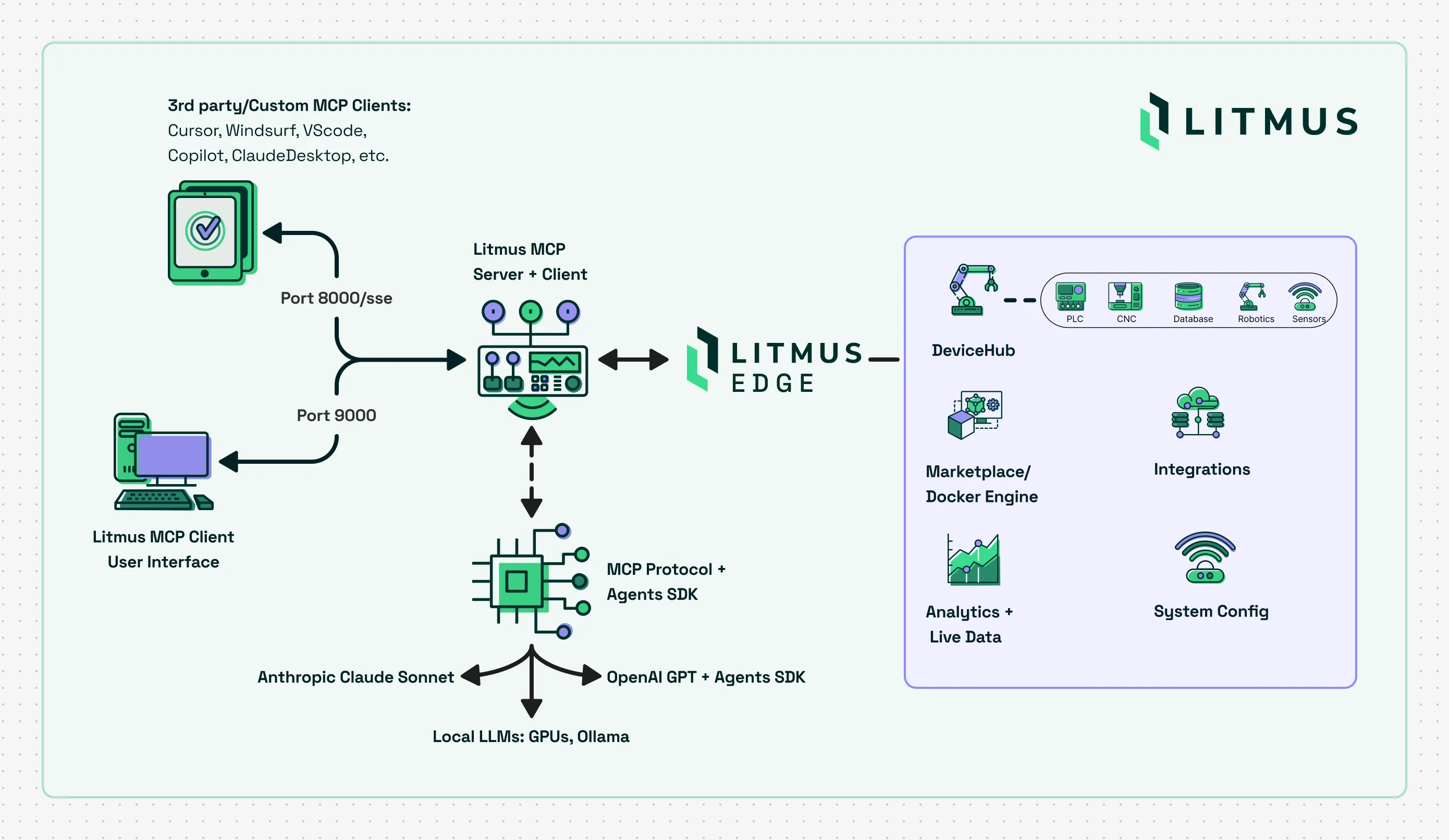
Built on the MCP SDK and compliant with the Model Context Protocol spec the server ships as a single Docker image with two components:
- MCP Server (port 8000): SSE transport endpoint for external MCP clients such as Claude Desktop, Cursor, VS Code, Windsurf, and Claude Code
- Web UI (port 9000): a built-in chat interface for interacting with Litmus Edge directly in a browser, no MCP client required
What you can do
The Litmus MCP Server exposes 57 tools across 11 categories, giving AI agents the ability to:
- Inspect and configure DeviceHub devices and tags
- Read live values from NATS topics
- Query historical time-series data from InfluxDB
- Manage Docker containers on the Litmus Edge Marketplace
- Build, list, and inspect Digital Twin models and instances
- Pull system events, network information, and packet captures
- Drive a Litmus Edge Manager (LEM) tenant: list devices, licenses, alerts, and project usage
See the Tools Reference for the full list.
Supported AI Clients
- Claude Desktop
- Claude Code
- Cursor
- VS Code Copilot
- Windsurf
- Any MCP-compatible LLM client
- Built-in Web UI (no client needed)
How It Works
The server is stateless. All credentials are supplied per connection via HTTP headers in SSE mode, or via environment variables in STDIO mode. An LLM client connects to the MCP server over SSE, which in turn communicates with:
- Litmus Edge: via REST API and the Litmus SDK
- NATS Broker: for live tag and event values
- InfluxDB: for historical time-series data
This architecture means no credentials are ever stored on the server, and each session is independently authenticated.
Architecture
Quick Start
- Getting Started - run the server in Docker in under a minute.
- Web UI - chat with Litmus Edge directly in your browser.
- Client Configuration - wire it into Claude Desktop, Cursor, VS Code, Windsurf, Claude Code.
- Tools Reference - every tool the LLM can call, grouped by category.
- Headers Reference - the full set of connection headers and what each one does.
Project links
- GitHub: litmusautomation/litmus-mcp-server
- Container image: ghcr.io/litmusautomation/litmus-mcp-server:latest
- Glama registry: glama.ai/mcp/servers/@litmusautomation/litmus-mcp-server
- MCP.so registry: mcp.so/server/litmus-mcp-server/litmusautomation