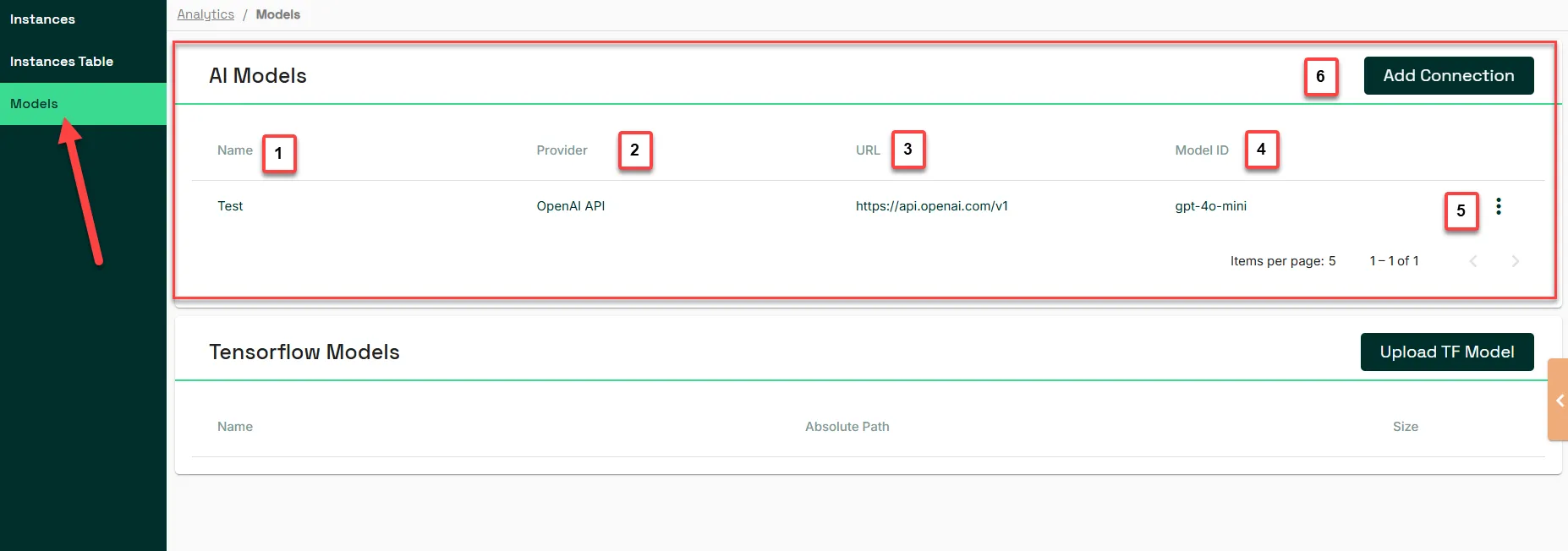
AI Models
4 min
AI Models connects Litmus Edge (LE) Analytics to external Generative AI providers, such as OpenAI and Google Gemini. Once a provider connection exists, you can reference it from an AI Processor in your analytics flows without writing custom integration code.
Why AI Models matters
Different analytics use cases call for different Large Language Models (LLMs). Rather than locking you into one provider, AI Models lets you connect multiple providers side by side and choose the right model for each flow.
Connection details
Each connection you add is defined by:
- Name: The label used to identify the connection within LE.
- Provider: The AI service the connection points to, such as OpenAI or Google Gemini.
- URL: The endpoint address for the provider's API.
- Model ID: The identifier of the specific model to use at that endpoint.
Limitations
While LE supports multiple providers (OpenAI, Cloudflare AI Gateway, OpenAI Assistants, Grok 3, Ollama, Google Gemini, Nvidia, and Anthropic), only specific options may be supported with this release.
Access AI Models UI
To access AI Models:
- Log in to LE.
- From the Navigation panel, navigate to Analytics > Models.