Server Settings
The Server Settings page shows the active configuration of the Litmus Edge (LE) OPC UA server. The values are read-only and come from the server's configuration file. You can check the limits and defaults the server enforces without opening a shell on the device.
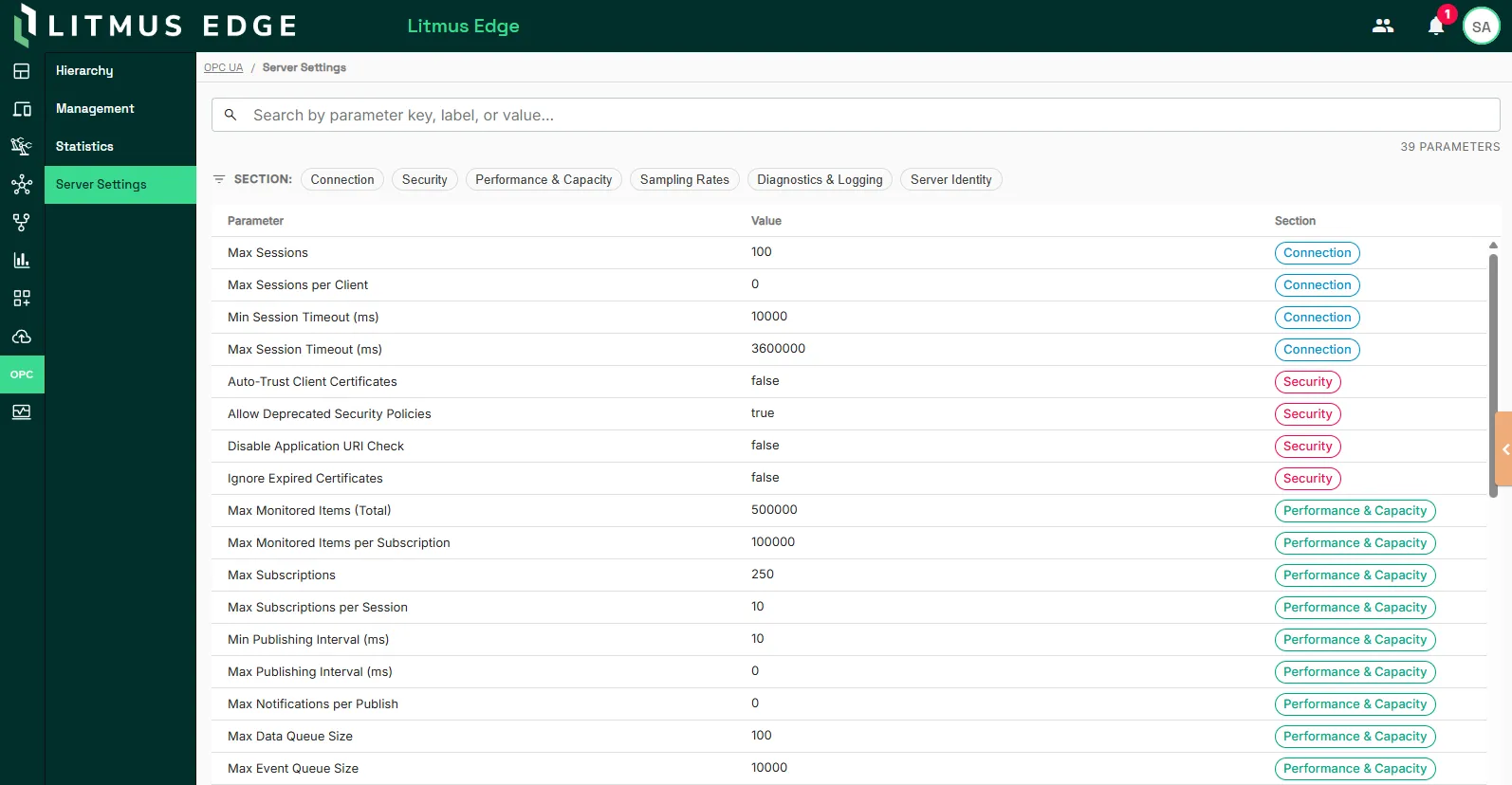
The values are grouped into the following sections:
- Connection: How clients reach the server
- Security: How the server secures those connections
- Performance & Capacity: How much work the server allows
- Sampling Rates: How often the server reads and publishes values
- Diagnostics & Logging: What the server records about itself
- Server Identity: How the server identifies itself
Why this matters
The OPC UA server enforces limits that decide what a client can do: how many sessions it accepts, how many subscriptions and monitored items it allows, and how fast it publishes. Server Settings shows those limits directly, so you can size a client design against the real numbers instead of finding a ceiling when a connection is refused. When a client behaves unexpectedly, the page also tells you in a few seconds whether the server is configured the way you assume, which rules out a whole class of causes before you open the logs.
Find a parameter
Enter a parameter key, label, or value in the search box to filter the table as you type. To see one group at a time, click a section name above the table.
Related topics
- Hierarchy
- Management
- Statistics