LS Serial
Review the following information for setting up and configuring the LS Serial driver. The driver connects to LS Electric (LSIS) PLCs over a serial line. It supports three link protocols, which you select with the LinkProtocol device setting:
- XGT dedicated (Cnet): XGT family CPUs through a Cnet module (XGL-CH2A or XBL-C21A) or the XBM built-in Cnet channel. RS-232C point-to-point, or RS-485 multidrop with up to 32 nodes.
- XGT CPU-Direct: The loader port of an XGB, XBM, XBC, or XGK CPU.
- Master-K CPU-Direct: The loader port of a Master-K CPU.
This driver replaces the LS XBM Cnet Serial, LS XBM Serial, and LS Master-K CPU Direct Serial drivers.
Note: This driver is experimental. Some features might not work as expected.
Litmus Edge compatible series
Compatibility parameter | Compatible items |
|---|---|
Driver type | Serial (RS-232C or RS-485) |
Validated devices/series | LS Electric XGT Series: XGB, XBM, XBC, XGK Cnet modules XGL-CH2A and XBL-C21A LS Electric Master-K Series: K7M LS Electric K80S LS Electric K120S LS Electric K200S LS Electric K300S LS Electric K1000S |
To set up and configure this device in Litmus Edge (LE), do the following:
- Step 1: Set up and configure the PLC device
- Step 2: Set up the PLC device in Litmus Edge DeviceHub
- Step 3: Configure the list of registers
Step 1: Set up and configure the PLC device
Record the serial communication parameters for the device, and note which port the cable is connected to. The LinkProtocol you select in Step 2 must match that port. The three protocols are not compatible with each other. A mismatch causes no reply or a rejected frame, not a clear error.
The driver does not detect the baud rate automatically. The serial settings in Step 2 must match the port exactly. The device defaults are 115200 baud, 8 data bits, no parity, and 1 stop bit for both XGT protocols, and 38400 baud, 8 data bits, no parity, and 1 stop bit for Master-K.
XGT dedicated (Cnet)
In XG5000, set the operation mode of the Cnet channel to XGT server. The CPU keeps this setting after a power cycle. If the channel is set to Modbus RTU server, Modbus ASCII server, or Use P2P, the device does not reply to the driver.
Also note the station number of the channel. You enter it as StationId in Step 2.
XGT CPU-Direct
The loader port needs no extra setup.
To check the connection to your device:
- Note down the following information and refer to it when needed.
- Device: LS XBM-DR165
- Communication I/F: RS232. Refer to the following figure.
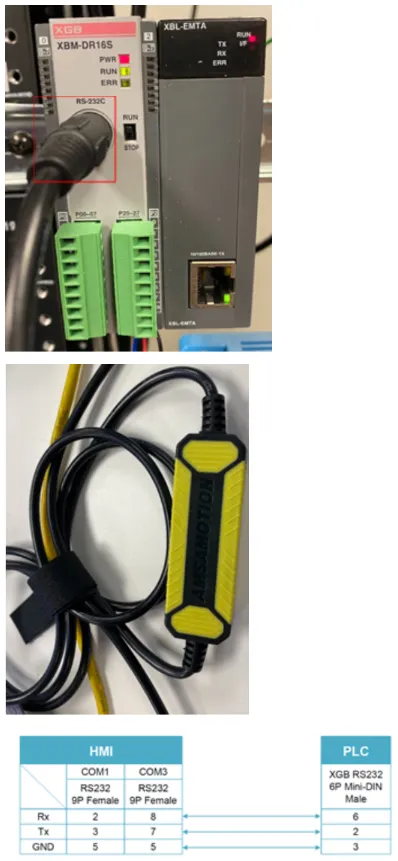
- Launch XG5000 v.3.71 software and click Online > Online Settings.
- Set up the COM port, and then click Auto Detect.
Master-K CPU-Direct
The loader port needs no extra setup.
To check the connection to your device:
- Note down the following information and refer to it when needed.
- Device: LS Industrial Systems
- Communication I/F: RS232. Refer to the following figure.
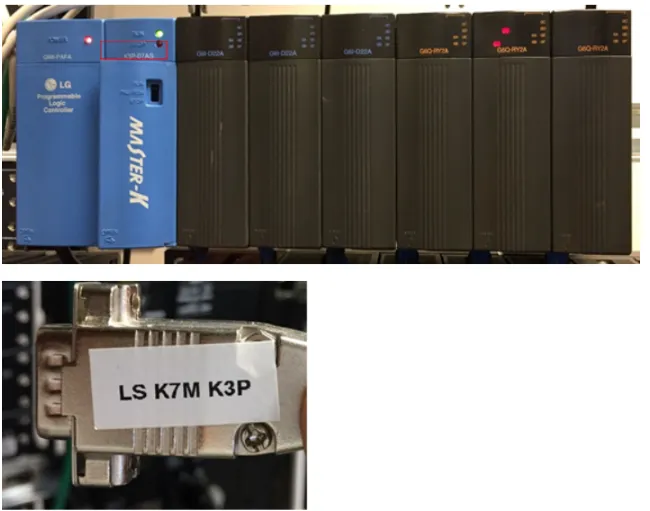
- Launch KGL_WE v3.66 software and click Project > Option > Connection Option.
- Set up the COM port.
- Click Connect.
Step 2: Set up the PLC device in Litmus Edge DeviceHub
Configure the following parameters when you Connect a DeviceConnect a Device with this driver. Update default values to the specific setup of your device.
Parameter | Value |
|---|---|
Type | LS Industrial System |
Driver | LS Serial |
DeviceFile | The serial port path used to communicate with the device, for example /dev/ttyS1 or /dev/ttyUSB0. Default value /dev/ttyS0 |
BaudRate | Must match the baud rate configured on the device. Select a value from 1200 to 921600. Default value 115200. For Master-K, the device default is 38400. |
DataBits | 5, 6, 7, or 8. Must match the device. Default value 8 |
Parity | None, Odd, or Even. Must match the device. Default value None |
StopBits | 1, 1.5, or 2. Must match the device. Default value 1 |
LinkProtocol | The link protocol of the port the cable is connected to. Select XGT dedicated (Cnet module / built-in Cnet channel), XGT CPU-Direct (loader RS-232 port), or Master-K CPU-Direct (loader RS-232 port). Default value XGT dedicated (Cnet module / built-in Cnet channel) |
StationId | For XGT dedicated (Cnet) only. The Cnet station number of the channel. Enter a value from 0 to 255. Default value 1 |
The following parameters are under Advanced Parameters.
Parameter | Value |
|---|---|
ReadTimeout | How long the driver waits for a response, in milliseconds. Enter a value from 10 to 10000. Default value 2000 |
RetryCount | The number of times a failed request is retried. Enter a value from 0 to 5. Default value 0 |
PauseBetweenRetries | The pause between retries, in milliseconds. Enter a value from 0 to 2000. Default value 0 |
For the Meta Data, Status Register, and Optional Settings options, see Connect a DeviceConnect a Device. By default, the status register is MW, value type uint16, address 0.
Step 3: Configure the list of registers
When you Add a TagAdd a Tag to the connected device, see the following register table and tag parameters. This driver does not support browsing tags.
See the following additional resources if necessary:
- Organize Device and Tag Data by Using MetadataOrganize Device and Tag Data by Using Metadata
- Tag Formula VariablesTag Formula Variables
Register table
All addresses start at 0. Each tag reads one value.
- Word registers address a word directly and use uint16.
- _bit registers address a bit inside a word. Enter the word number followed by a two-digit bit number, from 00 to 15. For example, address 10005 is bit 5 of MW100.
- SX addresses a step. Enter the group number followed by a two-digit step number, from 00 to 99.
- TX and CX address a timer or counter contact by its number.
The maximum addresses are the widest limits across all three CPU families. Some registers are not available on every link protocol. If you use one, the driver returns a configuration error and sends no request.
- Not available on Master-K CPU-Direct: SW, NW, ZW, ZRW, UW, UW_bit, RW, RW_bit, TSW, and CSW.
- Not available on XGT dedicated (Cnet): ZRW, TSW, and CSW.
Name | Value Types | Access Type | Address Format | Min Address | Max Address | Description |
|---|---|---|---|---|---|---|
PW | uint16 | R/W | DDDD | 0 | 2047 | I/O Relay |
PW_bit | bit | R/W | DDDDdd | 0 | 204715 | I/O Relay |
MW | uint16 | R/W | DDDD | 0 | 2047 | Auxiliary Relay |
MW_bit | bit | R/W | DDDDdd | 0 | 204715 | Auxiliary Relay |
LW | uint16 | R/W | DDDDD | 0 | 11263 | Link Relay |
LW_bit | bit | R/W | DDDDDdd | 0 | 1126315 | Link Relay |
KW | uint16 | R/W | DDDD | 0 | 2559 | Keep Relay |
KW_bit | bit | R/W | DDDDdd | 0 | 255915 | Keep Relay |
FW | uint16 | R/W | DDDD | 0 | 2047 | System Flag Relay |
FW_bit | bit | R/W | DDDDdd | 0 | 204715 | System Flag Relay |
DW | uint16 | R/W | DDDDD | 0 | 32767 | Data Register |
DW_bit | bit | R/W | DDDDDdd | 0 | 3276715 | Data Register |
UW | uint16 | R/W | DDDD | 0 | 6331 | Analog Refresh Register |
UW_bit | bit | R/W | DDDDdd | 0 | 633115 | Analog Refresh Register |
RW | uint16 | R/W | DDDDD | 0 | 32767 | File Register |
RW_bit | bit | R/W | DDDDDdd | 0 | 3276715 | File Register |
SX | bit | R/W | DDDDD | 0 | 12799 | Step Control Flag |
TX | bit | R/W | DDDD | 0 | 2047 | Timer Contact |
CX | bit | R/W | DDDD | 0 | 2047 | Counter Contact |
SW | uint16 | R/W | DDD | 0 | 127 | Step Control Group |
NW | uint16 | R/W | DDDDD | 0 | 21503 | Communication Data Register |
ZW | uint16 | R/W | DDD | 0 | 127 | Index Register |
TW | uint16 | R/W | DDDD | 0 | 2047 | Timer Current Value |
CW | uint16 | R/W | DDDD | 0 | 2047 | Counter Current Value |
ZRW | uint16 | R/W | DDDDD | 0 | 32767 | Extended File Register |
TSW | uint16 | R/W | DDDD | 0 | 2047 | Timer Setting Value |
CSW | uint16 | R/W | DDDD | 0 | 2047 | Counter Setting Value |
Writing to FW, FW_bit, and NW
You can write to FW, FW_bit, and NW on every link protocol, but the result depends on the device:
- On both CPU-Direct protocols, an FW write is only partly applied. The value is combined with the current word by a bitwise OR.
- An FW_bit write is accepted but has no effect.
- An NW write is rejected by the device, but it can still change data in the area.
- On XGT dedicated (Cnet), the CPU rejects FW and NW writes with NAK 1132.
Read these registers freely, and write to them only when you intend to.
Master-K addresses
Warning: Master-K CPU-Direct does not check address ranges. An address past the end of an area reads or writes the next area in memory, with no error. A read returns the next area's data, and a write overwrites it.
The following table shows the documented extent of each area and where it runs into the next area. Confirm the extent for your CPU model before you use an address near a limit.
Area | Documented extent | Runs into | At word |
|---|---|---|---|
PW / PW_bit | 63 | MW | 128 |
MW / MW_bit | 191 | LW | 256 |
LW / LW_bit | 63 | KW | 128 |
KW / KW_bit | 31 | TX | 128 |
FW / FW_bit | 31 | SX step control | 128 |
Tag parameters
- Name: Select a register name from the drop-down list. The available options depend on the names in the register table.
- Value Type: Select a data type from the drop-down list. The available options depend on the register name selected.
- Address: Enter the register address in decimal format, within the min and max range in the register table. Omit leading zeros. For _bit registers, add the two-digit bit number at the end.
- PollingInterval: Enter how often the tag polls for data, in seconds. Enter 0 to disable polling. Default value 1
- Tag Name: Enter a name for the tag.
- Description (Optional): Enter a description for the tag.
- Tag Formula: Enter a formula for the tag to process the generated data. You can use two variables: value (current tag value) and timestamp (current tag UNIX time in milliseconds). The following math functions are available:
- sin
- cos
- sqrt
- tan
- power: power(x) performs the operation 10^x.
- log: log(x) is the natural logarithm (the logarithm is in base e).
- exp: exp(x) performs the operation e^x.
- Only Publish on Change of Value: Select the checkbox to publish NATS messages only when the value parameter changes. Change of Value only applies to boolean, numeric (such as int or float), and simple string data types. It does not apply to complex types, such as JSON or array. Poll-once topics are not affected by Change of Value settings, and still receive a single message.
- Meta Data: Define key-value pairs to add to the device output payload.
Note: If you use special characters in metadata key names, the special characters are replaced with underscore characters in the payload. This can cause two key names to be combined into one. For example, configuring the key names a**b and a&&b creates only one key name (a__b).