Manage application releases
A Docker application release is always in one of two states, RELEASED (submitted) or DRAFT. When a Docker application release is in RELEASED state, it cannot be further modified. When it is in DRAFT, it can be modified.
Important: When a docker application release is in DRAFT state it can't be deployed to a Litmus Edge instance.
See the following on how to manage Docker application releases. The following user interface is identical for Containers, Containers Advanced, and Compose.
Note: If you have the Observer Marketplace role, you can view releases but you cannot clone, edit, submit, or remove them.
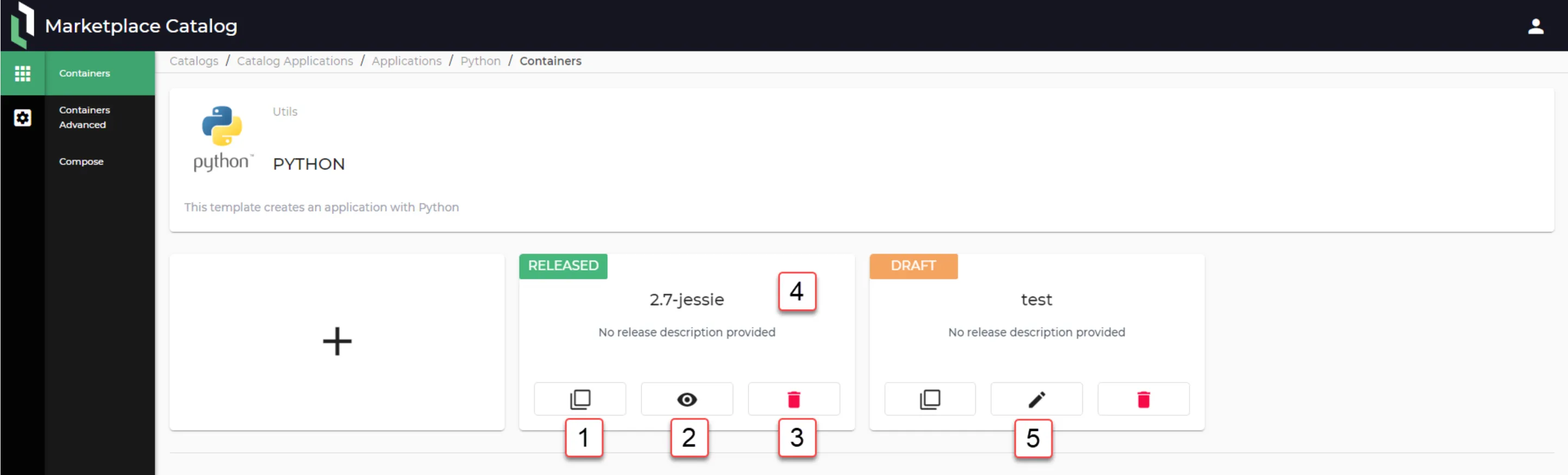
Action | Details |
|---|---|
[1] Clone release | Search by Name, Image. |
[2] Show release details | Modifications cannot be made when viewing a submitted release. |
[3] Remove release |
|
[4] View more details about this release | |
[5] Edit release | Once a release has been submitted, you can no longer modify it. You can clone the submitted release, and then modify the clone (while it is still in the Draft status).
|
Clone a release
Clone a release to create a draft copy that you can modify. You can clone a submitted release.
To clone a release:
- Find the release that you want to clone.
- On the release tile, click Clone. The Clone Release dialog box appears.
- In New Release Name, enter a name for the new release. The name must be unique for the application and can have up to 32 characters. The first character must be an ASCII letter, a digit, or an underscore _. The remaining characters can be ASCII letters, digits, underscores _, periods ., or hyphens -.
- Click Clone. If the name is not valid, an error message appears and the clone is not created.
The clone opens in the DRAFT state.
Note: If a submitted release contains a short-syntax port mapping with a variable, such as ${UI_PORT}:3130, and you submitted it before the fix, clone the release and submit the clone. See Configure container settings.
Next steps
After a Draft Application Release has been submitted (RELEASED), it can then be deployed to Litmus Edge instances. See Deploy an Application to Edge Devices for details.