Registry management
Registry management enables you to view, add, and remove registry providers. These registry providers will be the source of where Docker images of marketplace catalog applications can be pulled when deploying to Litmus Edge instances.
The registries on this page belong to the catalog you are viewing. A registry that you add here is private: only this catalog can use it. To manage registries that every catalog can use, see Shared registries.
Docker requires you to connect to a secure registry. You can find more information about how to connect to an insecure registry.
Litmus Edge Manager provides the following default registries. They are shared registries, so they are available in every catalog. You manage them on the Shared Registries page, not on this page:
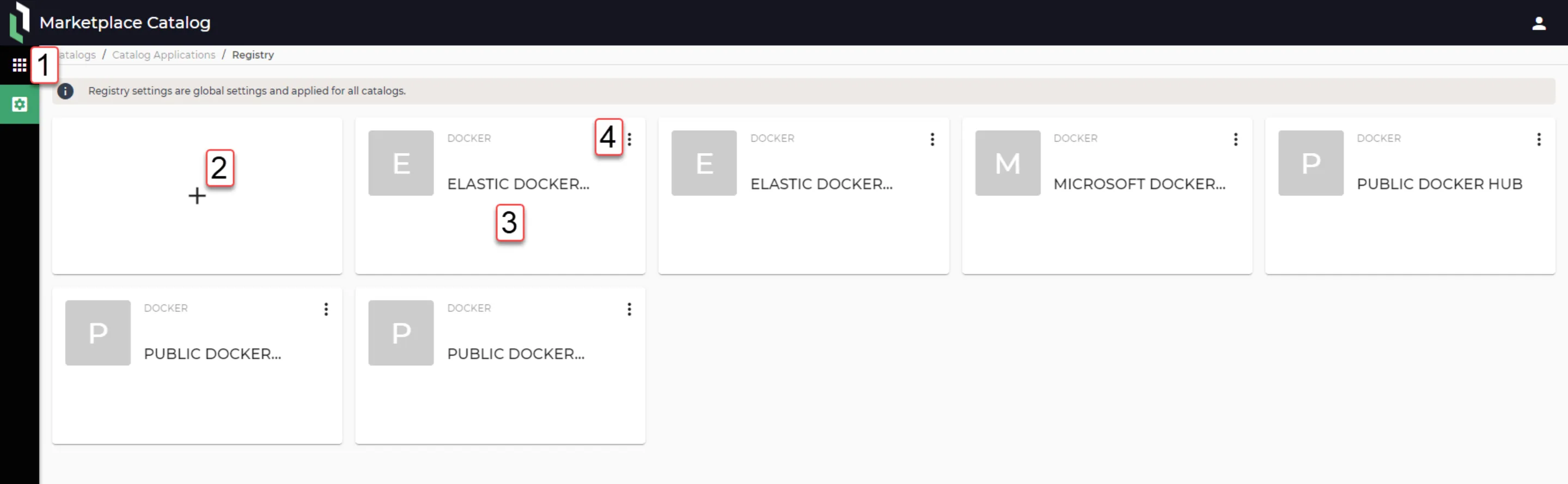
Action | Details |
|---|---|
[1] Return to Applications | |
[2] Add new repository | Refer to the following parameters to configure for each registry. AWS ECR
Azure Container Registry
Docker Registry
Google Container Registry
|
[3] Remove release | Delete the occurrence of release. |
[4] Delete repository | Remove the repository permanently. |
Use a registry in a release component
When you add a component to an application release, the Repository list shows two kinds of registries:
- The private registries of the current catalog.
- The shared registries, each labeled Shared.