Events
Litmus Edge Manager records platform activity as Events entries. Events has two views: Company Events, a single list rolling up activity across a company, and Project Events, scoped to one project and split into System Events and Edge Devices' Events tabs. Each entry lists a time, category, sub-category, severity level, user, and a description of the event.
What you see in Events depends on your access. Users without administrator access see only user-level entries for their company. Administrators also see administrator-level entries for the company. Entries that are not tied to a company do not appear in Events. Administrators can review them in the Audit Log. For details, see Audit logAudit log.
Company events
Company Events shows a single list of activity across the selected company, including activity that is not tied to any one project. Company Events includes the following categories:
- AI/ML: AI/ML model actions, including models on edge devices.
- Alerts: alert rules, alert triggers, notifications, acknowledgements, and resolutions.
- Applications: Marketplace applications, Grafana, edge device system services, and templates.
- Asset Management: industrial asset hierarchy and Digital Twins changes.
- Certificates: edge device certificates, CA certificate updates, and SSL certificates.
- Data Pipeline: edge device analytics and log and event forwarding, integrations, Git synchronization, and Docker registries.
- Device Lifecycle: edge device activation, deactivation, connectivity, high availability, and batch management.
- Licenses: license server configuration and edge device license pools and provisioning.
- Security: user logins, logouts, failed login attempts, and unauthorized access attempts.
- Software Updates: Litmus Edge firmware upgrades and Litmus Edge Manager upgrades.
- System: system configuration and maintenance, such as backups and support bundles.
- User Management: companies, projects, teams, users, roles, and API tokens.
Access company events
To access Company Events:
- Log in to Litmus Edge Manager.
- From the navigation panel, select Company List.
- Select a company.
- From the navigation panel, select Events.
The Events pane appears, showing activity for the selected company.
Project events
Project Events shows activity for a single, selected project. It has two tabs: System Events, for platform-level activity, and Edge Devices' Events, for activity on individual edge devices.
Access Project Events
To access Project Events:
- Log in to Litmus Edge Manager.
- From the navigation panel, select Project List.
- Select a project.
- From the navigation panel, select Events.
The Events pane appears, showing entries for the selected project. By default, the System Events tab is selected.
System events
The System Events tab lists platform-level activity for the selected project. Each entry has a category and a sub-category. System Events includes the following categories:
- Device Lifecycle: edge device deactivation, edge device connectivity, template updates, and template apply actions
- Data Pipeline: device log forwarding
- Applications: deployment actions
- AI/ML: AI/ML model actions
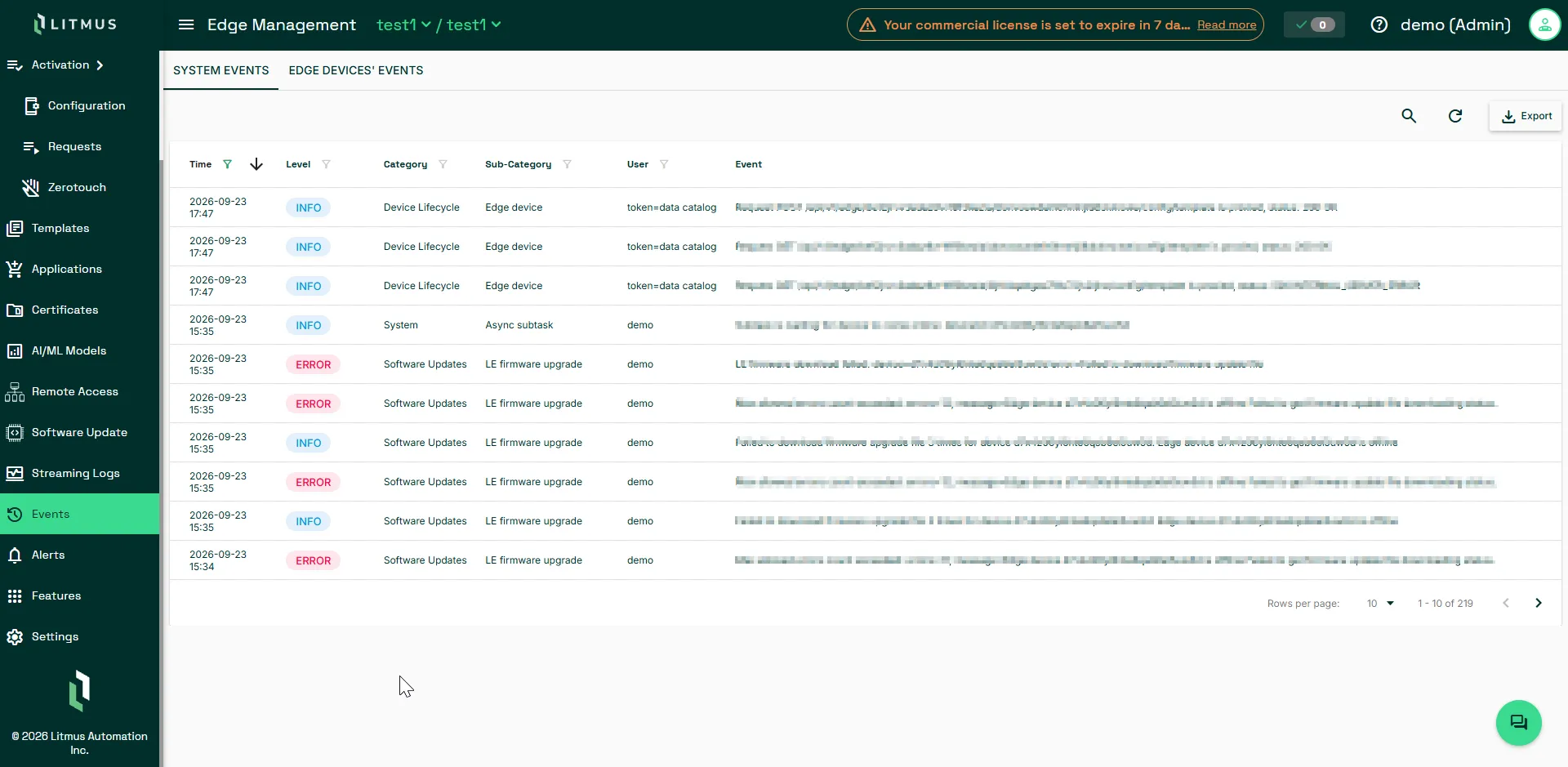
Filter System Events entries
Use the following filters to narrow the entries list.
Filter | Details |
|---|---|
Time | To narrow the entries to a date range, enter a Date from and a Date to, and then click Apply. To clear the range, click Reset. |
Level | Filter by level, for example INFO or ERROR. |
Category | Filter by category, for example Device Lifecycle. |
Sub-Category | Filter by sub-category, for example Template updated. |
User | Filter by the user shown on the entry. |
Search | Search the displayed entries. |
System Events entry details
Each System Events entry includes the following columns, in this order:
Field | Description |
|---|---|
Time | The date and time shown for the entry. |
Level | The severity shown for the entry, for example INFO or ERROR. |
Category | The category associated with the entry, for example Device Lifecycle. |
Sub-Category | The specific type of event within the category, for example Template updated. |
User | The user shown for the entry, when available. |
Event | The description shown for the entry. |
Edge devices' events
The Edge Devices' Events tab lists activity on individual edge devices in the selected project. Unlike System Events entries, these entries do not have a category and a sub-category. Each entry shows a single component instead.
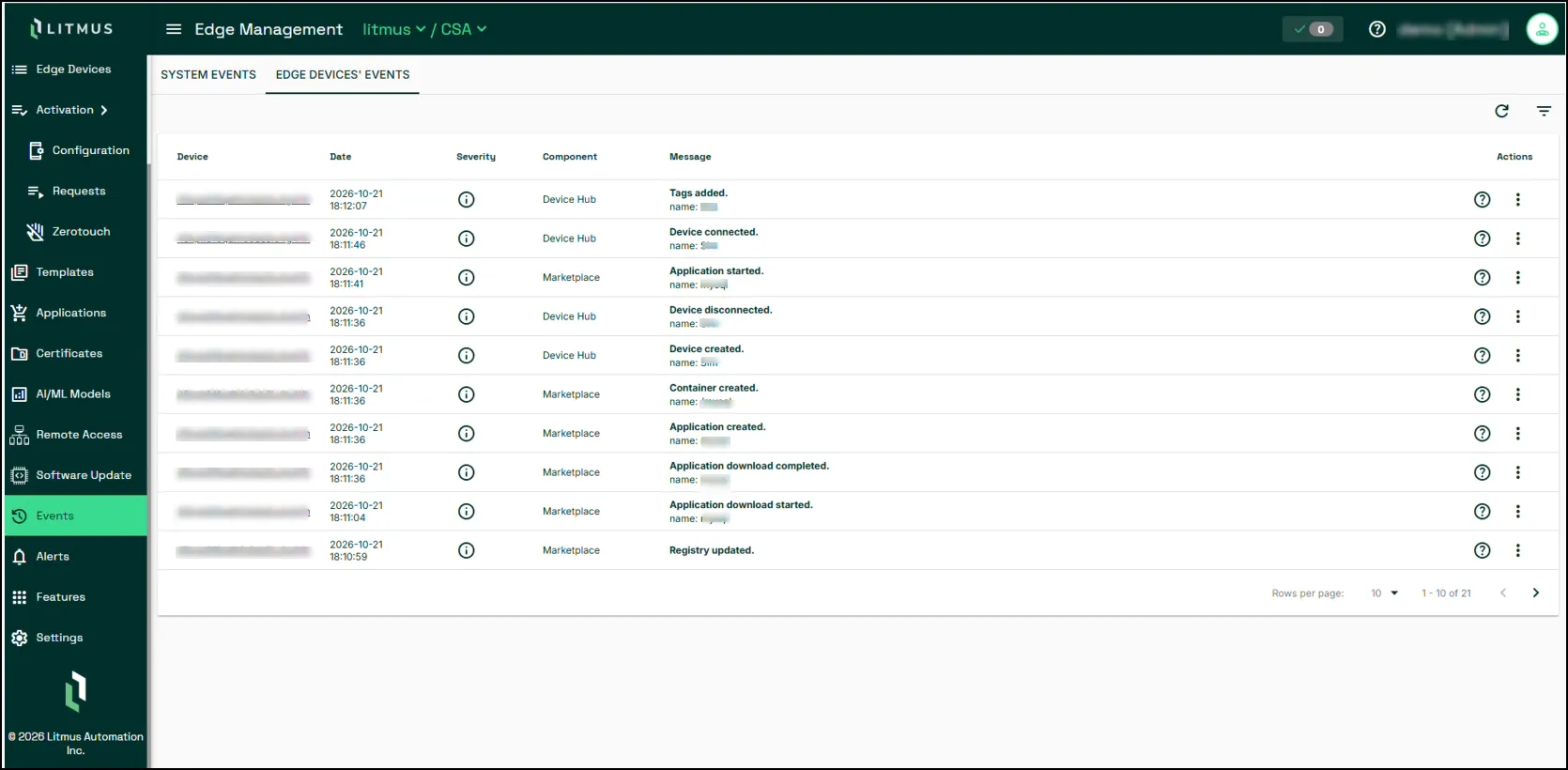
Filter Edge Devices' Events entries
Use the following filters to narrow the list of entries:
Filter | Details |
|---|---|
Edge Device | Filter by the edge device shown on the entry. |
Date | Filter by the date shown on the entry. |
Severity | Filter by severity: Info, Warning, Alert, or Error. |
Component | Filter by component, for example Analytics. |
Edge Devices' Events entry details
Each Edge Devices' Events entry includes the following columns, in this order:
Field | Description |
|---|---|
Edge Device | The edge device that the entry is for, shown as a link. |
Date | The date and time shown for the entry. |
Severity | The severity of the entry, shown as an icon. Click the icon to view the value: Info, Warning, Alert, or Error. |
Component | The component associated with the entry, for example Analytics. |
Message | The description of the entry. Click the ? icon next to the message to view additional details that are not shown in the table, for example userName and uuid. |
Actions | A menu that offers Filter by Edge Device and Filter by Component as shortcuts to the Edge Device and Component filters. |
Export event entries
Use Export to save event entries as a CSV or PDF file. Export is available on Company Events and on the System Events tab.