Broker Info
The Broker Info page reports the operational state of the MQTT broker in Litmus Unify. It shows which protocol limits and optional features are in effect, how many clients are connected, and how many messages the broker has handled.
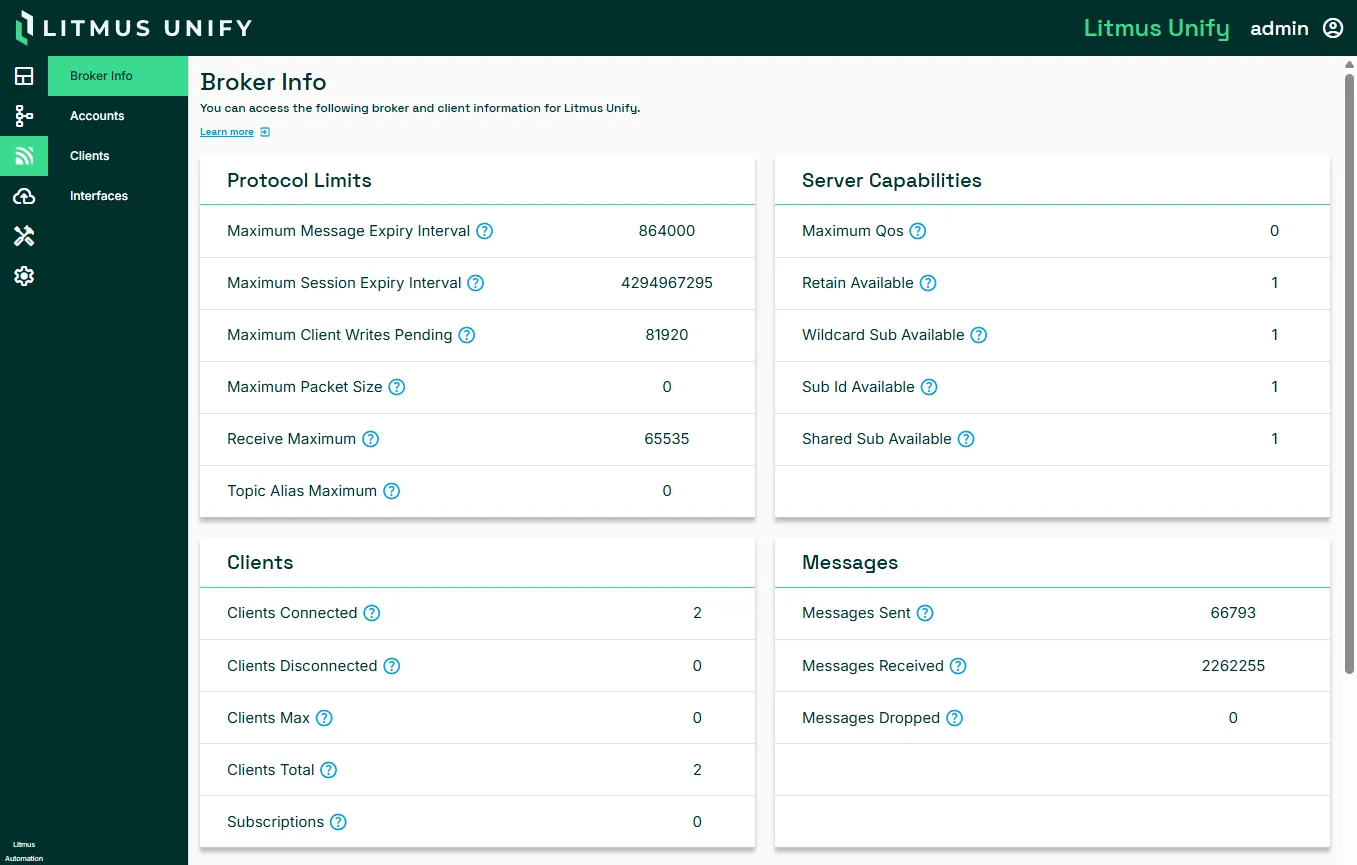
To access the Broker Info page:
Navigate to MQTT > Broker Info.
Metrics reference
The page includes two kinds of value. Protocol limits and Server capabilities are broker configurations. They tell you what the broker accepts. Clients and Messages are counters that change as traffic flows.
Protocol limits
Metric | Description |
|---|---|
Maximum Message Expiry Interval | Longest time (in seconds) that the broker holds an undelivered message before discarding it |
Maximum Session Expiry Interval | Longest time (in seconds) that the broker keeps a disconnected client's session state, including its subscriptions and queued messages |
Maximum Client Writes Pending | Number of outbound writes the broker queues for a single client before it refuses further writes to that client |
Maximum Packet Size | Largest MQTT packet (in bytes) that the broker accepts. The broker rejects larger packets |
Receive Maximum | Number of QoS messages a client can have in flight before it waits for acknowledgment |
Topic Alias Maximum | Highest topic alias value a client can use. A topic alias replaces a full topic string with a short integer to reduce packet size |
Server capabilities
Metric | Description |
|---|---|
Maximum QoS | Highest quality of service level the broker accepts: 0, 1, or 2 |
Retain Available | Whether the broker stores retained messages and delivers them to new subscribers. 1 is true and 0 is false. |
Wildcard Sub Available | Whether clients can subscribe using the + and # wildcards. 1 is true and 0 is false. |
Sub Id Available | Whether clients can attach a subscription identifier to a subscription and receive it back on matching messages. 1 is true and 0 is false. |
Shared Sub Available | Whether clients can share a subscription so that the broker distributes messages across a group instead of sending to every member. 1 is true and 0 is false. |
Clients
Metric | Description |
|---|---|
Clients Connected | Clients with an active connection to the broker |
Clients Disconnected | Clients with a persistent session that are not currently connected |
Clients Max | Maximum number of clients that can connect to the broker |
Clients Total | Cumulative total number of clients |
Subscriptions | Active subscriptions across all clients |
Messages
Metric | Description |
|---|---|
Messages Sent | Messages the broker has delivered to clients |
Messages Received | Messages the broker has accepted from clients |
Messages Dropped | Messages the broker discarded without delivering |
Related topics
- MQTT