MQTT Client
The MQTT Client is a built-in client for the message broker in Litmus Unify. You subscribe to topics, watch messages arrive, and publish test messages without installing a separate MQTT tool.
Use MQTT Client to confirm that a broker is receiving messages. When a device is not reporting, subscribing here tells you whether the data reaches the broker at all, which separates a device problem from a downstream one. When you set up a topic, publishing a test message confirms the path first.
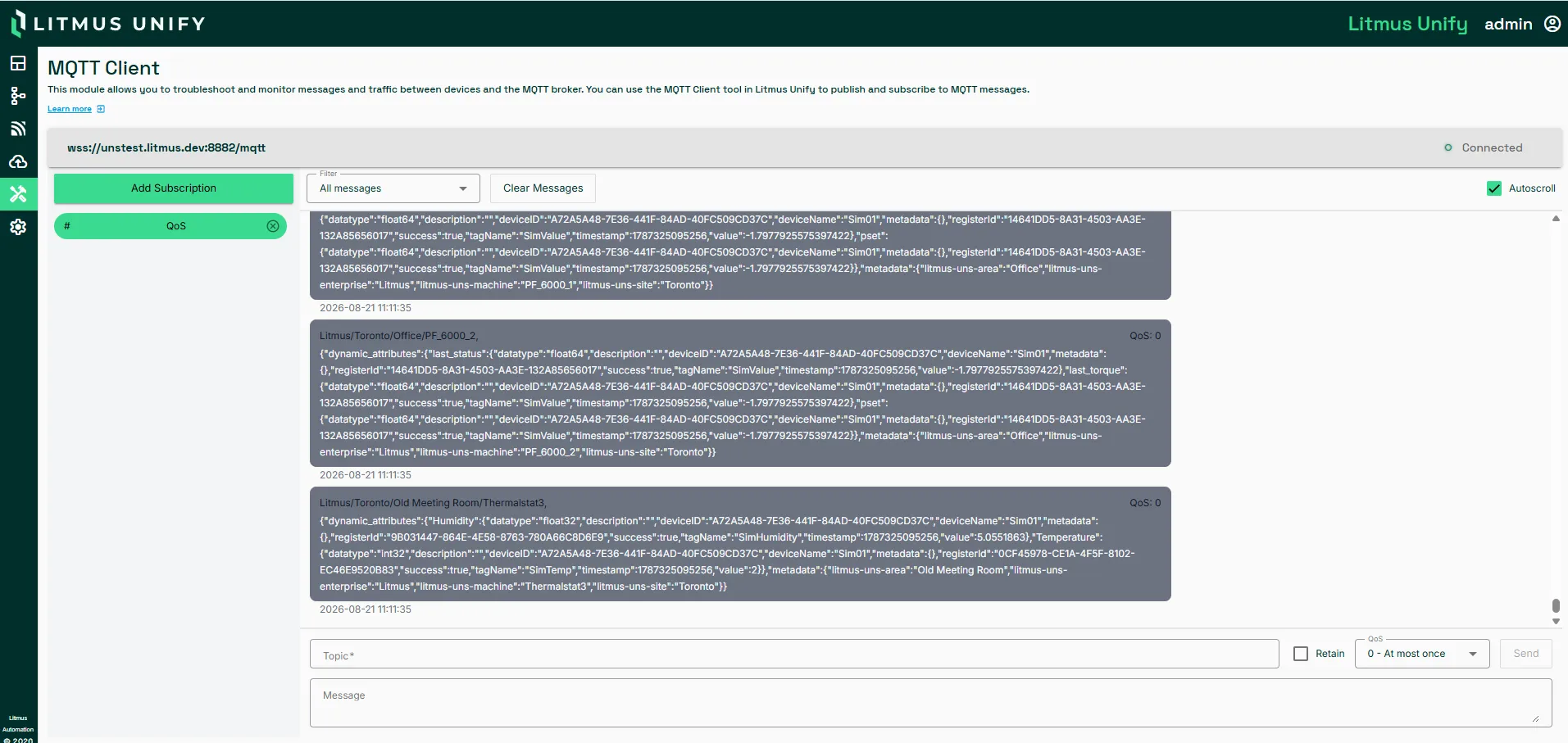
Access MQTT Client UI
To access the MQTT Client pane:
Navigate to MQTT Client.
Interface
Element | Description |
|---|---|
Connection Status | Whether the client is connected to the broker. Nothing arrives in the feed and nothing can be published while it reads Disconnected |
Add Subscription | Subscribes to a topic. Wildcards are supported, so + matches one topic level and # matches all remaining levels |
Filter | Narrows what the feed displays by topic or content. It filters the view only and does not change what you are subscribed to |
Auto-scroll | Keeps the newest message in view. Turn it off to read one message on a busy topic |
Message Feed | Messages arriving on your subscribed topics in ascending order |
Publish Message Panel | Sends a message to a topic. See field description in Publish message fields. |
Publish message fields
Field | Description |
|---|---|
Topic | Topic to publish to |
Message | Payload to send |
Retain | Tells the broker to keep this message and publish it to new subscribing clients |
QoS | Delivery guarantee: 0 at most once, 1 at least once, 2 exactly once |
Send | Publishes the message |
Troubleshooting
Symptom | What to check |
|---|---|
No messages arrive | Confirm that the subscription topic path matches the publisher's topic and check if wildcard usage is appropriate. |
A message will not publish | Validate that the topic and message payload format are correct. |
Considerations
- The feed starts empty and fills as messages arrive. It is not a history, so subscribing after an event does not show past messages.
- Retain has a lasting effect that the other fields do not. A retained test message stays on the topic and is delivered to every later subscriber until something overwrites it.