Namespace
The Namespace tab displays a dynamically generated tree of topics that reflects the data organization rules that you defined. Each node in the tree carries a status: New, Accepted, Neglected, or Rejected. You review the tree, accept the nodes that belong in your unified namespace, and reject the ones that do not.
How node statuses propagate
Status changes move through the hierarchy in opposite directions:
- Accepting a node also accepts all parent nodes in the hierarchy.
- Rejecting a node also rejects all child nodes
Review the affected branch before you accept or reject a node because a single action can change the status of many nodes.
Before you begin
Before you begin, make sure you have the following:
- A running instance of Unify and access to its web interface
- UNS Structure defined so that the tree can generate with proper class labels
- At least one MQTT account, if you plan to add or modify MQTT permissions
Access the Namespace tab
Select Explore UNS from the left navigation, then select the Namespace tab.
In this tab, you can filter and navigate the tree, accept or reject nodes, and view details for the selected node.
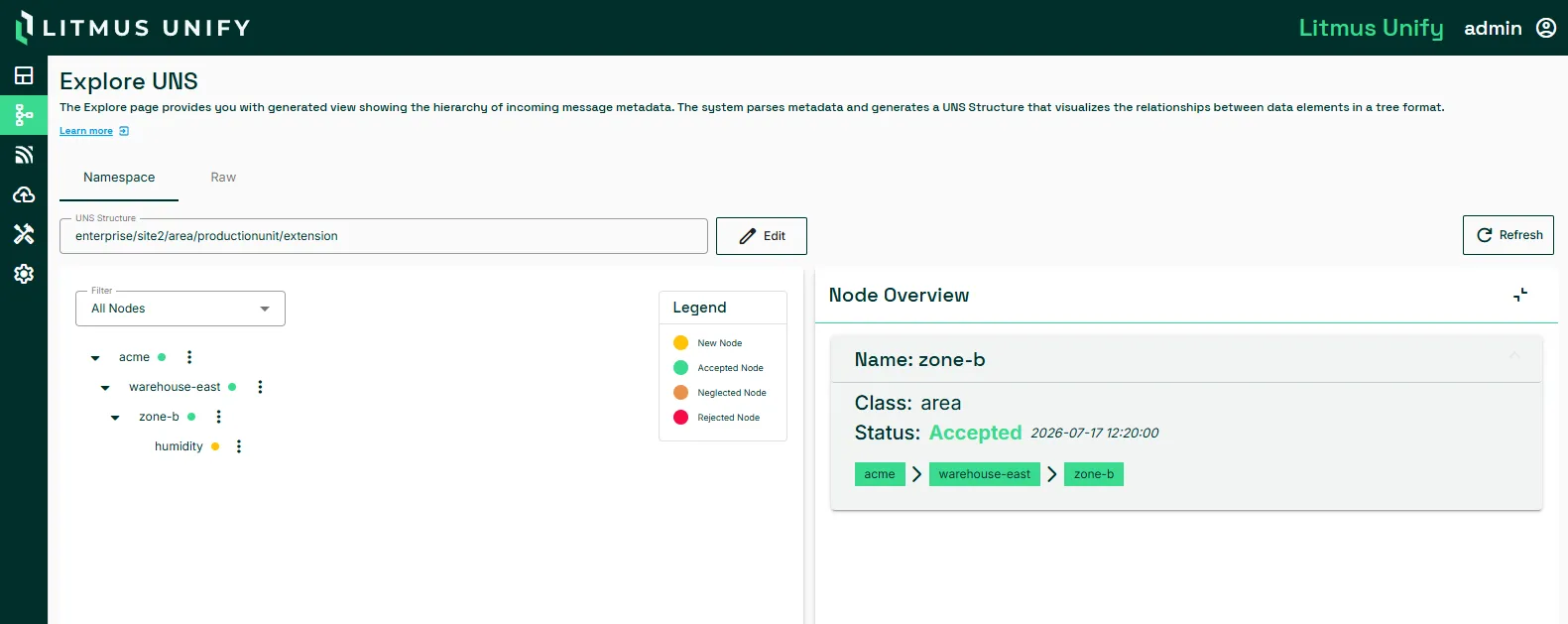
Section | Description |
|---|---|
UNS Structure | Filters the tree to topics that contain the search text. Click Edit to modify the structure. |
Filter | Filters the tree by All, New, Accepted, Neglected, or Rejected nodes. |
Hierarchy Tree | Displays topics in a tree that reflects your UNS categorization rules. Expand and collapse nodes to navigate subtopics, and click a node to select it. |
Action | Select a topic in the tree and open the Action menu:
|
Refresh | Refreshes the hierarchy |