Experimental Features
Experimental features give you early access to select Litmus Edge Manager (LEM) functionality. Enable each feature independently under Settings > Experimental Features.
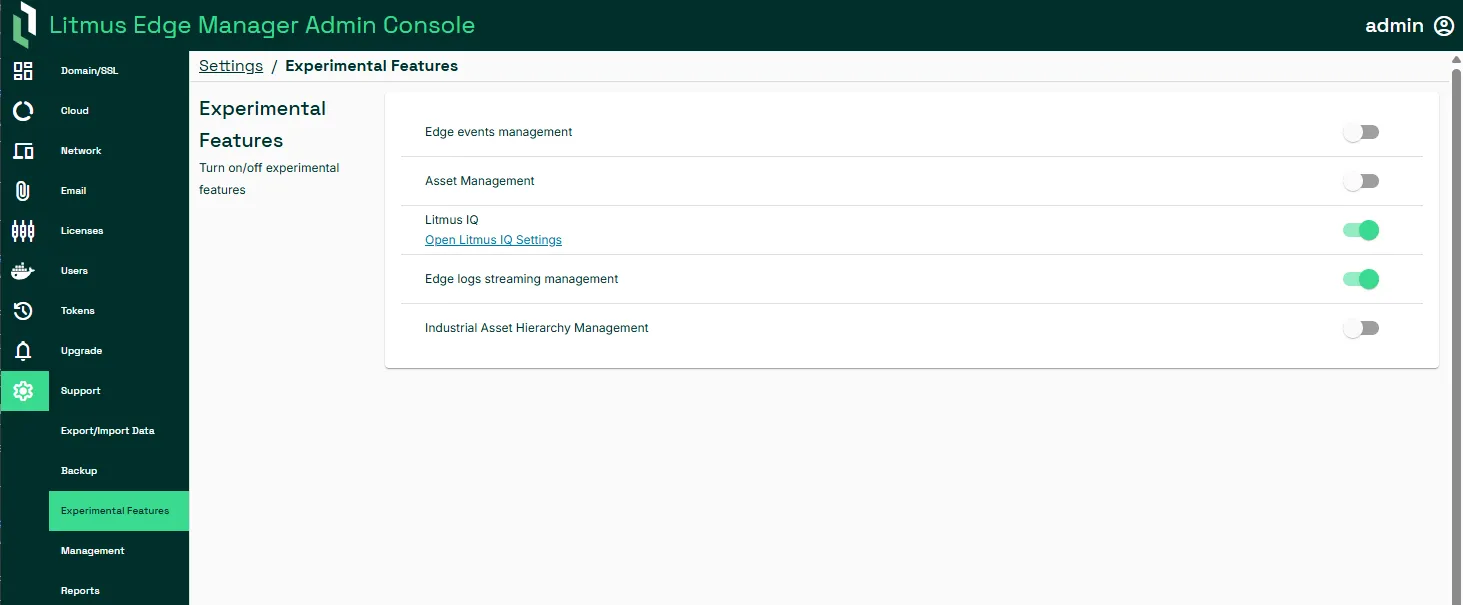
Edge events management
Edge events management allows you to view events for the entire date range for a device over its lifecycle. See Events for more information.
Note: You must enable Forward Events to receive Litmus Edge device alert events.
Asset management
Asset management enables Digital Twins in LEM. A Digital Twin is a virtual representation of an asset or system that uses real-time data to model how a product or process performs. You can add or remove a Digital Twin model, add or remove tags for a model, and arrange the tags in a hierarchy. See Digital Twins for more information.
Litmus IQ
Litmus IQ is an AI chat agent that accepts questions in natural language based on daily digest report data. For example, you can ask "How many edge devices are online?" or "What's the current disk usage and available space?". Before enabling, configure your AI backend under Integration > Litmus IQ. See Litmus IQ for more information.
Edge logs streaming management
Edge logs streaming management enables centralized log forwarding from Litmus Edge devices to Litmus Edge Manager (see Streaming logs). Logs are stored in VictoriaLogs.
You can control log forwarding by device from the device details page or across multiple devices using bulk actions. See Log Forwarding and Multi-select mode for more information.
Note: Requires Litmus Edge Manger 2.34.0 and Litmus Edge 4.1.0 or later.
Industrial Asset Hierarchy Management
Industrial Asset Hierarchy Management lets you model your physical operations using an industry-standard level schema based on ISA-95: Enterprise, Region, Site, Plant, Area, Work Center, and Work Unit. You can define a hierarchy template, build an instance tree of nodes that conforms to the active template, and bind leaf nodes (Work Units) to existing Digital Twin models and instances. Once enabled, manage your hierarchy under Company List > Asset Hierarchy. See Asset Hierarchy for more information.
Note: Available for Litmus Edge Manager 2.34.0 and later.