Git Provider
Litmus Edge Manager (LEM) supports native integration with Git providers such as GitHub, GitLab and Azure DevOps. This integration enables organizations to manage Edge templates using standard Git workflows, ensuring version control, auditability, and centralized governance.
The Git Provider integration allows LEM to:
- Store and version template files in a Git repository
- Automatically synchronize template updates of Edge devices to Git
- Track template changes across companies and projects
- Maintain a consistent configuration baseline across distributed deployments
This diagram shows how template synchronization occurs from edge devices to LEM and to your Git provider.
The current implementation operates in one-directional manner and is intended primarily for audit and tracking purposes.

Prerequisites
The configuration requires:
- Administrative access to Litmus Edge Manager Admin Console
- A valid SSH GIT URL (for example, [email protected]:org/repo.git)
- An ED25519/RSA-SHA2-512 public key generated by LEM
- A deploy key with write access added to the Git repository
Synchronization Model
LEM supports the following synchronization mechanisms:
- Synchronization on a schedule:
- Hourly
- Daily at 00:00 UTC
- Weekly on Monday at 00:00 UTC
- Monthly on the 1st at 00:00 UTC
- Synchronization triggered during edge device backup
- Synchronization that you triggered manually
Error Handling and Validation
LEM performs validation and provides actionable error messages for:
- Valid SSH keys
- Whether the repository is accessible
- Write permissions
- Template schema compliance
- Detecting sync conflicts
Security Considerations
- Authentication uses ED25519/RSA-SHA2-512 SSH keys
- Deploy keys are scoped to a single repository
- Write access is required in the Git Provider for LEM to commit changes
- No credentials beyond the SSH keypair are stored
Best Practices
- Use a dedicated private repository for Edge templates
- Restrict deploy key permissions to the minimum required scope
- Apply branch protection rules for production environments
- Use scheduled sync for predictable updates
- Use manual sync for validation and testing
Configuration workflow
The following workflow shows how you set up Git Provider.
Note: Also see the How to Setup Git Provider Integration.
Setup a GitHub repository
- In GitHub, create a new private repository.
- Record the repository name.
Configure Git Provider in LEM
- In LEM, navigate to Integration > Git Provider.
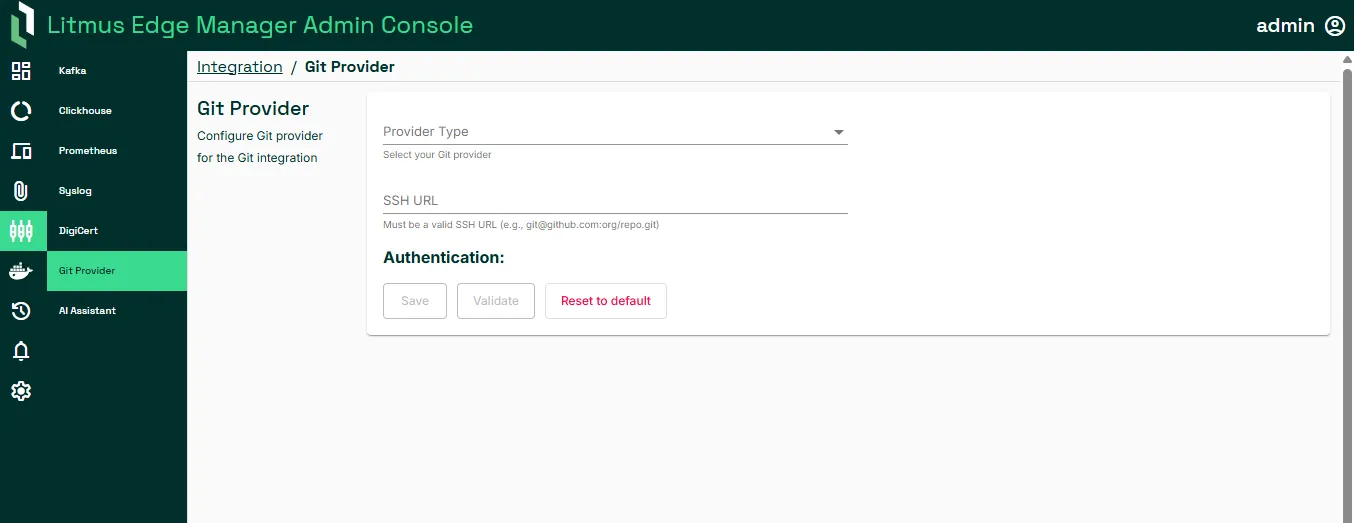
- Select the Git provider (GitHub, GitLab, or Azure DevOps).
- Enter the SSH URL from the private repository that you created with the following syntax: [email protected]:github-name/github-repo.git
- Copy the generated SSH Public Key.
- Add the public key to the repository. For example, in GitHub add the public key to the Git repository as a deploy key with write access.
- In LEM, validate access to the repository. Confirm that the Repository access successful message displays.
- Save the configuration.
Configure Project Tracking
You set tracking at the project level.
- Navigate to Edge Devices > Edge Git Integration.
- Set the synchronization frequency: hourly, daily, weekly, or monthly. Syncs occur at 00:00 (UTC) daily, weekly on Mondays, and monthly on the first day of the month.
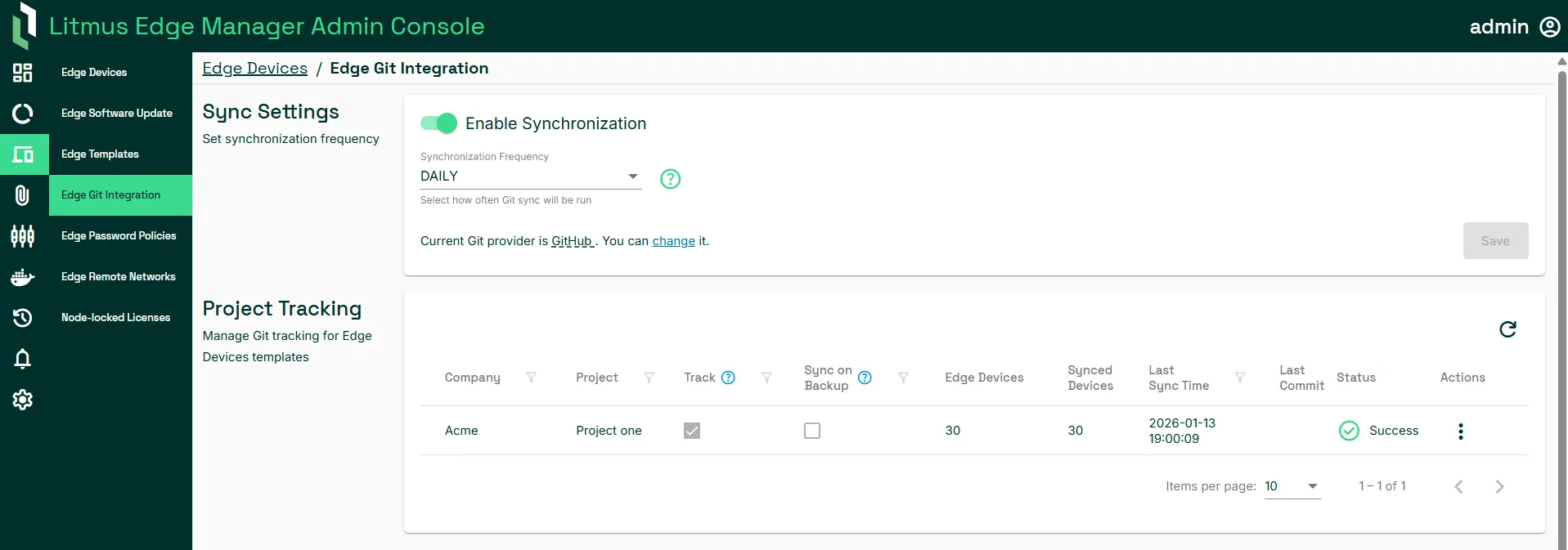
- For each company and project, choose when syncs occur. To set syncs:
- Based on the synchronization frequency that you set, select Track.
- When the device is backed up, select Sync on Backup.
- To run the synchronization manually, select Run Manual Sync from the Actions menu.
Configure integration for edge devices at the company and project level in Project Tracking. View the number edge devices and synced devices, last sync and commit ID, and integration status. The following columns display in Project Tracking:
Field | Description |
|---|---|
Company | Company to which the devices belongs |
Project | Project to which the devices belong |
Track | Enable to push changes to Git based on the selected synchronization frequency |
Sync on Backup | Enable to push changes to Git when the device is backed up |
Edge Devices | Number of devices in the project |
Synced Devices | Number of devices that have been synchronized |
Last Sync Time | The last time that a synchronization was performed from all edge devices in the current project to LEM |
Last Commit | Git commit hash which is a unique identifier representing a specific commit in a Git repository |
Status | Status of the integration: NEW, WAITING, RUNNING, CANCELING, SUCCESS, ERROR, or CANCEL |
Action | Options to enable or disable tracking on the predefined schedule, on device backup, or to run a manual synch |