Asset hierarchy
In many industrial operations, asset structure information is spread across ERP systems, MES systems, historians, spreadsheets, and individual edge devices. There is often no single source of truth. Asset identifiers may differ between systems and local definitions on edge devices can drift from enterprise standards. Asset Hierarchy gives you one place in Litmus Edge Manager (LEM) to define and govern your enterprise asset structure and to deploy Digital Twin models and instances to your Litmus Edge (LE) devices from that structure.
An asset hierarchy organizes your physical operations into a structured tree. A hierarchy template defines the levels of that tree. LEM ships with an ISA-95 standard template, which provides the following levels:
Enterprise > Region > Site > Plant > Area > Work Center > Work Unit
You do not have to follow ISA-95 and you can create a custom template with your own level chain. Only the root level is required, so you can shape the tree to match how your operations are organized.
The hierarchy organizes your assets, such as a boiler, a press, or a filling line. It does not manage your edge devices directly. Litmus Edge devices are activated and managed separately on the Edge Devices page, and an LE device enters the hierarchy only as the host of a bound Digital Twin instance. DeviceHub devices are the exception. You can add a DeviceHub device to the hierarchy directly, without a Digital Twin instance in between.
Why use Asset Hierarchy
Asset Hierarchy helps platform and operations teams who manage assets across many companies and projects, and anyone who integrates edge data with enterprise systems such as an ERP, MES, historian, or cloud data platform. Asset Hierarchy provides you with:
- A single source of truth. Keep your asset structure in one place instead of scattered across systems and devices.
- A common structure for your sites. Define your structure once and deploy it to your edge devices so local definitions stay aligned with enterprise standards.
- Context that travels with your data. A Digital Twin instance's position in the hierarchy is pushed to the device that hosts it to enable payloads to carry the asset's location and metadata.
- A hierarchy that you can customize. Bind a Digital Twin at any level and keep only the levels you need.
- Controlled access at scale. Grant edit access to one branch of the hierarchy at a time, so local teams can manage their own area without broader access to the rest of the tree. See Roles and permissionsRoles and permissions below.
Key concepts
The following diagram shows how these concepts relate to each other. The template governs the levels, nodes form the tree, and the Digital Twin entities in the panel apply only if your deployment uses them.
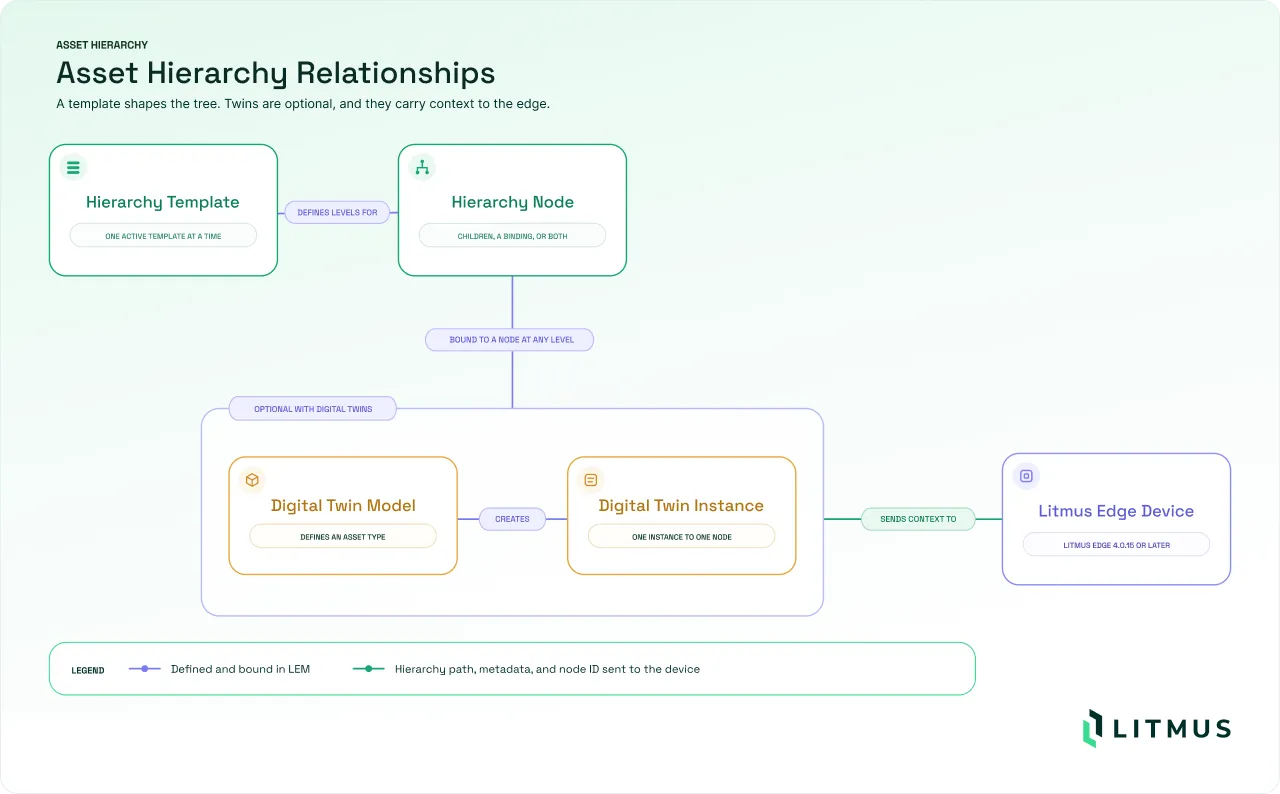
- Hierarchy template: Defines the levels available for your enterprise and their order. One template is active at a time. Templates are managed on the Hierarchy Templates page, under Administration in the left navigation. Also see Define an asset hierarchy and publish asset context.
- Hierarchy level: A named tier in the template, such as Site or Area. Only the root level is mandatory. You can remove any other level in a custom template, including Work Unit, which the ISA-95 template uses for an individual physical asset.
- Hierarchy node: A single item in the tree, such as a specific region, plant, or work center.
- Asset and edge device: An asset is the equipment you want to model, such as a boiler. A Litmus Edge device is the Litmus Edge instance that collects data from it. It joins the hierarchy only by hosting a bound Digital Twin instance. A DeviceHub device can join the hierarchy directly.
- DeviceHub (DH) device: A device managed through DeviceHub that you can place directly in the asset hierarchy, the same way you place a Digital Twin instance. Unlike a Digital Twin instance, a DeviceHub device doesn't need a model.
- Node structure and bindings: A node can hold child nodes, carry a Digital Twin or asset binding, or do both at the same time. Structure and binding are independent, so you can bind first and add children later or the reverse. The active template caps the depth: a node on the last template level cannot have children.
- Digital Twin binding: The link between a node and a Digital Twin model or instance. Bindings are optional. A tree of nodes with no bindings is a valid hierarchy. You can create a binding at any level, including on a node that already has children.
- Work Unit: A level that represents an individual physical asset, typically the lowest level of the hierarchy. Work Unit is optional.
- Digital Twin model: A reusable definition of an asset. Models display in the Model Library and are managed on the Models page.
- Digital Twin instance: An asset created from a model and bound to a node with Add DT Instance. You can bind an instance at any level, and one model can create many instances. Instances are managed on the Instances page.
- Asset ID: An external identifier on an instance that maps it to a record in another system, such as an ERP or a cloud data platform.
- Hierarchy path and metadata: Values that record where an asset sits in the hierarchy. LEM sends these values to the edge device where the instance runs. The instance can then include its location in data that it publishes through the {$EDGE_DT_HIERARCHY_PATH} and {$EDGE_DT_HIERARCHY_METADATA} attributes.
How Asset Hierarchy works
The hierarchy template sets the levels. The node tree follows that template. Digital Twin binding is optional. When you bind an instance to a node, LEM deploys that instance to the device that hosts it, along with its location in the tree.
The first two steps give you a governed asset structure on their own. The rest apply only to nodes with a bound Digital Twin. The following diagram shows the sequence.
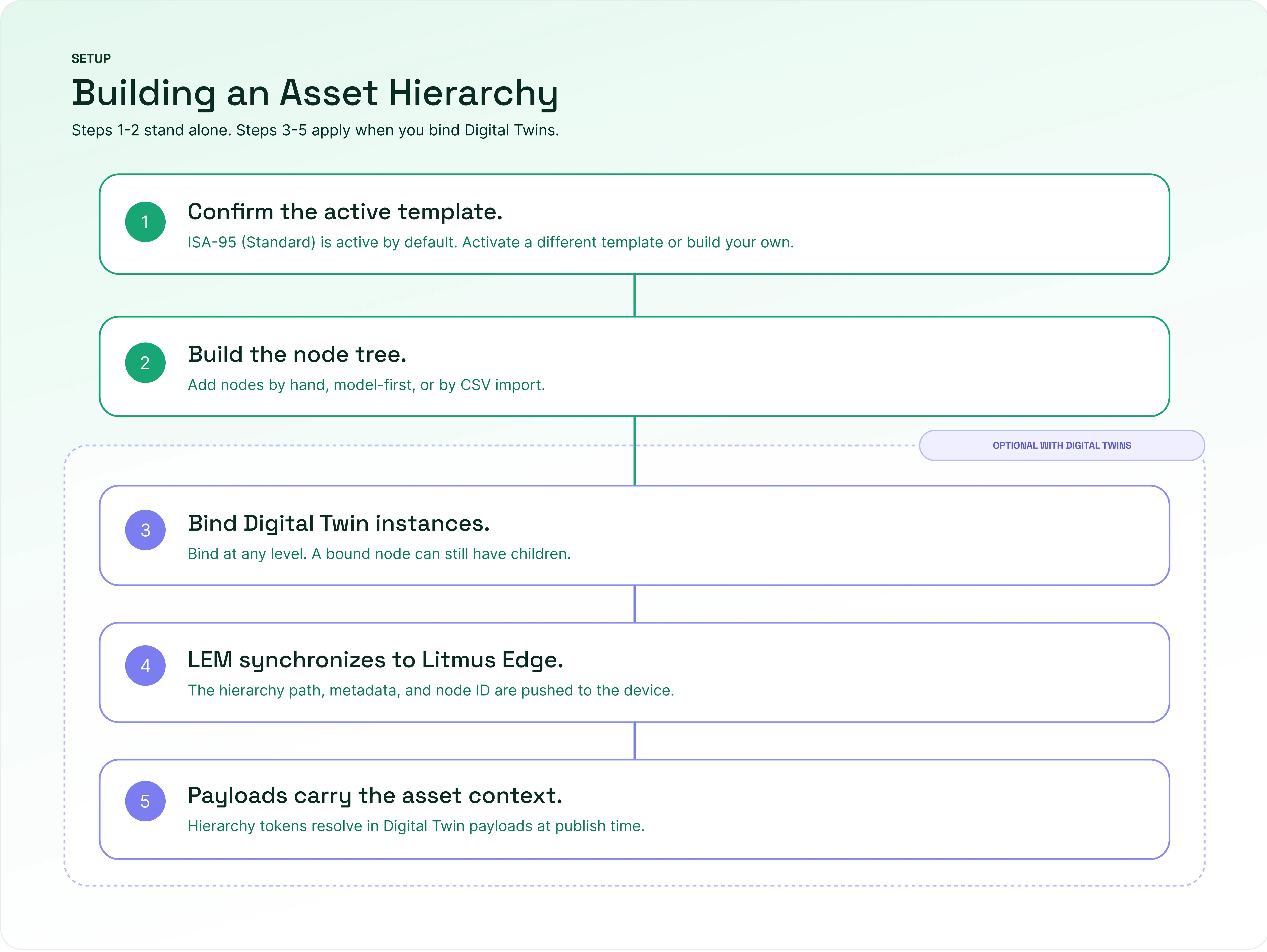
Once a hierarchy is in place, LEM keeps it in step with your devices:
- Litmus Edge resolves the {$EDGE_DT_HIERARCHY_PATH} and {$EDGE_DT_HIERARCHY_METADATA} tokens in Digital Twin payloads at publish time. This requires Litmus Edge 4.3.0 or later. Devices on earlier versions are skipped without an error.
- If you move an instance node to a different parent, LEM recomputes the values and pushes them to the device. You do not edit the instance.
- If you detach an instance or delete its node, LEM clears the values on the device. LEM is the source of truth for the structure. Litmus Edge resolves the tokens from the values that LEM sends.
Hierarchy path and metadata
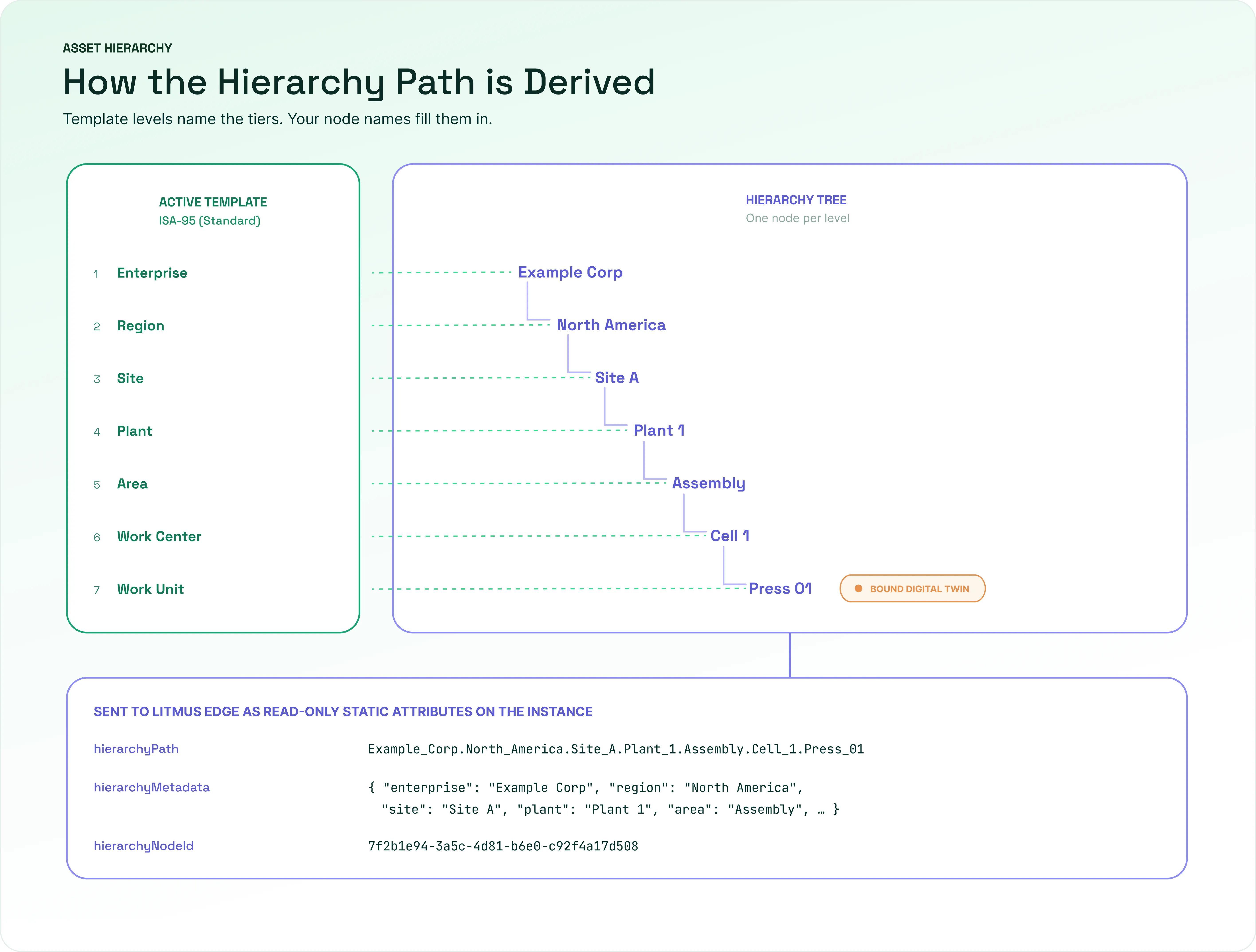
When you bind an instance to a node, LEM sends the instance's location in the tree to the device that hosts it. The instance receives read-only attributes: {EDGE_DT_HIERARCHY_PATH} and {EDGE_DT_HIERARCHY_METADATA}.
The path is a single compact value you can use in a topic or a token. The metadata holds the same location as an ordered array, one single-key object per hierarchy level, from the top of the hierarchy down, so you can read a single level on its own.
"Asset_Hierarchy_Metadata": [
  {"Enterprise": "Enterprise A"},
  {"Region": "EMEA"},
  {"Site": "LE"},
  {"Plant": "Urethanes"},
  {"Area": "R2310"},
  {"Work Center": "Loading"},
  {"Work Unit": "Reactor2310"}
]
Hierarchy node names allow only letters, numbers, underscores, and hyphens. Spaces and other characters aren't allowed, which keeps node names safe for use directly in system variables, JSON keys, and file paths.
A Digital Twin instance's name is available as a system variable for static attributes, alongside the existing instance ID system variable, so you can reference a human-readable name instead of only an identifier.
Ways to build a hierarchy
You can build your hierarchy in the following ways:
- Hierarchy-first: Define the enterprise structure first, then create instances and place them in it. This approach suits new deployments.
- Model-first: Create Digital Twin models and instances first, then assign them to hierarchy locations. This approach suits teams whose models already exist.
- CSV import: Import hierarchy data and instances from a CSV file that uses the name, levelName, and parentName columns. You can attach a Digital Twin to any row that has no children.
Alternatively, you can also use Import and Export on the Asset Hierarchy page to build a hierarchy.
Roles and permissions
LEM's asset hierarchy access model has three roles:
- Viewer: Can view the asset hierarchy, but can not make changes.
- Asset Hierarchy Operator: Can manage nodes at the Area, Work Center, and Work Unit levels only.
- Admin: Can manage the entire asset hierarchy, at every level, and is the only role that can grant or revoke Asset Hierarchy Operator access.
Asset Hierarchy Operator role is scoped to one branch, the node it's placed on, and everything under it. This means two users can both hold the Asset Hierarchy Operator role while having permissions for different branches. For example, one user has access to a Europe branch and another to a Japan branch, and they cannot edit the other's branch.
You can create, rename, and delete nodes, bind and unbind Digital Twin instances, and move nodes that have no children. Only an Admin can import a structure from a CSV file or change hierarchy templates. Operators can't grant their own branches to other users.
Access is set on a single node and applies to every node below it. If an Admin revokes it at that node, it's also removed from the entire branch.
Asset Hub has its own Viewer and Administrator roles.
Limitations and considerations
- You must enable Industrial Asset Hierarchy Management in Settings > Experimental Features before you use it.
- A node is either a container or an asset. A node cannot have both child nodes and a Digital Twin binding.
- The active template caps the tree depth. A node on the last template level cannot have children.
- Only the top (Enterprise) level is mandatory. You can delete any other level in a custom template.
- Hierarchy path and metadata sync requires Litmus Edge 4.0.15 or later. Devices on earlier versions are skipped without an error.
- One instance maps to one node.
- Hierarchy node names allow only letters, numbers, underscores, and hyphens.
Access asset hierarchy
To access Asset Hierarchy, in the left navigation under Modeling, click Asset Hierarchy.