Account Details
MQTT Account Details is the configuration view for a single MQTT account. It lists the operations available on the account, the clients currently connected with its credentials, and the topic rules that govern what those clients can publish and subscribe to.
Creating an account lets a client authenticate with the broker. It grants no access on its own. Until you attach a rule, the client can connect but cannot publish or subscribe to any topic.
To open the page, select an account name on the Accounts page.
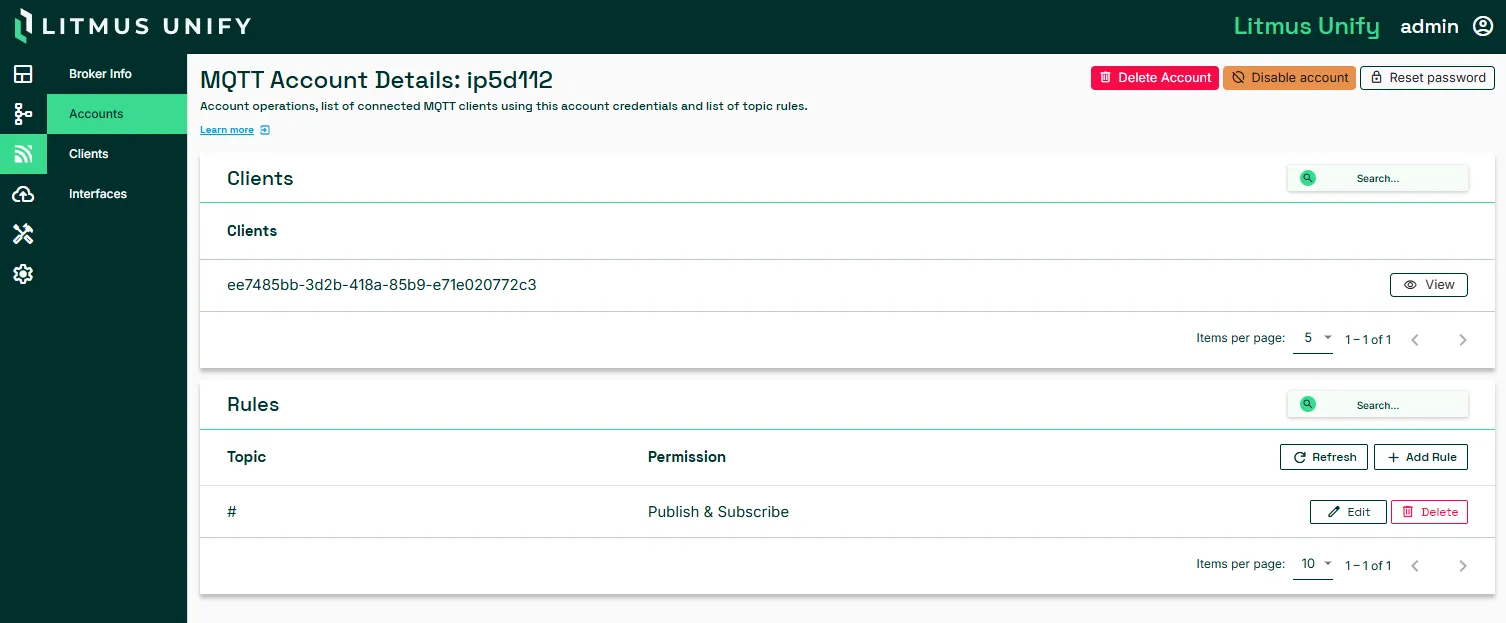
Account operations
Operation | Description |
|---|---|
Reset password | Generates a new password. Copy it before you close the dialog, because it is not shown again. Any client using the old password stops connecting. |
Disable account | Blocks the account from connecting and keeps its rules. Select Enable Account to restore it. |
Delete Account | Removes the account and its rules. Clients using it can no longer connect. |
Disable an account to block access temporarily. The account keeps its rules, and re-enabling it restores the same permissions.
Clients
The Clients section lists the connections currently open with this account's credentials. One account can carry multiple clients at once, so review this section before you disable or delete the account to see which connections are affected.
An account with nothing connected shows Clients not found. This is expected for an account that is configured but not yet in use, or a disabled account.
Caution: Deleting an account also deletes its rules. This action cannot be undone.
For the connection list across all accounts, see Clients.
Rules
A rule pairs a topic with a permission. An account can hold several rules.
Permission | What the account can do on the topic |
|---|---|
Deny | Use it to override a broader rule that would otherwise grant access |
Publish | Send messages to the topic |
Subscribe | Receive messages on the topic |
Publish & Subscribe | Send and receive messages on the topic |
The topic can be a single path or a wildcard. A rule on # grants the account every topic on the broker. Use a wildcard of that scope for testing, and restrict production accounts to specific paths.
A new account shows Rules not found. You can add a new rule. Until a rule exists, the account can only open a connection.
Considerations
- A password is shown once, when the account is created. If it is lost, reset the password rather than recreating the account. A new account starts with no rules, so recreating means rebuilding its permissions.
- A client that connects but exchanges no messages usually has a rules problem rather than a connection problem. Confirm the account has a rule covering the topic, then check Rejected Topics on the client.
- Scope wildcard rules to the narrowest path that meets the requirement. An account granted # has access to every topic on the broker until you narrow the rule.
Related topics
- Accounts
- Clients