Clients
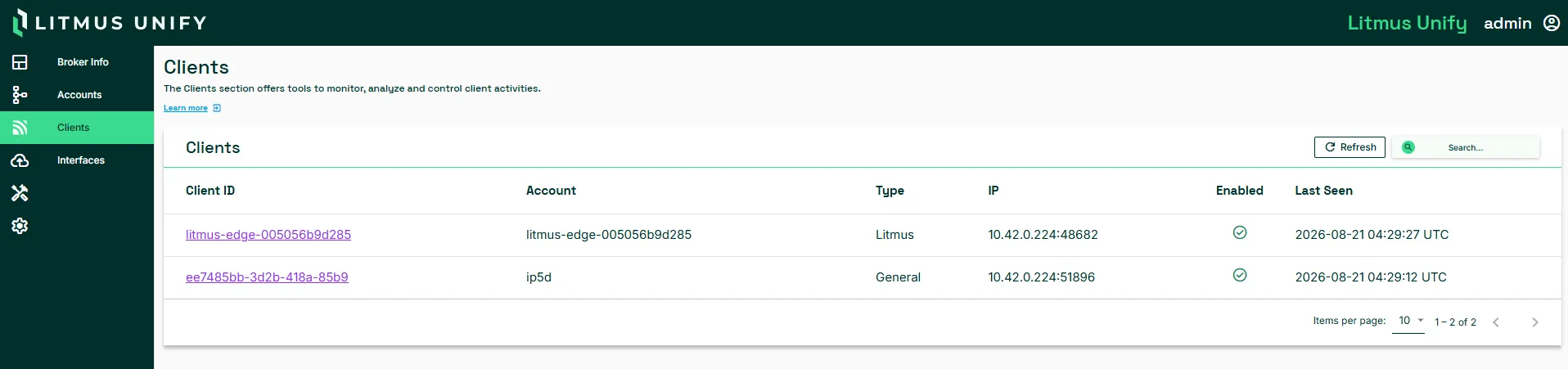
A client is a single live connection to the message broker in Litmus Unify. The Clients page lists those connections and lets you open any one of them to see what it is subscribed to and what it has been refused.
Clients and accounts are not the same thing. An account is the credential. A client is one connection made with that credential. Several clients can connect under one account, which is why the Accounts page carries a # Of Clients column.
Access Clients UI
To access the Clients page:
Navigate to MQTT > Clients.
Clients list
Column | Description |
|---|---|
Client ID | Identifier the client sent when it connected. Select it to open Client Details. |
Account | Account the client authenticated with. The account's rules decide what this client can publish and subscribe to. |
Type | Type of the account behind the connection: General or Litmus. |
IP | Source address and port the client connected from |
Enabled | Whether the account behind the client is enabled |
Last Seen | Time of the client's most recent activity in UTC. |
Select Refresh to update the list. Use the search box to filter by client ID or account.
Client details
Select a Client ID to open Client Details. The page has four tabs.
Tab | Description |
|---|---|
Client Info | Connection facts for this client. See the Client info table below. |
Subscribed Topics | Topic filters the client has subscribed to |
Published Topics | Topics the client has published to |
Rejected Topics | Topics the broker refused. Look here first when a client is connected and no messages are processesed. |
Client info
Field | Description |
|---|---|
Connected | true while the client holds an open connection to the broker |
Last Seen | Time of the client's most recent activity in UTC |
Protocol Level | MQTT version the client connected with, such as 3.1.1 or 5.0. Features such as topic aliases and shared subscriptions need 5.0. |
Remote | Source address and port the client connected from |
Username | Account the client authenticated with |
Considerations
- Client IDs are set by the client not by Unify. A device that reconnects with a new random ID each time produces a new row rather than reusing the old one.
- Compare Subscribed Topics with Rejected Topics when a client receives some data but not all of it. A subscription can succeed while individual topics under it are refused.
Related topics
- MQTT