Ignition Digital Twins Broker - Beta
Overview
The Ignition Digital Twins Broker allows Litmus Edge to act as a data source for an Ignition Gateway via Digital Twins by automatically converting Digital Twins to versioned Ignition UDTs and writes data in real-time to a specified tag provider.\
This module is currently in open beta. This module is subject to breaking changes and functionality is not guaranteed.
Prerequisites
- Ignition Gateway version 8.3.x with support for Java 17
- Litmus Edge version 4.x
- Open network connection between Ignition Gateway and Litmus Edge on ports:
- 4222 (NATS broker)
- 443 (HTTPS for API)
Installation/Upgrade
The process of upgrading to a newer version of the module is identical to the installation process.
- Download the ignition module from the Litmus Central Portal
- Log into your Ignition Gateway with Admin privileges
- Navigate to Platform->Modules->Install or Upgrade Module
- Select Choose File and select the Litmus-Edge-Broker-x.x.x.modland press Install Module
- When prompted with the module certificate mark I accept the module certificate and press Trust Certificate. Note, this will only happen on your initial installation of the module.
- If you are prompted with an error reading "Module Certificate already Accepted" this is a known UI bug with Ignition. To resolve manually restart your Ignition Gateway and after restart you should be prompted to accept the module certificate and EULA again. After doing so the module will be correctly installed
- Read and accept the Litmus EULA.
- Wait a few seconds, or refresh the page and you will be prompted with a Gateway Restart Required prompt at the bottom of your screen. When ready restart the gateway. After you restart the module should be installed and running. Verify by navigating to Platform->System->Modules and identifying the Litmus Edge Ignition Module is installed and marked as active.
Configuration
To run the module, you need to enable the NATS proxy and provide a NATS token and OAuth2.0 API client.
Litmus Edge
- Enable NATS proxy with read access to system.> service. Save the Access Token.
- Tokens
- Create an OAuth2.0 client with View permissions for Digital Twins service. Save the ClientID and ClientSecret
Ignition Gateway
- In the Ignition Gateway navigate to Connections->Litmus Edge->DTwin Broker. If this page is not present this indicates the module is incorrectly installed.
- Fill in the associated fields and Save Configuration
- Client ID and Client Secret use the OAuth2.0 API credentials
- NATS API Key uses the NATS Proxy Access Token
- Provider Name specifies which Ignition Tag Provider where the UDT models and Instances will be created. If no provider has a matching name, a managed tag provider will be created automatically
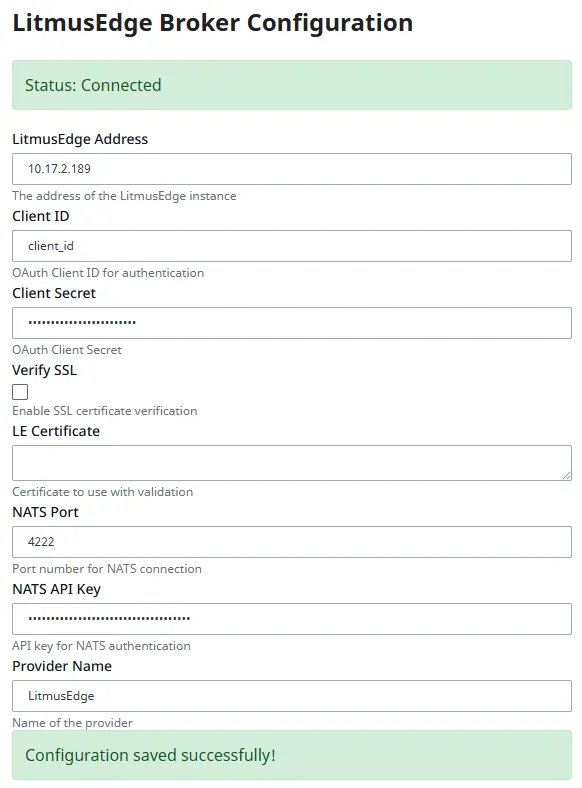
- Verify that the broker is Connected and that the associated tag provider exists.
- You can verify the tag provider has been created by navigating to Services->Tags or via the Ignition Designer.

Enabling TLS
In order to use TLS you must select Verify TLS in the configuration menu and provide a corresponding certificate. To read more on Certificates
Functionality
After connections all models and instances from the connected Litmus Edge will be automatically created in the specified Tag Provider. The tag provider can changed at anytime via the configuration module.
- If the Tag Provider is a Managed Tag Provider created by the module, this tag provider will be automatically removed.
- User managed tag providers will persist, however module created UDTs and Instances will be removed when no longer using that Tag Provider.
Models and Instances are synced in real-time - with all changes/upgrades being propagated automatically in Ignition.
Model Tracking
Every Digital Twin model will have corresponding UDTs created on the Version and Schema of model.
Model Versioning
- Digital Twin model versions are named {model_name}-v{version_number} in Ignition.
- ex. A model named InjectionMolder with a version of 15 has a corresponding UDT of InjectionMolder-v15
- Outdated model versions are tracked if there exist corresponding Instances using those models. When instances are upgraded or deleted, out of date UDTs will be automatically deleted if they are no longer in use by any instance.
On initial connection, some out of date instances may not have corresponding models. These are treated as Orphaned Instances.
Tracking Nodes and Arrays
- Digital Twin Node Arrays are represented by Folders with child-elements being named based on their numerical index in the array
- Digital Twin Nodes are represent by Folders with child-elements being named using the child name in the schema
Instance Tracking
Instances are the source of data in Ignition - automatically subscribing to the associated NATS topics upon creation - reading data at the corresponding publishing interval.
UDT Instances
Ignition Instances with corresponding UDT models will be created as UDT instance tags with the versioned model as their parent.
Orphaned Instances
If an instance is out of date when the module first connects to Litmus Edge it will be unable to retrieve the model schema. Because of this, the instance will exist as an Folder in Ignition as opposed to a UDT instance. Data will still be ingested as normal, and the Folder will become a UDT instance upon instance upgrade in Litmus Edge.
Support for Model Schema Inference is planned
Release Notes
Beta v1.0.0
- Full Create/Update/Delete/Upgrade support for Models and Instances
- Support versioning of UDTs to match DTwin Models
- Data Ingestion into UDT Instances