Litmus Edge Manager Alert monitoring with Prometheus Alertmanager
Overview
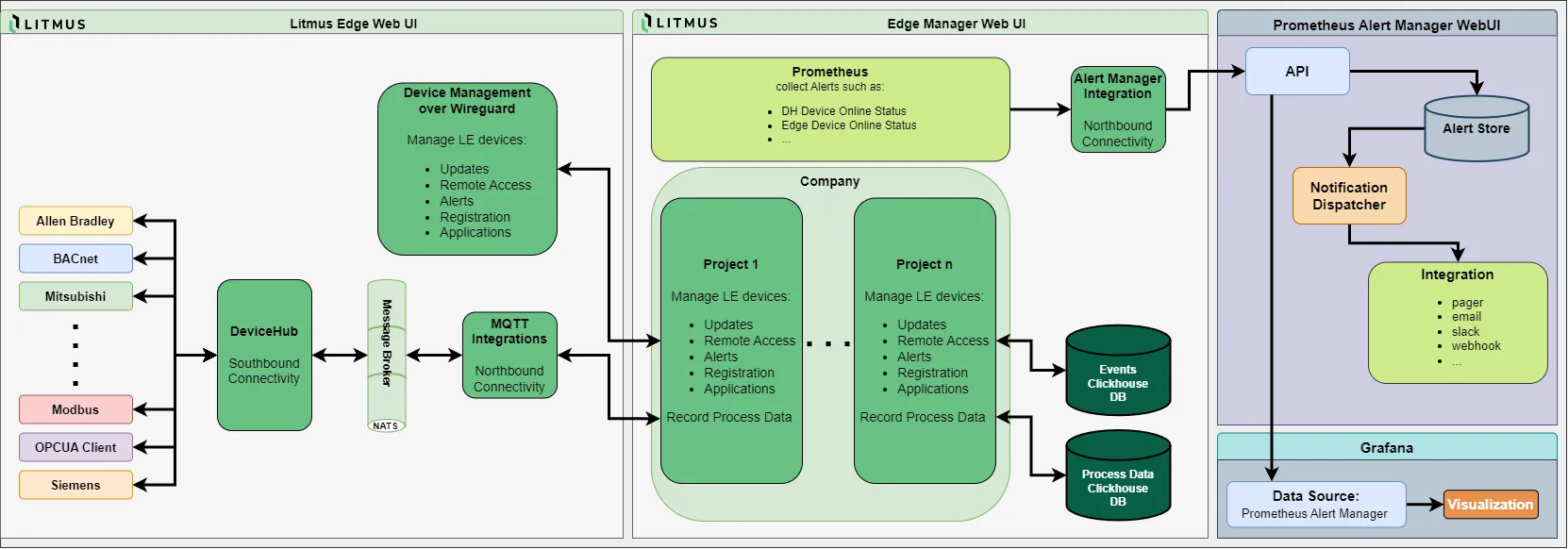
Litmus Edge Manager (LEM) 2.31.x and later can send its alert incidents to an external Prometheus Alertmanager. You enter the Alertmanager address in LEM, and LEM pushes its alerts to Alertmanager's API. Alertmanager then groups and routes them to receivers such as email, Slack or PagerDuty, following its own configuration.
Data flow: LEM sends alerts to the Alertmanager host and port, 9093 by default. Alertmanager needs no special setup to accept them.
Scope: this guide assumes LEM and Alertmanager are already installed and running. It does not cover installing Alertmanager or writing its routes and receivers. The LEM interface labels this feature "Alert Manager"; the Prometheus project spells it "Alertmanager". Both refer to the same product.
Key facts
Item | Value |
|---|---|
What LEM sends | Alert incidents, the same alerts shown on the LEM Dashboard |
Minimum LEM version | 2.31.x |
Direction | LEM pushes alerts to Alertmanager |
Network requirement | LEM must reach Alertmanager on its port, 9093 by default |
Address format | Host and port, for example 10.0.0.5:9093 |
Where to configure LEM | LEM Admin Console at https://<LEM IP address>:8446, then Integration, then Prometheus |
Alertmanager setup needed | None to receive alerts |
Test Alert Manager button | Checks that Alertmanager is reachable and shows its version; it does not send a test alert |
Sources: LEM Prometheus, LEM Alerts.
Before you begin
Confirm all of these before starting:
- LEM 2.31.x or later is running, and you can log in to the LEM Admin Console as an administrator.
- Alertmanager is running, and you can open its web UI to check incoming alerts.
- LEM can reach Alertmanager on its port. Check the Alertmanager host's firewall and any network firewalls in between.
- For the end-to-end test in Part 3, you can create an alert trigger in a LEM project and briefly cause the condition it watches.
Collect these values as you go:
Value | Where it comes from | Where it is used |
|---|---|---|
Alertmanager host or IP address | Your Alertmanager installation | LEM Prometheus pane, Alert Manager Address field |
Alertmanager port | Your Alertmanager installation, 9093 by default | LEM Prometheus pane, Alert Manager Address field |
LEM IP address | Your LEM installation | LEM Admin Console URL; firewall rules on the Alertmanager side |
Part 1: Prepare Prometheus Alertmanager
Alertmanager needs no configuration to receive alerts from LEM. It accepts alerts on its API from any client that can reach it. You only need its address and an open network path.
- Note the host or IP address and the port Alertmanager listens on. The port is set by its --web.listen-address flag and is 9093 by default.
- Make sure the Alertmanager host's firewall, and any network firewalls in between, allow TCP traffic from LEM on that port.
- Optional: add a route and receiver for LEM alerts in your Alertmanager configuration. Without one, LEM alerts go to the receiver of your default route.
Continue with Part 2.
Part 2: Configure Litmus Edge Manager
You need the Alertmanager host and port from Part 1.
- Open https://<LEM IP address>:8446 and log in to the LEM Admin Console.
- In the navigation panel, select Integration. The Kafka pane opens by default.
- In the Integration sub-panel, select Prometheus.
- In Alert Manager Address, enter the Alertmanager host and port, for example 10.0.0.5:9093.
- Click Test Alert Manager. If LEM can reach Alertmanager, it shows the Alertmanager version. This test only checks the connection and does not send an alert.
- Save the change.
You do not need to turn on the Prometheus endpoint toggle on the same pane. That toggle exposes LEM metrics for scraping and is separate from alert forwarding.
Part 3: Verify that alerts arrive
The Test Alert Manager button proves LEM can reach Alertmanager, but it sends no alert. To confirm alerts flow end to end, trigger a real LEM alert.
- In a LEM project, create an alert trigger whose condition you can cause safely. For example, follow Create an Email-Alert Trigger for Connector Online Status, which watches a Litmus Edge connector and then disables it briefly.
- Cause the condition and wait for the incident to show on the LEM Dashboard.
- Open the Alertmanager web UI at http://<Alertmanager host>:9093 and check the alert list for the same alert.
- Restore the condition, for example by turning the connector back on.
If the alert is in Alertmanager, setup is complete. If it is not, use the troubleshooting table below.
Troubleshooting
Symptom | Likely cause | What to check |
|---|---|---|
Test Alert Manager fails | Wrong address, Alertmanager not running, or a firewall blocks the port | The address is host and port of the running Alertmanager. From a machine on LEM's network, curl http://<Alertmanager host>:9093/-/healthy returns OK. Firewalls allow TCP from LEM on that port. |
Test Alert Manager fails with a full URL | Address format | Enter host and port only, without http://, for example 10.0.0.5:9093. |
Test succeeds, but no alerts arrive | Address not saved, or no alert has fired yet | The address was saved after the test. An incident is open and shows on the LEM Dashboard. |
Incident exists in LEM but not in Alertmanager | The incident is not shown on the LEM Dashboard | Only alerts shown on the LEM Dashboard are sent. Check the trigger's settings. |
Alerts are in Alertmanager, but no notifications go out | Alertmanager routing, silences or inhibition rules | The route that matches LEM alerts points to a working receiver, and no silence or inhibition rule hides them. Notifications come from Alertmanager, not from LEM. |
Remove the integration
Stop forwarding in LEM first, then clean up Alertmanager. Alerts already in Alertmanager are not deleted; they resolve or expire under Alertmanager's own rules.
Stop forwarding in LEM
- In the LEM Admin Console, open Integration > Prometheus.
- Clear the Alert Manager Address field and save the change.
- If you created a test trigger in Part 3, delete it from the project's Alerts module.
Clean up Alertmanager
- Remove any route or receiver you added only for LEM alerts, then reload the Alertmanager configuration.
- If you opened a firewall rule only for LEM, remove it as well.
Common questions
Does Test Alert Manager send a test alert?
No. It only checks that LEM can reach Alertmanager and shows the Alertmanager version. To test alert delivery, trigger a real alert as described in Part 3.
Which alerts does LEM send to Alertmanager?
The alert incidents shown on the LEM Dashboard. That includes alerts from custom triggers you define in the LEM Alerts module.
Do I need to enable the Prometheus endpoint in LEM?
No. The Prometheus endpoint exposes LEM metrics for scraping and is separate from alert forwarding.
Does Alertmanager need any configuration to receive LEM alerts?
No. Alertmanager accepts alerts from any client that can reach its API. Your routes and receivers decide where the notifications go.
Can LEM alerts reach email, Slack, PagerDuty or Opsgenie?
Yes, through Alertmanager receivers. LEM can also notify directly through actions in its own Alerts module, without Alertmanager.
Which LEM versions support this?
LEM 2.31.x and later.
Do I need to open inbound ports on LEM?
No. LEM connects out to Alertmanager. Only the Alertmanager host needs to accept inbound TCP on its port. The Prometheus endpoint serves metrics on port 9090, but alert forwarding needs no inbound access to it.