PostreSQL extension litmus-pgnats
Overview
litmus-pgnats is a PostgreSQL extension (written in Rust) that integrates PostgreSQL with NATS messaging. It exposes SQL functions for publishing, subscribing, request/reply, JetStream, Key-Value store, Object Store, and responder operations.
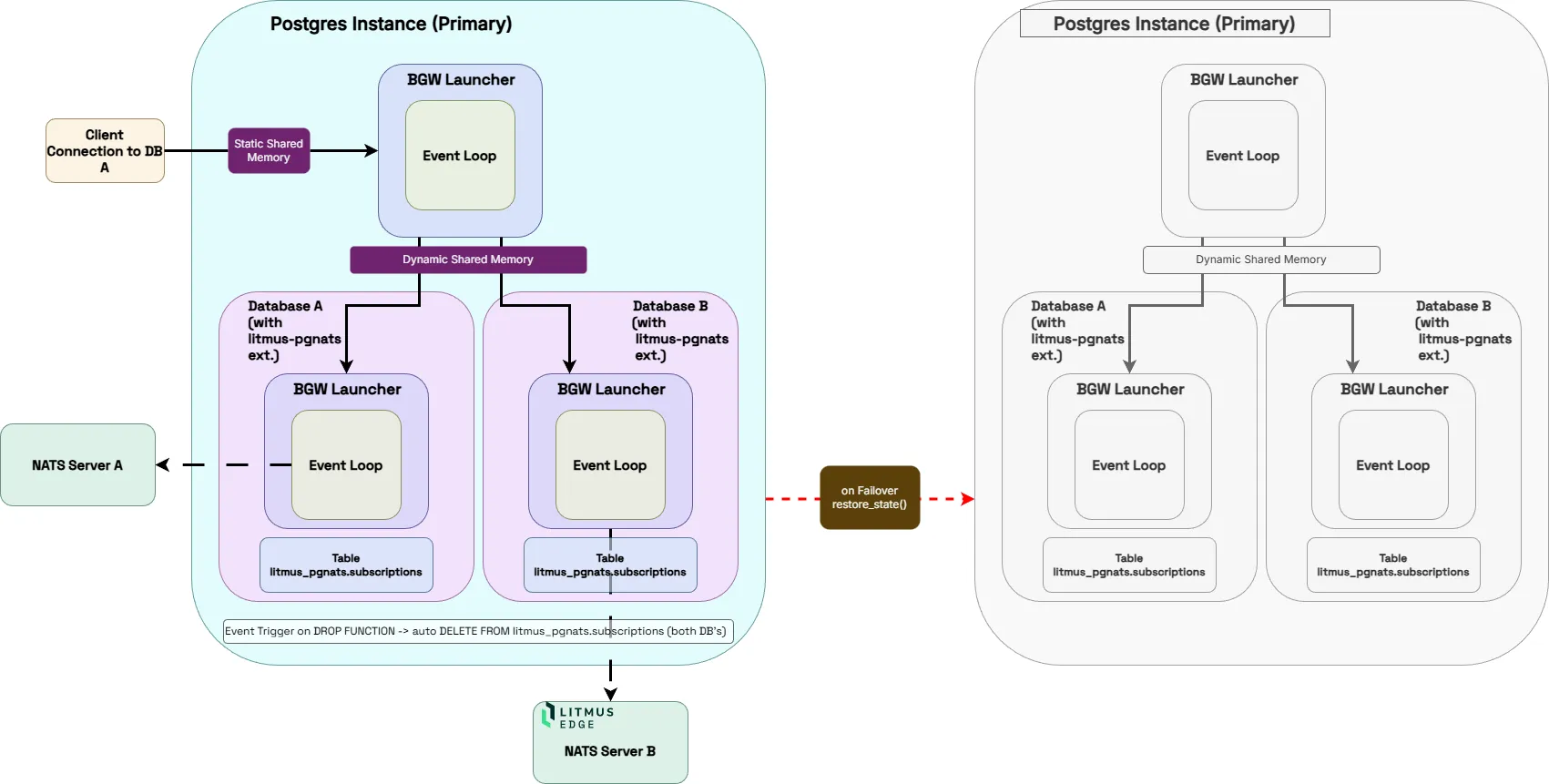
Note:
When connected to Litmus Edge, currently only the subscribe functionality is supported.
Deployment Options
Litmus provides two options for customers to deploy the litmus-pgnats extension.
Marketplace Deployment with PostgreSQL PG18
The image is based on the official postgres:18 image with the litmus-pgnats extension pre-installed and pre-loaded.
What's included
- litmus_pgnats extension files installed into the PostgreSQL directories
- shared_preload_libraries=litmus_pgnats set at server start — no postgresql.conf change needed for background workers
Self-deployment in external hosted PostgreSQL server
For user with externally deployed PostgreSQL servers, a zip file is available for different PostgreSQL PG15 - PG18.
Allowing users to add the extensions to their existing deployments.
Prerequisites - Linux (amd64) - PostgreSQL 15, 16, 17, or 18 - Root or sudo access to the PostgreSQL server
What's included
- install.sh is a shell script which will move copy the required extension files into the correct location of your PostgreSQL setup
- litmus_pgnats.so the rust extension
- litmus_pgnats.control the extension control file
- litmus_pgnats--*.sql sql script(s) which setup all the PostgreSQL infrastructure
Installation
Marketplace deployment
On Litmus Edge select from from Applications->Marketplace the Catalog App Postgres18 with litmus-pgnats.
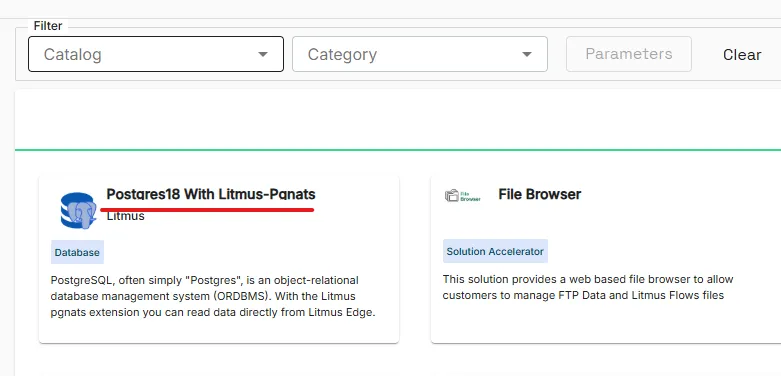
Follow the deployment instructions and Launch the Catalog App.
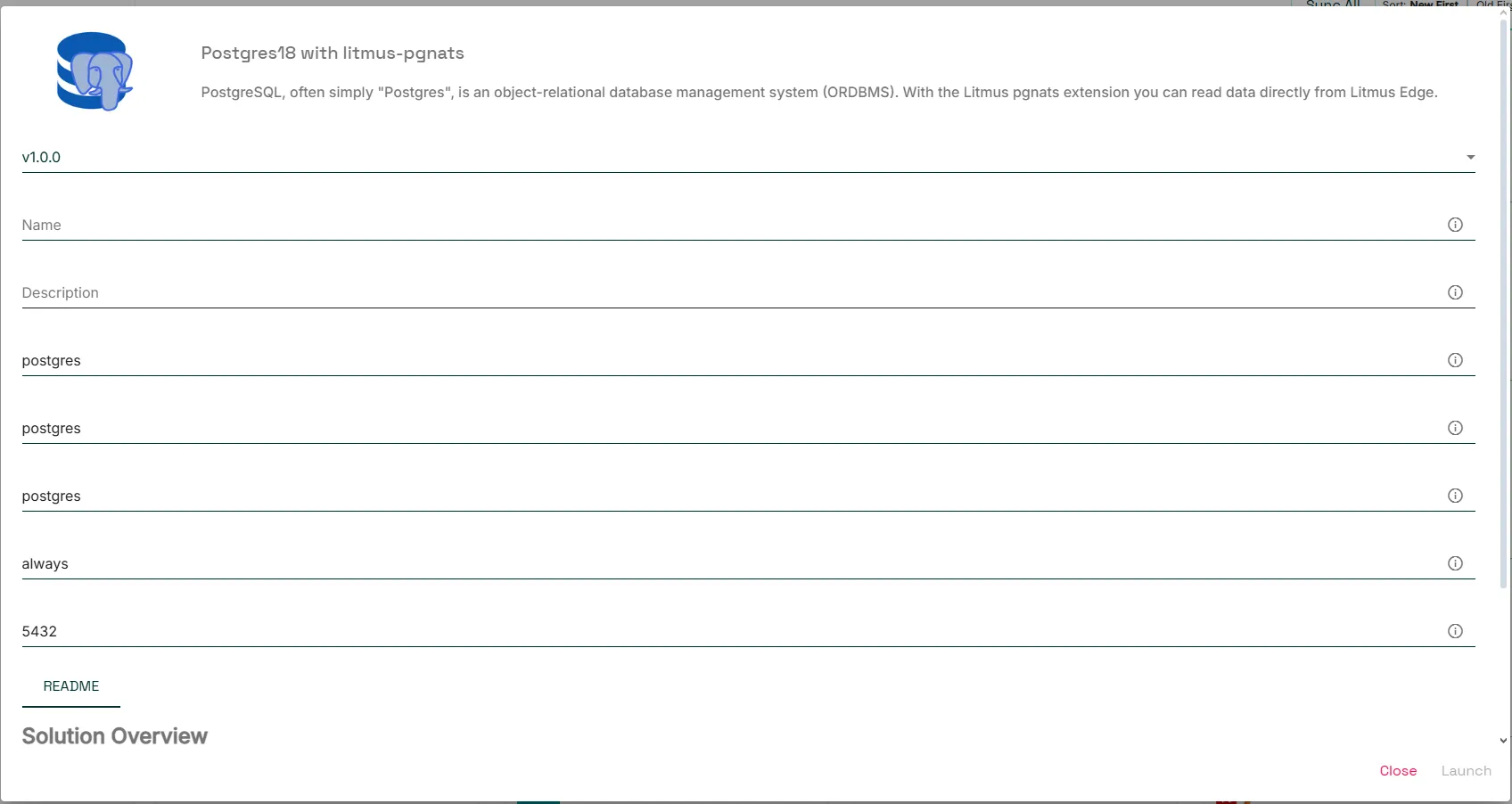
Parameter | Description | Required |
|---|---|---|
Name | Name of the Docker Container | Yes |
Description | A description for the Catalog App | No |
dbname | Postgres Database Name | No (Default: postgres) |
dbuser | Is used in conjunction with POSTGRES_PASSWORD to set a user and its password. This will create the specified user with superuser power and a database with the same name. If it is not specified, then the default user of postgres will be used. | No (Default: postgres) |
dbpassword | sets the superuser password for PostgreSQL. The default superuser is defined by the <<Postgres user>> variable | No (Default: postgres) |
RESTART | Application restart option: no, always, on-failure | No (Default: always) |
PORT | Destination port for the application | No (Default: 5432) |
Self Deployment
1. Download the zip file
Download the ZIP for your PostgreSQL version from the Litmus Accelerators page. The filename follows this pattern:
litmus_pgnats-<version>-pg<PG_VERSION>-linux-amd64.zip
2. Extract
Extract the zip file.
unzip litmus_pgnats-*.zip3. Install
Run the included install script (requires root). It copies the extension files to the correct PostgreSQL directories automatically:
sudo ./install.shIf pg_config is not in your PATH, pass the full path:
sudo ./install.sh /usr/lib/postgresql/18/bin/pg_config4. Enable background workers (subscriptions and responders)
Add the following to postgresql.conf:
Then restart PostgreSQL for the change to take effect.
First-time setup
1. Enable the extension
Connect to your database and run:
CREATE EXTENSION IF NOT EXISTS litmus_pgnats;This needs to be run once per database where you want to use the extension.
Note:
litmus_pgnats and the original pgnats extension cannot be installed in the same database — the nats_* functions would conflict. They can coexist in separate databases within the same PostgreSQL cluster.
2. Configure the NATS connection
Connection settings are stored in PostgreSQL as a Foreign Server. Run this once per database:
2.1. Connecting to Litmus Edge
Before being able to connect to Litmus Edge, you will need to firstcreate and configure an Access Account and enable the NATS Proxy server.
After that you can create the Foreign Server in PostgreSQL.
CREATE SERVER le_nats_fdw_server FOREIGN DATA WRAPPER litmus_pgnats_fdw OPTIONS (
    host '<Litmus Edge IP>',
    port '4222',
    capacity '128',
    username '',
    password '<Access Account token>'
);
2.2. Connecting to an external NATS Server
To configure the NATS connection, you need to create a Foreign Server.
CREATE SERVER nats_fdw_server FOREIGN DATA WRAPPER litmus_pgnats_fdw OPTIONS (
    -- IP/hostname of the NATS message server (default: 127.0.0.1)
    host 'localhost',

    -- TCP port for NATS connections (default: 4222)
    port '4222',

    -- Internal command buffer size in messages (default: 128)
    capacity '128',

     -- Path to the CA certificate used to verify the NATS server certificate.
    -- Required for TLS when tls_insecure is not set.
    tls_ca_path '/path/ca',

    -- Path to the client certificate for mutual TLS authentication.
    -- Optional unless the server requires client auth.
    tls_cert_path '/path/cert',

    -- Path to the client private key. Required when tls_cert_path is set.
    tls_key_path '/path/key',

    --optional:
    -- Skip TLS certificate verification entirely.
    -- For development or servers with self-signed/private-CA certs (e.g. Litmus Edge).
    tls_insecure 'true',

    --optional:
    -- Default JetStream domain for all KV, object store, and stream publish calls.
    -- Can be overridden per-call via the domain parameter on individual functions.
    domain 'hub',

    --optional:
    -- NATS username for username/password authentication.
    -- Requires password or password_path.
    username 'myuser',

    --optional:
    -- Absolute path to a file containing the NATS password.
    -- File contents are trimmed of surrounding whitespace.
    -- Preferred over the inline password option — rotation takes effect on reconnect.
    password_path '/run/secrets/nats_password',

    --optional:
    -- Inline NATS password. Stored in pg_foreign_server.options (visible to superusers).
    password 'hunter2',

    --optional:
    -- Absolute path to a file containing an NKey seed string.
    -- Takes precedence over username/password when set.
    nkey_seed_path '/run/secrets/nats_nkey_seed',

    --optional:
    -- Inline NKey seed. Stored in pg_foreign_server.options (visible to superusers).
    nkey_seed 'SUABC...',

    --optional:
    -- Absolute path to a file containing a NATS token (no username required).
    -- Takes precedence over username/password; use for NATS token auth mode.
    token_path '/run/secrets/nats_token',

    --optional:
    -- Inline NATS token. Stored in pg_foreign_server.options (visible to superusers).
    token 'my-token',

    --optional:
    -- NATS subject for Patroni role-change notifications.
    notify_subject 'my.subject',

    --optional:
    -- Patroni REST API URL for role-change detection.
    patroni_url 'http://localhost:8008/patroni',

    --optional:
    -- Statement timeout (ms) applied to responder handler SPI calls (default: 5000).
    responder_timeout_ms '5000'
);
Authentication Parameters
Parameter | Description |
|---|---|
host | IP/hostname of the NATS message server (default: 127.0.0.1) |
port | TCP port for NATS connections (default: 4222) |
capacity | Internal command buffer size in messages (default: 128) |
tls_ca_path | Path to the CA certificate used to verify the NATS server certificate. Required for TLS when tls_insecure is not set. |
tls_cert_path | Path to the client certificate for mutual TLS authentication. Optional unless the server requires client auth. |
tls_key_path | Path to the client private key. Required when tls_cert_path is set. |
tls_insecure | Skip TLS certificate verification entirely. For development or servers with self-signed/private-CA certs (e.g. Litmus Edge). |
domain | Default JetStream domain for all KV, object store, and stream publish calls. Can be overridden per-call via the domain parameter on individual functions. |
username | NATS username for username/password authentication. Requires password or password_path. |
password_path | Absolute path to a file containing the NATS password. File contents are trimmed of surrounding whitespace. Preferred over the inline password option — rotation takes effect on reconnect. |
password | Inline NATS password. Stored in pg_foreign_server.options (visible to superusers). |
nkey_seed_path | Absolute path to a file containing an NKey seed string. Takes precedence over username/password when set. |
nkey_seed | Inline NKey seed. Stored in pg_foreign_server.options (visible to superusers). |
token_path | Absolute path to a file containing a NATS token (no username required). Takes precedence over username/password; use for NATS token auth mode. |
token | Inline NATS token. Stored in pg_foreign_server.options (visible to superusers). |
notify_subject | NATS subject for Patroni role-change notifications. |
patroni_url | Patroni REST API URL for role-change detection. |
responder_timeout_ms | Statement timeout (ms) applied to responder handler SPI calls (default: 5000). |
Authentication priority
Options are evaluated in this order — first match wins:
Priority | Mode | Required options |
|---|---|---|
1 | NKey (file) | nkey_seed_path |
2 | NKey (inline) | nkey_seed |
3 | Token (file) | token_path |
4 | Token (inline) | token |
5 | Username/password (file) | username + password_path |
6 | Username/password (inline) | username + password |
— | No auth | (none set) |
mTLS (`tls_cert_path` + `tls_key_path`) is independent of credential mode and can be combined with any row above.
`tls_insecure 'true'` is mutually exclusive with `tls_ca_path` — when set, no CA certificate is loaded and all server certificates are accepted.
3. Reload configuration
After changing Foreign Server options, reload without restarting:
Force a full reconnect (drops and re-establishes the NATS connection):
Background workers (subscriptions & responders)
The image already sets shared_preload_libraries=litmus_pgnats, so background workers start automatically. If you need more than the default number of workers, set this in your PostgreSQL configuration:
SQL functions
Publish
-- Core NATS (fire and forget)
SELECT nats_publish_text('sub.ject', 'hello');
SELECT nats_publish_json('sub.ject', '{"key": "value"}'::json);
SELECT nats_publish_jsonb('sub.ject', '{"key": "value"}'::jsonb);
SELECT nats_publish_binary('sub.ject', 'data'::bytea);

-- With reply subject
SELECT nats_publish_text('sub.ject', 'hello', 'reply.subject');

-- With headers
SELECT nats_publish_text('sub.ject', 'hello', NULL, '{"Nats-Msg-Id": "1"}'::jsonb);

-- JetStream (sync)
SELECT nats_publish_text_stream('sub.ject', 'hello');
SELECT nats_publish_json_stream('sub.ject', '{"key": "value"}'::json);
SELECT nats_publish_jsonb_stream('sub.ject', '{"key": "value"}'::jsonb);
SELECT nats_publish_binary_stream('sub.ject', 'data'::bytea);

-- JetStream with domain override
SELECT nats_publish_text_stream('sub.ject', 'hello', NULL, 'hub');
Subscribe
The callback function must accept a single argument of type bytea.
-- Subscribe a PostgreSQL function to a NATS subject
SELECT nats_subscribe('events.user.created', 'schema.handle_user_created'::regproc);

-- Multiple functions can be subscribed to the same subject
SELECT nats_subscribe('events.user.created', 'schema.log_user_created'::regproc);

-- Unsubscribe
SELECT nats_unsubscribe('events.user.created', 'schema.handle_user_created'::regproc);
Request/Reply
To be able to use the nats_request_* functions a responder needs to setup.
SELECT nats_request_text('rpc.subject', 'payload', 5000);    -- timeout in ms
SELECT nats_request_json('rpc.subject', '{"q": "v"}'::json, 5000);
SELECT nats_request_jsonb('rpc.subject', '{"q": "v"}'::jsonb, 5000);
SELECT nats_request_binary('rpc.subject', 'data'::bytea, 5000);
Responders
Register a PostgreSQL function as a persistent NATS request handler. The function must accept bytea and return bytea.
SELECT litmus_pgnats_register_responder('rpc.ping', 'public.handle_ping'::regproc);
SELECT litmus_pgnats_unregister_responder('rpc.ping');
Example
This is an example for a simple responder function.
-- simple responder function
CREATE OR REPLACE FUNCTION litmus_pgnats.test_responder(
	  payload  text,
	  subject  text,
	  reply_to text
)
RETURNS text LANGUAGE sql AS $$
	  SELECT 'echo: ' || payload;
$$;

-- adding responder
SELECT litmus_pgnats_register_responder('litmus.test.responder', 'litmus_pgnats.test_responder'::regproc);
Key-Value
All KV functions accept an optional domain argument. When omitted, the FDW-level domain option is used.
-- Write
SELECT nats_put_text('bucket', 'key', 'value');
SELECT nats_put_json('bucket', 'key', '{"x": 1}'::json);
SELECT nats_put_jsonb('bucket', 'key', '{"x": 1}'::jsonb);
SELECT nats_put_binary('bucket', 'key', 'data'::bytea);

-- Write to a specific domain
SELECT nats_put_text('bucket', 'key', 'value', 'hub');

-- Read
SELECT nats_get_text('bucket', 'key');
SELECT nats_get_json('bucket', 'key');
SELECT nats_get_jsonb('bucket', 'key');
SELECT nats_get_binary('bucket', 'key');

-- Read from a specific domain
SELECT nats_get_text('bucket', 'key', 'hub');

-- Delete
SELECT nats_delete_value('bucket', 'key');
SELECT nats_delete_value('bucket', 'key', 'hub');
Object Store
All object store functions accept an optional domain argument.
-- Upload
SELECT nats_put_file('store', 'file.txt', 'content'::bytea);
SELECT nats_put_file('store', 'file.txt', 'content'::bytea, 'hub');

-- Download
SELECT nats_get_file('store', 'file.txt');

-- Delete
SELECT nats_delete_file('store', 'file.txt');

-- Metadata and listing
SELECT * FROM nats_get_file_info('store', 'file.txt');
SELECT * FROM nats_get_file_list('store');
SELECT * FROM nats_get_file_list('store', 'hub');
Utility
SELECT * FROM litmus_pgnats_version();     -- extension version
SELECT * FROM nats_get_server_info();      -- NATS server connection info
Example
This is a simple example connecting directly to Litmus Edge and capturing payloads as simple string.
-- enable the extension in the database you want to implement your use case
CREATE EXTENSION IF NOT EXISTS litmus_pgnats;

-- setup the Foreign Server connection
CREATE SERVER nats_fdw_server_test FOREIGN DATA WRAPPER litmus_pgnats_fdw OPTIONS (
	-- nats-external is the primary NATS server (JetStream domain: hub).
	host '10.30.50.1',

	-- TCP port for NATS connections
	port '4222',

	-- Internal command buffer size in messages
	capacity '128',

	-- pgnats NATS username (for LE Access Token leave set to empty string)
	username '',

	-- Litmus Edge Access Account token
	password '<Access Account token>');

-- relaod config
SELECT litmus_pgnats_reload_conf()

-- verify connection
SELECT * FROM nats_get_server_info();

-- create table to store LE payloads as simple string
CREATE TABLE IF NOT EXISTS litmus_pgnats.test_messages (
	received_at timestamptz DEFAULT now(),
	payload     text
);

-- create a function used by the subscriber to process the incoming payload
CREATE OR REPLACE FUNCTION litmus_pgnats.test_capture(msg bytea)
RETURNS void LANGUAGE sql AS $$
	INSERT INTO litmus_pgnats.test_messages(payload) VALUES (convert_from(msg, 'UTF8'));
$$;

-- Subscribe to topic from Litmus Edge
SELECT nats_subscribe('devicehub.alias.<mydevice>.<mytag>', 'litmus_pgnats.test_capture'::regproc);

-- verify data are captured
SELECT * FROM litmus_pgnats.test_messages ORDER BY received_at DESC LIMIT 10;

-- cleanup
SELECT nats_unsubscribe('devicehub.alias.<mydevice>.<mytag>', 'litmus_pgnats.test_capture'::regproc);